Simultaneous skill / combat encounter: Burning grove

In the second part of my online party’s recent session (part 1 is here), they attempted to help a dragonborn sorcerer remove the magical fire from a dryad’s grove.  This was mainly a skill challenge, with some combat thrown in.
I decided to use lots of color when drawing the map in MapTool, and I’m happy with how it turned out.  My only minor regret is that I used a lot of objects rather than just drawing on the map (the trees and flames are objects, for instance) and that meant a long load time for my players (about 3 minutes for some of them).  Lesson learned: Don’t overload MapTool with too many objects (unless you don’t mind some loading time for the party, which might not be a big deal).  Also, given the way the encounter played out, I would want to move the dryad and her children from the far left side of the map to a spot that’s a bit closer to the center.

When the encounter began, the sorcerer went to the altar in the middle of the grove to begin the ritual.  The players gathered around him, and those with Arcana training attempted to assist.  After a couple of minutes the ritual started to have an effect.  The burning grass died down, and the dryad screamed and started running toward the lake in the lower right corner.  A couple of players went over to assist her and her children, but most stayed near the altar.

Shortly after that, catastrophe struck.  A rift opened near the far left side of the map, separating the children from their now-running mother.  The four big trees surrounding the altar came to life, with vines attacking the players and force barriers going between each pair of trees.  And then the ground directly beneath the altar collapsed, casting the sorcerer down into a cave below.

It was clear to the players that the first priority was rescuing the children – the sorcerer seemed to be unconscious but alive at the bottom of the cave below.  The characters outside the force barriers started to use skills to get to the children and calm them down while those inside started working on the trees.  I was curious to see what they would try, and they ended up using skill checks to try to disable the magic of the angry trees.  Nature and Arcana eventually worked (hard DCs), and a crit on the third tree disabled both it and the fourth one.

Now the whole party was trying to help the children, and they did all right (barely).  Since we were in initiative order, it was a little awkward having the children so far out to the left, since players used their turns double running just to get partway over to them, and then had to do lots of running to get back to the lake.  It was awkward, but I hand-waved some of the distance in the end.

Two of the characters felt like there wasn’t much they could do to help the children, so they started working on rescuing the fallen sorcerer.  One set up pitons and a rope in the ground (good dungeoneering check) and then tied the rope to herself while the other held the rope and lowered her down.  She made it okay, tied the rope to the sorcerer and then moved into hiding (she’s a tiefling warlock who recently multiclassed to rogue).  Unfortunately, as the other character began pulling the sorcerer up, some fungus creatures came out of the darkness and cut the rope.

My favorite part: This is where we ended the session.  I love ending on a cliffhanger. The dryad children have been rescued (though the mother died in the effort), but now the warlock is alone in the lower cave with just the unconscious sorcerer for company and some fungus creatures coming out of the darkness.  I’ve already changed this next encounter up from the published version, and I’m excited to try it out next week!

Fungus and determined fighters

My online party ventured into its ninth session in the War of the Burning Sky campaign last night.  This session involved two skill challenges and really just one combat (though as you’ll see the dedicated fighter in the party tried to stretch that one out).

Deep in an eternally-burning forest, the party comes across a dragonborn sorceror who is studying the magical fire and trying to develop a ritual to put it out.  He asks the adventurers to go to a nearby cave to get reagents for the ritual – mushrooms and flint.

Upon entering the cave, the party is greeted by screeching, howling, screaming noises coming from the small chamber at the bottom left corner of the map.  The fighter nervously tiptoes in and finds that it’s coming from a small hole in a corner.  There’s a gem in the hole, and the fighter breaks a bone off a nearby skeleton and pokes the gem.  Nothing happens.  Eventually the swordmage detects magic and figures out that it’s an Eye of Alarm ritual that’s never been deactivated, so she takes the gem and throws it out of the cave, causing the noise to stop.  Cool roleplaying here.

  • DM Lesson: When there’s a very loud noise, play it up.  Make the characters think about it.  Can they communicate effectively?  Might it temporarily deafen them?

The mushrooms were clearly down in the chamber below, so three members of the party took the downward-sloping bridge at the top of the map while the others just climbed down.  The mushroom and flint hunt was on, and cooperation was the word of the day as the party worked together to try to get the needed reagents.  They noticed a misty tunnel in the upper left corner that seemed to get more active whenever they tried and failed to get the reagents.  The skill challenge ultimately failed, which meant that monsters (fungus creatures) came out of the misty tunnel in a surprise round.

This got a little bit interesting for me as a DM.  My players have generally mowed down most unmodified battles, so I had taken to upping the difficulty of most combat encounters.  I did that here, too, adding a couple of monsters.  After one round, I realized that this battle was way too tough – players were getting badly bloodied, and the monsters were barely scratched (they can essentially share hit points by shifting damage taken to one another).  I made some modifications on the fly:

  • I intentionally “forgot” to use the regeneration ability that several of the bad guys had
  • I nearly halved all of their hit points

This made for a kind of weird battle in the end.  Initially the monsters were nearly indestructable because of their high HP and their damage splitting ability.  Once I lowered the HP (and decided not to use the regeneration), they all dropped in a hurry.  Clearly my on-the-fly adjustments need some work!  But the players seemed to have fun bashing the mushrooms into oblivion, so all’s well that ends well.

The best part was the end of the battle, when all of the monsters were dead.  Before taking even a short rest, the fighter wanted to explore the misty cave.  Okay, that’s his call.  He walks into total concealment and sees some orbs that appear to be the source of the mist.  He almost stumbles into a pit (heavy mist obscured it) but makes the athletics check to catch himself.  He finds a ledge that he can walk around, and while standing on it gets knocked into the pit by attacks from mushroom creatures that he can’t see.  The swordmage then charges in to help, fails her athletics check and falls into the pit on top of the fighter.

  • DM Lesson: When one character falls on top of another, split the falling damage between the two of them (it seemed like fun).

So we have our two defenders prone at the bottom of a pit, with mushroom creatures on the far side attacking them.  The creatures have made it clear that they simply don’t want any intruders and that retreat is an option.  But no, the defenders start attacking (ineffectually) from the pit.  Our druid came in to help, lowering a rope to the pit-bound PCs, and only very reluctantly did they decide to climb out and rest.

After the short rest… the fighter charged back in!  He was immediately attacked at range by things he couldn’t see, and only when it became clear that the rest of the party was not helping did he finally back out.  Honestly, I see this as great roleplaying – that fighter is stubborn and refuses to back away from a fight!

Another great bit of roleplaying came when our shaman discovered an old book while searching for flint.  He flipped through it a little bit and then discarded it on the ground, since he’s not much of a book kind of guy.  He never mentioned it to the rest of the party, and it was only at the end of the session that we realized the book was still lying on the ground in the mushroom cave.  Heh.  Good thing it’s not too important!

The second skill challenge, involving the ritual to extinguish a dryad’s burning grove, will be covered in the next post.

MapTool macros: Improved tracking of encounter/daily powers

I’ve been having fun playing with my MapTool campaign file recently.  One of my latest improvements is to add actual tracking for encounter powers and daily powers so that the players can know which powers they’ve used and which are still available.

In an earlier post I described my addition of code to the encounter and daily power macros that would give the player an error message if they tried to use a power that had already been used.  The code is basically as follows:

[h, if(E1==0), CODE:
{[assert(1==0,add(“This power has already been expended.”),0)]
};{[h: E1=0]}
]

Each macro will need its own E1, E2, E3, Daily1, Daily2, Daily3, etc. property to modify and check.  This is nice, but the player only figures out that they can’t use the power again if they try to do so.  What would be even better? A visual cue to show the player that the power is gone.

Enter the MetaMacro!  I didn’t learn until recently that MapTool macros can change the macro button itself.  One of the simplest things to change is the background color of the button.  I want the button to turn dark gray after a power is used up, so:

[h: setMacroProps(getMacroButtonIndex(), “color=darkgray”) ]

This piece of code uses the setMacroProps function to set the color property to “darkgray”.  The setMacroProps function takes two arguments: the index number of the macro whose button you want to change, and then a string that says what property you want to change and what you want the new value to be.

I didn’t know that each macro on a token has an index number, but it’s true.  I’m not sure how they’re assigned (perhaps the order in which you create them).  Fortunately, there’s a function you can use to get MapTool to tell you the index number of the macro you’re currently running.  That’s the getMacroButtonIndex() function that you see above.  It takes no arguments, and it just gives you the index number of the button.  Perfect!

Witchfire has been expended; Otherwind Stride is still available

Next, I had to write some code to turn the buttons back to their original color when the character takes a short rest (encounter powers only) or an extended rest (both encounter and daily powers).  This ended up being quite a bit trickier, but I finally figured it out.

[h, foreach(currentMacroName, getMacros()), CODE:
{
[h, foreach(currentMacroIndex, getMacroIndexes(currentMacroName)), CODE:
{
[h: myProps=getMacroProps(currentMacroIndex)]
[h: currentButtonColor=getStrProp(myProps, “color”)]
[h: currentFontColor=getStrProp(myProps, “fontColor”)]
[h: encounterPower=if(currentFontColor==”red” || currentFontColor==”purple”, 1, 0)]
[h: changeThisButton=if(currentButtonColor==”darkgray” && encounterPower==1, 1, 0)]
[h, if(changeThisButton==1): setMacroProps(currentMacroIndex, “color=default”) ]
}]
}]

Okay, what’s going on here? This piece of code loops through every macro on the token (that’s the first line), gets the index number for that macro (that’s the third line, counting the curly bracket as line 2), then checks to see if that macro needs to have its color changed.  That involves getting a string containing all of the properties for the macro (getMacroProps(currentMacroIndex)) and extracting the button color and font color for that macro.

In my campaign, the buttons for attack macros and special abilities use the default color for their background and a color-coded system for the text (green for at-will powers, red for encounter powers, purple for twice-per-encounter powers and blue for daily powers).  The short rest macro only resets encounter and twice-per-encounter powers, so it checks to see if the button is currently dark gray (expended) and the font is red or purple.  If so, it changes the color back to the default.  Otherwise, such as with a daily power, it leaves the button alone.

The same piece of code for extended rests looks like this:

[h, foreach(currentMacroName, getMacros()), CODE:
{
[h, foreach(currentMacroIndex, getMacroIndexes(currentMacroName)), CODE:
{
[h: myProps=getMacroProps(currentMacroIndex)]
[h: currentButtonColor=getStrProp(myProps, “color”)]
[h: currentFontColor=getStrProp(myProps, “fontColor”)]
[h: encounterOrDaily=if(currentFontColor==”red” || currentFontColor==”blue” || currentFontColor==”purple”, 1, 0)]
[h: changeThisButton=if(currentButtonColor==”darkgray” && encounterOrDaily==1, 1, 0)]
[h, if(changeThisButton==1): setMacroProps(currentMacroIndex, “color=default”) ]
}]
}]

Pretty much the same thing, except now it looks for fonts that are red, purple OR blue.

By the way, I’m aware that there are complete campaign frameworks out there, such as Rumble’s, and I’ve talked about them in an earlier post.  They’re great and very cool and they do everything that my code does and more.  But I write macros for the joy of it, and I love to learn about the language of MapTool.  My posts are intended to help other do-it-yourselfers out there who want to write their own code because they enjoy it.  If this isn’t for you, I highly recommend using a pre-packaged campaign framework – they’re quite slick!

In future posts I’ll talk more about my Short Rest and Extended Rest macros, and the concurrent improvements I’ve made to the healing macro.  Please let me know if there are particular macros that you’d like to hear about!

MapTool macros: Tracking encounter/daily powers

Update 10/7/2010: I’ve written another post that expands and improves on this one.

Update 3/29/2011: I’ve updated the daily properties from D1-D10 to Daily1-Daily15.

Over the past few weeks as I’ve continued running my online campaign through the War of the Burning Sky saga, I’ve made some tweaks to my MapTool framework.  Part of this has been driven by one of my players, who has also been using MapTool in her own game and has had some good ideas for improving the player character tokens.

Specifically, she suggested adding buttons for every character ability, even if it didn’t involve rolling dice, just so the players would remember that those abilities existed.  She also added some notes to her character sheet to remind her of things like her damage resistance and so on.  Good thinking!  I plan to do this for the rest of the PC tokens.

I’ve starting making some other changes as well.  I’ve added a Saving Throw button for each character.  Yes, it’s generally just a d20 roll and we do have buttons for that, but one character has an artifact that gives him a +2 bonus to saving throws, so I figured we might as well have a button that includes any modifiers to saves.

I’ve added a set of buttons for ability checks (Strength check, Dexterity check, etc.).  These don’t come up as often as skill checks, but they do come up enough to make it worthwhile to add macros for them.

I’ve also decided that it’s time to code up the tracking of encounter and daily powers.  I’d love it if I had an easy way for a character to tell at a glance which powers hadn’t been used yet, but failing that I can at least add logic to let the player know, “Sorry, you’ve already used that power.”  Here’s how I’ve done it:

  • I’ve added properties E1 through E15 for each character (I can add more later if PCs have more than 15 encounter powers).  These have default values of 1.
  • I’ve also added Daily1 through Daily15 for dailies (default of 1) and S1 through S3 (default value of 2) for special twice-per-encounter powers (Healing Word, etc.).
  • Note that you can’t use D1, D2, etc. because MapTool will recognize those as dice rolls (like d6 and d20).
  • In each encounter/daily/special power macro I’ve added a bit of code that looks something like this:

[h, if(E1==0), CODE:
{[assert(1==0,add(“This power has already been expended.”),0)]
};{[h: E1=0]}
]

That code checks to see if the property for that power has been expended (equal to zero) and if so uses the ASSERT function with a false condition (1==0) to display a message and exit the macro.  If it hasn’t been expended, it sets the property to 0 (or reduces it by 1 in the case of twice-per-encounter powers).  Note that each encounter power uses a different property (E1, E2, etc.).

Finally, I’ve created a Short Rest macro that resets all of the E and S properties back to their default values.  I plan to eventually add a function to the Short Rest macro that lets the player specify how many surges they want to spend and restores that many hit points, but one thing at a time.  I’ll need to add an Extended Rest macro at some point as well, refreshing dailies, healing surges, etc.

What macros am I missing here?  Are there things that I should be adding for my PCs?  I’m feeling pretty good about the direction my campaign is going, and I’m having a great time with it so far!

War of the Burning Sky Session 8

My online group gathered for its eighth session in the War of the Burning Sky campaign yesterday evening.  Eight sessions for a group of strangers spread across the US plus one person in London – that’s pretty impressive.  I honestly expected when I first gathered folks for an online campaign that people would flake out, drop out, not show up, etc.  But my players are flat-out awesome, and I love them.

The session began with the party having recently entered the Fire Forest.  They had easily defeated some fiery bats, and now found themselves faced with a precarious-looking bridge.The bridge had clearly collapsed in one area, with the wreckage of a wagon visible in the canyon 60 feet below.
None of the players had enough Dungeoneering skill to identify the weak points, so Fudrick the gnome shaman started heading across.  He soon learned that if all of the weak points were stepped on and the monsters living beneath the bridge were revealed, it would look like this:

Fudrick’s reflexes weren’t quick enough to jump out of the way of the collapsing stones, and he fell 60 feet, taking 33 damage. His maximum hit points were only 37.  Ouch.

The bat swarms sleeping under the bridge were alerted by this, but I granted everyone in the party a full round of initiative before adding the bats.  Some of the characters started working together to tie two ropes together to lower to poor Fudrick.  Others moved forward to attack.  Jaks, the minotaur druid, used perception to identify two more fragile squares.  However, on the next round when the swarms moved in, Jaks hit with an attack that let him shift – and he shifted right onto one of those weakened squares!  Down he went, falling unconscious.

It looked grim for a while, but the healers in the party got Jaks up on his feet and out of the canyon while the defenders handled the swarms.  It made for a pretty exciting fight!

Next, the party was confronted by a hell hound who dropped a bone at their feet.  The bone had a message saying that they should “leave the case” (a case of military secrets they were trying to get through the forest) and take the bone if they wanted to escape with their lives.  They quickly discovered a loophole – the message didn’t say the plans had to be IN the case!  This let them avoid combat with the hell hound and his fiery wolf friends and also gave them some quest XP to boot – not bad!After that, the party was confronted by the devil who had written the message on the bone.  He wasn’t happy about the empty case and he attacked, but the PCs beat him up easily before he teleported away.

We ended the session after the gang met a dragonborn sorceror who was researching the magic of the fire forest and agreed to help him collect some mushrooms so that he could complete a ritual to quench the fire in a nearby glade with a dryad.  I hadn’t prepared the next encounter area, so we called it a night a little early.

I definitely am enjoying the fire forest adventure in this campaign.  It allows for a lot of branching and meaningful player decisions.  Most of those choices will come later, but there are some even now.  It helps to have such a great group of players!

Getting back to running my online game

I took last Friday off from running my online game in the War of the Burning Sky campaign so that I could attend TactiCon here in Denver.  The convention was great both for running and playing games, but I’m ready to get back to my ongoing campaign with my online players in the War of the Burning Sky world.

The last session was a weird one. We only had four of the five players, so I mostly ran them through a Living Forgotten Realms module that I had prepared for TactiCon. I didn’t want to advance the story from Adventure 1 to Adventure 2 without the full party being present.  Also, they needed a little more experience for leveling up to move into Adventure 2.  We’ll likely begin tomorrow by running the final encounter from the one-shot game and then resume the main quest.

I’ve had time to prepare for the next section, and I’m glad for it.  The second adventure in the War of the Burning Sky is complicated.  There are a lot of NPCs, and the adventure is written with great flexibility – the party could meet various characters in lots of different orders and take lots of different actions, which could lead to lots of different encounters.  The railroading is diminished.  This is great for the players, but tough for the dungeon master.

The problem isn’t so much that I have to be prepared for lots of different eventualities. It’s more that I need to UNDERSTAND what the various possibilities are well in advance so that I can make them available to the party whenever it’s appropriate.  I’ve read through the entire second adventure once now (all 93 pages of it) and I’d like to read it a second time before we play it if possible.  The campaign is starting to grow on me, and I think my enthusiasm will translate well for the players.  Here’s hoping!

P.S. I’m also excited to say that Bree, the DM for the ongoing in-person campaign I play in, is ready to start running adventures again, and we’re going to meet on Sunday for some gaming.  Huzzah!

The projector setup is a success!

It’s late.  I have to go to work in the morning.  I don’t care, though – I’m excited, and I need to write about it!

This evening I put my projector setup into action for the first time.  I ran a Living Forgotten Realms session at the local store, Enchanted Grounds.  I had seven players turn up for a session of CORM 1-1 The Black Knight of Arabel.  I had played this module in the first LFR game I had ever experienced as a player, so I was pretty comfortable running it as a DM.
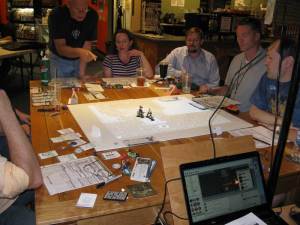
I arrived at the store about 40 minutes before the game’s scheduled start time so that I would have plenty of time to find a good table, set up the rig, adjust the projector’s focus and so on.  All of that went totally smoothly.  By the time 6:00 rolled around, I was ready to go.

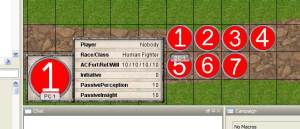
This would be the first time that I was using MapTool for the monsters and the map but not for the player tokens – the players brought their own minis for that.  I had realized when putting the adventure together that, if I wanted to keep track of initiative within MapTool, I would need to have something to at least represent each player for that purpose.  So, I created a set of seven generic PC tokens with their own set of properties.  The image for each token was a number (1 through 7) which I assigned based on the players’ seating arrangement around the table.  The name of each token is the character name.  Their properties include the player’s name, their race and class, their defenses, their initiative modifier (for tiebreaking) and their passive Insight and Perception scores.  It was great for helping me remember everyone’s name, character name, and character type.  The defenses didn’t come up much, nor did the passive insight or perception, but it was nice to have in case I needed it.
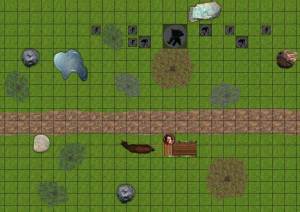
The adventure began with a little back story of how the party came to be traveling to the town of Arabel – charged by the king in the capital city to investigate rumored Netherese activity involving shadow creatures and reports of a black knight.  They began by helping a man repair his wagon, when they were set upon by shadow creatures.

The first battle was quite easy for the party, even though I made the minions into two-hit minions.  They dispatched the shadow creatures with little fanfare, helped the wagon driver repair his vehicle, and set off after the dark rider they had spotten on a distant ridge.

At this point I turned off the projector as the party entered a skill challenge to track down the rider.  This was a well-written skill challenge, and the players role-played it well, too.  They ultimately came upon the rider in his camp and started disagreeing about whether to attack or talk.  I allowed a little talk from those who wanted to do so, but the “attack” camp grew restless, so I called for initiative.
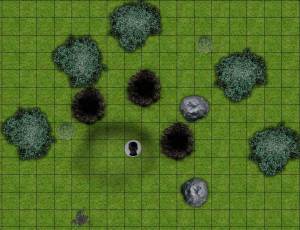
The not-so-bright fighter in the party (good role-playing, not a dumb player) decided to charge Dark Skull, narrowly avoiding some traps.  Other players tried to convince Dark Skull to drop his weapon, and he said that he didn’t want to hurt anyone, but he wasn’t willing to drop his guard with the fighter standing next to him.  So, the parlaying character decided to bull rush the fighter out of the way.  Great plan – except that in her quest to get to the fighter, she ran over a pit trap!  Oops.

Dark Skull teleported into the shadows, and the cooler heads in the party were eventually able to start a dialogue that led to an alliance with the falsely-accused knight (the skull was just a mask). They decided to go back to Arabel to find out who was really behind the dark goings-on. Since we were going into role-playing, I turned the projector back off.

Since we were doing fine on time, I decided to  run a little bit of the Arabel skill challenge.  The party repaired a broken obelisk in the town square, then went to the tavern where the innocent “black knight’s” father worked.  The father had cursed his son, leading to his shadow powers, and so the party questioned the father.  They asked about his family, and the father didn’t mention any adult son but told them that his wife and infant son were at his house some distance away (I made this up on the spot).  The PCs decided to go to that house to question the wife.  They found the house to be dark and broke in – no one was home, but the door to the basement was locked.  They picked the lock – and found an empty basement.  Clearly the father had lied.

The group returned to the tavern to confront the father about the lie, and found that he had left, heading toward the town square.  Some streetwise checks confirmed that people had seen him go that way, with some young lovers (also made up on the spot) in the square pointing toward the theater as being the father’s destination.

Upon entering the theater, the party saw a bunch of cultists of Shar looking at the stage, where the father was making a speech and getting ready to sacrifice a baby.  Again, some of the party wanted to talk, but others charged into action – the battle was on!

This is an interestingly-designed encounter, with the players having the option of either convincing the crowd to disperse, in which case they fight the leader and some shadow creatures, or not convincing the crowd to disperse, in which case they fight the leader and the crowd.  Since the party had mowed down everything in their path, I decided to have them fight BOTH the crowd and the shadow creatures!  Happily, the shadow creatures rolled low for initiative, so their entrance from behind the party made for a nice little surprise.

Even with the two-front battle, the players were able to win the day.  They mowed down cultists with no trouble, and the shadow creatures simply didn’t deal enough damage to be a threat.  The most interesting part of the battle was in round four, where I had the leader give up on fighting off the party and start trying to sacrifice the baby.  He picked up the baby and got ready to slaughter it, so the players tried hard to stop him.  One of the physically weaker characters in the party leapt down from the balcony and bull rushed the leader to make him drop the baby.  Unfortunately, this left the baby next to the party wizard’s flaming sphere!

One of the fighters, who was prone at the base of the stage, made a DC 20 athletics check to pull herself up onto the stage from prone and charge over to bull rush the baby out of harm’s way, diving to the ground again to do so.  The cult leader naturally picked the baby back up again, getting ready for the slaughter, so the party wizard hit him with an attack that caused him to lose the ability to take opportunity actions.  There’s a little-known rule that says if you can’t take opportunity actions, you lose any grabs you were making.  The baby gets dropped again (fortunately, I ruled that it was wearing a tiny little Amulet of Feather Fall as part of the ritual), and ultimately the cult leader was wiped out.

The session was loads of fun, and the technology ran without a hitch.  The only minor issue is that even the 2,500 lumens aren’t quite bright enough in some cases – the altar on the stage was tough to see (black on brown).  The solution there is probably for me to think a little more about contrast when I put the maps together.

I’ll tweak a couple of things for the convention on Saturday, but for the most part I am ecstatic about this rig.  It’s loads of fun to run, and it makes the game go very smoothly.  Thank you to my players for coming out to give this a whirl – especially to Andy, who told me that he reads my blog.  That’s the first time I’ve ever met one of my readers without having known them in person first.  It was a pleasure gaming with you, Andy, and with everyone else, too!

P.S. If anyone wants the MapTool campaign file that I used for this game (with my updated tweaks added), it can be downloaded here.

Building a better portable projector rig

I originally put most of this information in an earlier post that described a similar mount that sat on my table.  This information is pretty much the same, except that it’s floor-mounted and the angle of the projector is much more adjustable in the updated version.

At long last, I have built a working, portable projector setup for playing D&D using MapTool to run the game.

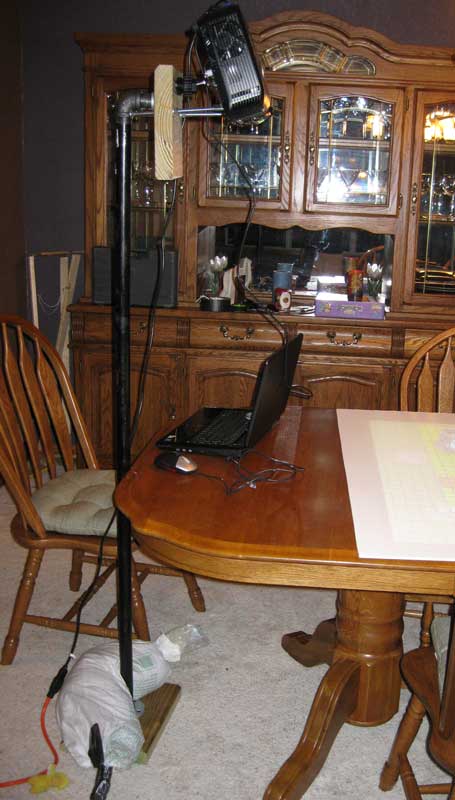
First, let’s see the finished rig in all its glory:

Maybe it’s not the most beautiful rig in the world, but by golly it works!

I’ll say right here that I’m a little surprised that I ended up going with a single-pole rig anchored with a sandbag.  I originally expected to build a big cube rig out of aluminum (like Sean Pecor’s), then thought I’d build a wooden tripod, but I settled on this design after receiving lots of great feedback here on the blog and on EN World.  It feels quite stable, too – heavy wood, heavy pipes and a heavy sandbag all combine to result in a rig that makes me feel comfortable that my projector is in no danger of falling.  I plan to carry the laptop, projector, cords/mouse and sandbag in an old roll-aboard suitcase and the rest of the rig in one piece in my other hand whenever I take this on the road.

Would you like to build something similar?  Here’s how to do it.

Parts

  • 1 heavy board at least 2 feet long.  Mine was a four-foot long 10 by 2 (actually 9.5″ by 1.5″) that I found in the scrap bin of Home Depot for 51 cents.  I believe it’s pressure-treated – it’s quite dense.  Cost: 51 cents.
  • 2 floor flanges for 1″ galvanized pipe. Cost: $6.38 each, $12.76 total
  • A five-foot length of 1″ diameter galvanized pipe (black), threaded at both ends (technically called a nipple). Cost: $16.12
  • A 90 degree elbow for 1″ galvanized pipe. Cost: $2.36
  • A two-inch long nipple for 1″ diameter galvanized pipe. Cost: $1.22
  • Eight wood screws, 1″ in length. Cost: I had these in my toolbox, but we’ll call it 25 cents.
  • Two carriage bolts, 3/8″ diameter, 8″ in length.  Cost: $1.49 each, $2.98 total.
  • Two fender washers and two hex nuts for the carriage bolts.  Cost: 13 cents apiece, 52 cents total.
  • A 60-pound  bag of tube sand. Cost: $3.99
  • Two pieces of 30″ by 20″ white foam board from Michael’s (I would have preferred a single bigger piece, but this is what they had). Cost: $1.50 each, $3.00 total.
  • Some duct tape. Cost: I’ll assume you have this on hand already.
  • A projector mount. I got mine via Amazon from a company called Projector Ceiling Mounts Direct. Cost: $26.40 (with shipping)
  • A projector.  I went with the ViewSonic PJD5152 and purchased it from Buy.com via Amazon. Cost: $463.99 (free shipping)
  • An extension cord and probably a splitter / surge protector. Cost: Already on hand.
  • A laptop – but I’ll assume you have that already.

Total cost:

  • Projector: $463.99
  • Rig: $70.11
  • Projector and rig together: $534.10

Tools

  • A table saw (or some other way of cutting the board – you could also probably get it pre-cut at the hardware store)
  • A drill with a screwdriver bit (you could technically get by with a regular screwdriver, but the drill makes it go faster

Assembly instructions

This version ended up being dead simple to put together, much easier than my tripod – and better, too.  You could knock this together in less than an hour if you had all of the parts ready to go.

  • Cut a 12″ length and a 7″ length from your long board using a table saw. The 12″ length will be the base of your rig and the 7″ piece will be the top plate that the mount connects to.
  • Screw one of the flanges to the middle of the 12″ board using four of the wood screws and your drill or screwdriver.
  • Screw the other flange to the middle of the 7″ board using the other four wood screws and your drill or screwdriver.
  • Screw the part of the projector mount that would ordinarily go into your ceiling onto the opposite side of the 7″ board from the flange.  I put mine high up on the far side, with the mounting screws just barely coming through the board, right next to the top of the flange.
  • Drill two 3/8″ diameter holes through the 7″ board, about 2.5″ down from the center of the projector mount and about 1″ in from each edge of the board (this is approximate, not exact).
  • Manually screw the five-foot pipe into the flange on the 12″ board.
  • Manually screw the 90 degree elbow onto the top of the five-foot pipe.
  • Manually screw the 2″ nipple onto the other end of the 90 degree elbow.
  • Take the 7″ board with the other flange and screw that board/flange assembly onto the other end of the 2″ nipple.  Tighten as necessary to get it pointed at the angle you want (I went with vertical).
  • Push the carriage bolts through the back of the 7″ board so that they extend forward about 5″ from the front of the board.
  • Push a washer onto each carriage bolt, then screw a nut onto each bolt to keep the carriage bolt from being able to be pushed back through the board.
  • Wrap some duct tape around the tip of each carriage bolt.
  • Put the rig on the floor next to where you will sit, resting against the edge of the table.
  • Empty out about half of the sand from your sandbag and twist tie / tie / duct tape up the opened end.
  • Wrap the sandbag around the base of the rig, sitting on the base board.  Put more of the weight away from the edge of the table (opposite of where the projector will be).
  • Assemble the rest of the mount per its instructions.  You already have one piece attached to the far side of the 7″ board, and the other piece will be attached to the projector itself.
  • Tighten the projector onto the mount as best you can. If your mount is like mine, it will want to move.
  • Figure out the exact angle you want the projector to be held at, and adjust the nuts on the carriage bolts to hold the projector at that angle.
  • Put the foam boards on the table beneath and in front of the projector.

At this point, your rig is completely set up.  All that’s left now is to hook up the cables, make any necessary adjustments (either to the projector’s angle, to the keystone of the image, to the lens focus/zoom, etc.) and start running your game!

Running the game

  • Create your maps / monsters / etc. in MapTool
  • Start MapTool on your laptop and load up the appropriate campaign
  • Start a server in MapTool
  • Open a second instance of MapTool
  • In that second instance, connect to the first one as a client (it will be in the LAN tab on the connection menu)
  • Hook the laptop to the projector
  • Set your display to the Extend Desktop option (setting the resolutions on each monitor appropriately).  The laptop should the primary (left) monitor, with the projector being the secondary (right) monitor.
  • Drag the second instance of MapTool onto the projector (drag it off to the right)
  • In the second instance, hit Ctrl+Alt+Enter to put it in fullscreen mode
  • Adjust the zoom level on both versions so that your squares are 1″ on a side.  The simplest way to do this is to just adjust it on the main MapTool instance and then use Ctrl+F to force the second instance to the same view as the main instance.
  • Run the game as you normally would online!
  • Extra tip: If the image resolution of your 1″ monsters isn’t great on the table, you can temporarily make a token Colossal so that the players can clearly see the artwork, then shrink it back to size (I use macros for this).

That’s all there is to it!  I haven’t gotten to run a real game with this yet, but it will at the very least get some use at TactiCon here in Denver over Labor Day weekend.  I’m excited to try it out!

Improvised cave trolls and double skill challenges

Yesterday evening my online group got together for our fifth session of our game in the War of the Burning Sky campaign.  It was another fun session, though it began with some doubt – only one of the five players dialed in at the scheduled start time.  That was not so bad, actually – she runs an online game using other software, and she’s interested in learning more about MapTool (which reminds me – I need to send her the campaign file!).  A second player soon joined, and a third player came online about 15 minutes after the scheduled start.  Since everyone wanted to game, we decided to make do with what we had.

DM Lesson: Playing with less than a full party

When in doubt, fight!  In this case, only three of the five party members were online, so we decided to say that the two absent party members would stay in the ruined village where the party had rested while the other three kept exploring the caves in order to find their way out.  I threw them into an encounter with some deathjump spiders that I had prepared in case of a wrong turn in the cave navigation skill challenge (or in case they decided to unwisely rest in the caves).  For the no-healer mini-party, this turned into a tough encounter.  Our shaman player showed up partway through the battle, and when things started looking dire I allowed him to rush in as reinforcements.

As the party finished the battle and was deciding what to do next, the fifth and final player logged on – good timing!  (We’ll cut him some slack – he’s in London and had set his alarm to wake up him for the 1:00 AM local start time, but the alarm failed to go off.) I had him roleplay the stuff he was doing in the ruined village, and he soon rejoined the rest of the party in the caves.

I decided that the extended skill challenge to make it through the caves had gone on just about long enough, so when the party made a lousy dungeoneering check to finish finding the way through, I decided to throw them into one more monster lair.  The problem: I didn’t have any more cave encounters prepared.

DM Lesson: Whipping up a battle on the fly

One of my players suggested trying the random encounter generator at Asmor.com, but I didn’t have the time to tweak these as needed for the setting.  Instead, I tried to think about what make sense for another cave encounter.  I had already used cave fishers, crauds (in a pit of water) and spiders.  If the final battle would be near the cave exit, why not a troll?  I looked in the DDI Adventure Tools Monster Builder for a troll and decided that the level 7 Cave Troll would be just fine for a party of five second-level characters.  And he was!  I love the ability he has to grab one character and then use that character as a weapon to swing into another.  Too cool!  It was a fairly easy encounter, but still exciting – just what the doctor ordered.

DM Lesson: Running simultaneous skill challenges

Next up, the party crossed into the territory of a small-time dwarven king who insisted that they split into two groups to simultaneously solve two problems.  I had the characters sort themselves as they saw fit, and then I picked one group to begin.  I let each player in that group try something, and then as they started making progress I moved to the other group for a bit.  I tried to keep everything very snappy, and I liked the couple of times that I had a character tell me what they were about to do – perhaps something risky – and I then cut away to the other group before resolving the skill check.  This went far better than I expected, even though one of the challenges ended in failure.

DM Lesson: Reality checking monster attacks

The final encounter of the evening was a roadside ambush by hyenas under the direction of a gnoll controller.  It was quite vicious – the hyenas had a Pack Attack ability that had them deal extra damage to characters that had at least two other bad guys next to them.  This meant that they would try to gang up on one character at a time.  Our Wizard/Swordmage hybrid found herself on the wrong end of three of these attacks, all of which hit her high armor class – dropping her below her negative bloodied value.  Yes, that’s “dead-dead.”

As we began to mourn (and panic a little), the swordmage’s player realized that the attack bonus from these hyenas seemed really high (+12).  And that was true – it was a mistake on my part.  The gnoll was attacking at +12, but the hyenas were only level 2 enemies attacking at +7.  I had screwed up in MapTool when I copied a macro from the gnoll to the hyenas.  We rolled back time just a little and saw that two of the hyena attacks would have missed. (It’s worth noting here that I reveal the math behind the monster attacks to the players – I like them to see that I’m not fudging anything.)

There were some hyena attacks from earlier in the battle that probably would have been misses as well had the numbers been right, but I decided that trying to go back farther than the previous turn made no sense.  I just added some extra XP to the battle to account for the extra difficulty and called it a day.  Happily, this extra experience was enough to push the party to level 3 at the end of the session!

Final thoughts

Even though some players were running late for this most recent session, it’s remarkable that a band of six strangers on the Internet have managed to get together for five of the past six weeks, with one substitute one week and one week that we took off due to multiple scheduling conflicts.  No one has flaked.  No one has dropped out.  We’re still going strong.  I love my group!

Building a simple, portable RPG projector setup

Update 8/24/2010: I’ve improved the design to make the projector floor-mounted with an adjustable angle.  Details are in this post.

At long last, I have built a working, portable projector setup for playing D&D using MapTools to run the game.

First, let’s see the finished rig in all its glory:

Maybe it’s not the most beautiful rig in the world, but by golly it works!

I’ll say right here that I’m a little surprised that I ended up going with a single-pole rig anchored with a sandbag.  I originally expected to build a big cube rig out of aluminum (like Sean Pecor’s), then thought I’d build a wooden tripod, but I settled on this design after receiving lots of great feedback here on the blog and on EN World.  It feels quite stable, too – heavy wood, heavy pipes and a heavy sandbag all combine to result in a rig that makes me feel comfortable that my projector is in no danger of falling (well, except for the coat hangers that are in place until the real mount arrives, that is).  I plan to carry the laptop, projector, cords/mouse and sandbag in an old roll-aboard suitcase and the rest of the rig in one piece in my other hand whenever I take this on the road.

Would you like to build something similar?  Here’s how to do it.

Parts

  • 1 heavy board at least 2 feet long.  Mine was a four-foot long 10 by 2 (actually 9.5″ by 1.5″) that I found in the scrap bin of Home Depot for 51 cents.  I believe it’s pressure-treated – it’s quite dense.  Cost: 51 cents.
  • 2 floor flanges for 1″ galvanized pipe. Cost: $6.38 each, $12.76 total
  • A three-foot length of 1″ diameter galvanized pipe (black), threaded at both ends (technically called a nipple). Cost: $11.37
  • A 90 degree elbow for 1″ galvanized pipe. Cost: $2.36
  • A two-inch long nipple for 1″ diameter galvanized pipe. Cost: $1.22
  • Eight wood screws, 1″ in length. Cost: I had these in my toolbox, but we’ll call it 25 cents.
  • Two curtain rod mounts plus four more wood screws for mounting them. Cost: I had these laying around, but I imagine you would spend about $1 each on them if you had to buy them plus another 25 cents for the screws, I guess.  Feel free to substitute something similar for the projector to rest on.
  • A 60-pound  bag of tube sand. Cost: $3.99
  • Two pieces of 30″ by 20″ white foam board from Michael’s (I would have preferred a single bigger piece, but this is what they had). Cost: $1.50 each, $3.00 total.
  • Some duct tape. Cost: I’ll assume you have this on hand already.
  • A projector mount. I got mine via Amazon from a company called Projector Ceiling Mounts Direct. Cost: $26.40 (with shipping)
  • A projector.  I went with the ViewSonic PJD5152 and purchased it from Buy.com via Amazon. Cost: $463.99 (free shipping)
  • An extension cord and probably a splitter / surge protector. Cost: Already on hand.
  • A laptop – but I’ll assume you have that already.

Total cost:

  • Projector: $463.99
  • Rig: $64.11
  • Projector and rig together: $528.10

Before the projector mount had arrived I was too excited to wait, so I substituted some coat hangers for testing purposes.  Those, too, were lying around – no cost. 🙂 (You can see that version in some of the pictures.)

Also, I ended up using 1″ galvanized pipe, but I was planning on getting 3/4″ galvanized pipe.  Home Depot was out of 3/4″ flanges, though, so I went with 1″. I’m guessing either one will work fine.

Tools

  • A table saw (or some other way of cutting the board – you could also probably get it pre-cut at the hardware store)
  • A drill with a screwdriver bit (you could technically get by with a regular screwdriver, but the drill makes it go faster

Assembly instructions

This version ended up being dead simple to put together, much easier than my tripod – and better, too.  You could knock this together in less than an hour if you had all of the parts ready to go.

  • Cut a 12″ length and a 7″ length from your long board using a table saw. The 12″ length will be the base of your rig and the 7″ piece will be the top plate that the mount connects to.
  • Screw one of the flanges to the middle of the 12″ board using four of the wood screws and your drill or screwdriver.
  • Screw the other flange to the middle of the 7″ board using the other four wood screws and your drill or screwdriver.
  • Manually screw the 36″ pipe into the flange on the 12″ board.
  • Manually screw the 90 degree elbow onto the top of the 36″ pipe.
  • Manually screw the 2″ nipple onto the other end of the 90 degree elbow.
  • Take the 7″ board with the other flange and screw that board/flange assembly onto the other end of the 2″ nipple.  Tighten as necessary to get it pointed at the angle you want (I went with vertical).
  • Put the rig on your gaming table.
  • Empty out about half of the sand from your sandbag and twist tie / tie / duct tape up the opened end.
  • Wrap the sandbag around the base of the rig, sitting on the base board.  Put more of the weight toward the edge of the table (opposite of where the projector will be).
  • Assemble the mount per its instructions.  One piece will be attached to the far side of the 7″ board and the other piece will be attached to the projector itself.
  • Tighten the projector onto the mount as best you can. If your mount is like mine, it will want to move.
  • Figure out the exact angle you want the projector to be held at, and hold the curtain rod holders underneath either front corner of the projector at the proper place to support it.  Mark the places for the screw holes in the curtain rod brackets with a pencil.
  • Take the projector assembly off the base part of the mount, remove the top board, and screw the curtain rod holders to the board in the appropriate spot.  Reassemble – now your projector should stay where you want it.  Feel free to bend the curtain rod holders a little bit as needed.
  • Put the foam boards on the table beneath and in front of the projector.

At this point, your rig is completely set up.  All that’s left now is to hook up the cables, make any necessary adjustments (either to the projector’s position on the mount, to the keystone of the image, to the lens focus/zoom, etc.) and start running your game!

Running the game

  • Create your maps / monsters / etc. in MapTool
  • Start MapTool on your laptop and load up the appropriate campaign
  • Start a server in MapTool
  • Open a second instance of MapTool
  • In that second instance, connect to the first one as a client (it will be in the LAN tab on the connection menu)
  • Hook the laptop to the projector
  • Set your display to the Extend Desktop option (setting the resolutions on each monitor appropriately).  The laptop should the primary (left) monitor, with the projector being the secondary (right) monitor.
  • Drag the second instance of MapTool onto the projector (drag it off to the right)
  • In the second instance, hit Ctrl+Alt+Enter to put it in fullscreen mode
  • Adjust the zoom level on both versions so that your squares are 1″ on a side.  The simplest way to do this is to just adjust it on the main MapTool instance and then use Ctrl+F to force the second instance to the same view as the main instance.
  • Run the game as you normally would online!

That’s all there is to it!  I haven’t gotten to run a real game with this yet, but it will at the very least get some use at TactiCon here in Denver over Labor Day weekend.  I’m excited to try it out!