Online campaign session 4: Through the caverns

Ah, I love being a dungeon master!  My online group, consisting of five players whom I’ve never met in person, got together this evening for the fourth session of our ongoing campaign.  The first session was a standalone Living Forgotten Realms game, and the next three have been from the War of the Burning Sky.

Tonight’s session was the first I’ve ever run that was entirely homebrewed.  Yes, we’re still in the War of the Burning Sky campaign saga, but I decided to completely change the story of the party’s escape from Gate Pass.  Rather than dealing with politics and masquerading as city guards, I gave the party the option of going through the city sewers and into some natural caverns.  Happily, they took that option.

In our last session (two weeks ago – we took last week off), we finished with the party fighting through a crypt filled with undead dwarves.  It was a tough battle, but they made it through.  They also found a whole bunch of treasure in the crypt, evidently things that the ancient dwarves were buried with.  This included a mysterious blue cube that the party spent quite a bit of time experimenting with.  It seems mostly harmless so far…

From there, they delved into the caves.  This is a skill challenge, although I’m not running it by simply asking for a skill check, marking success or failure, etc.  Some parts of it have involved navigation – figuring the right path among many, or navigating through a maze of twisty little passages, all alike (the minotaur in the party is, appropriately, great at that).  There have also been some physical challenges – getting down a steep slope, or crossing a narrow bridge.

I built the challenge so that failure could lead to battles.  In the case of the bridge, five out of the six characters in the party (including an NPC, Torrent) made it across safely.  The sixth, our swordmage, decided to just walk on across while holding onto a rope, but not tying it around herself.  Naturally, she failed badly on her acrobatics check and wound up down in the pit, where she was promptly attacked by some crauds in a surprise round.  Some of the crauds rolled first in the initiative order, so they got a second wave of attacks which left the poor swordmage unconscious at the bottom of a pit full of water and lobster-creatures.

It was then up to the rest of the party to rescue the swordmage.  The fighter jumped on down (falling and hurting himself, but landing on a bad guy and hurting it, too) and started swinging his craghammer.  The druid decided to climb rather than jump down.  The others mostly stayed at the rim of the pit and attacked from range.  This ended up being a surprisingly nasty battle, despite the fact that it was technically below the party’s level and despite the fact that I held back a little bit in not using one craud’s encounter power before it was killed.  Go figure.

With the swordmage now at full hit points but no surges and the fighter down to his last surge, the group pressed on and took a wrong turn, ending up in a den of cave fishers.  I’ve been looking forward to running this encounter ever since I saw the cave fishers in Monster Manual 3, and I have to say that it was a lot of fun.  I love the way the anglers grab onto a character and pull them into the air while their young climb down to start eating the PC.  And of course once the angler is dead or the PC manages to extract themselves, they have to deal with the fall from the ceiling.  Good times!

I also tried to bring more of the characters’ back stories into the game this time.  The minotaur druid, who has no memory of his past, is starting to get hints above some savagery within himself.  He role-played the situation well, and I’ve ended up deciding to introduce an artifact into the game.  I’m open to ideas: What should a totem of Melora that’s tied to a minotaur druid be like?

I had the party finish tonight’s session in the village where our fighter had grown up – technically, in the ruins of the village, which had been pillaged by orcs.  It felt like a good place to wrap up the session, with the party next having to either figure out a way through the rockfall that has blocked the ruined village in, or heading back into the caves to finish navigating their way out.

I have some pretty good ideas about where the adventure is going from here – likely back onto the adventure path – but I really enjoyed writing my own skill challenge and encounters, and I think they played well.  The flexibility to do what I want is fantastic, and I’m not totally comfortable at winging things when I’m working from published material.  I just need to get over that!

Maybe 800 by 600 is enough

With my planned projector setup for RPG mapping, it looks like I’ve gotten some good news and some bad news about the projector that I bought.  The good news is that my buddy who works with projectors was able to help me out with my projector last night at the bowling alley, and it looks like the resolution will be just fine.

A quick aside: Toting a laptop, projector, cables and an extension cord into a bowling alley will get you some funny looks.  Accidentally shining the projected image onto the lanes (distracting the other bowlers) will get you yelled at.

Anyway, my friend was able to show me how to adjust the height of the projector and the zoom of the lens to get the image focused from a good height in such a way that the quality of the image was on par with what I was looking for.  It’s still a little pixellated, but not bad at all.  A higher resolution projector wouldn’t make any difference.

The bad news is that if I want a better image quality, I’ll have to use something other than MapTool.  Now, I love MapTool.  I’m not really interested in using anything else, so that means that I’m willing to accept so-so graphics.  The graphics for the maps themselves are fine – it’s the tokens for the monsters that don’t look great.  I’m probably okay with that in the end, but I will at some point experiment with other graphics options.

I’ve also gotten lots of good feedback from commenters on the blog and people on EN World about my tripod setup and other options.  My bowling pal likes the idea of a tripod, with one leg right under the projector and the other two legs some distance back, resulting in a squat isoceles triangle of legs rather than the equilateral triangle I have now.  However, my next approach will be as follows:

  • Get a 12 inch square piece of pretty heavy wood (maybe 3/4″ thick)
  • Mount a pipe flange onto that piece of wood with screws
  • Screw a length of pipe (maybe 24 inches long) into that flange
  • Put a 90 degree elbow on the top of that pipe
  • Screw a short pipe (maybe 4 inches) onto the elbow, sticking out parallel to the table
  • Screw another flange on another piece of wood onto the end of that short pipe
  • Put a projector mount (perpendicular to the table) on the other side of the piece of wood
  • Put the projector on that mount, aiming downward (and maybe slightly outward, with keystone correction)

This, too, should be pretty inexpensive.  I’ve ordered a projector mount for about $27, and I’m guessing that the pipes, flanges, wood and elbow shouldn’t be more than another $25 or so.  I’ll need to get some good clamps to hold the bottom piece of wood to the table, and maybe some kind of weight to put on that wood as well, but I expect the mounting system all-in to cost less than $75.

Next stop: The hardware store!

Two-hit minions (and another gaming hiatus)

One-Week Hiatus (from gaming, not blogging)

After three Fridays in a row of running my online D&D game, it looks like we’re finally going to have to take a week off.  My wife and I have a date Friday (yes, I have a life outside of D&D!) and two of the five players have scheduling conflicts or potential scheduling conflicts, so we’re going to take the week off.  This is probably a good thing since I’ll be on a business trip to New York next Monday through Wednesday and probably won’t have a ton of time to get ready during the trip (although I’ll admit that several hours on a plane with the laptop does make for a lot of D&D planning time if I wish).  I’m pretty much set for the next session already, so getting a little ahead would be a good thing.

TactiCon Prep

Dark Skull - The Black Knight of Arabel

I’m also going to start getting ready for the Living Forgotten Realms game that I’ll be running at TactiCon over Labor Day weekend.  I’ve been through the adventure once as a player, and I’ve just finished reading through the published version this evening.  The DM who ran it was pretty creative with rearranging things on the fly; I might take some of his modifications into the game when I run it.

One thing that the DM who ran this adventure did that I liked was making minions a little tougher.  Minions in D&D 4e are enemies that only take one hit to kill, no matter how little damage they take.  That’s fine – it gives the wizard in the party a gang to blow up.  But honestly, minions end up feeling a little bit pointless.  I’ve been making a lot of my minions two-hit minions instead, and I think it makes them more fun.  The rules I use are as follows:

Two-hit minions

  • Minions begin with two hit points
  • Whenever a minion takes damage, that damage is reduced to 1 hit point
  • This first hit bloodies the minion (so any PC abilities that kick in on bloodying an enemy kick in)
  • Damaging a bloodied minion drops it
  • Dealing a critical hit to an unbloodied minion drops it
  • Dealing damage to an unbloodied minion of a type that the minion is vulnerable to drops it
  • Rule of cool – anything that should wipe out a typical enemy drops a minion even if it’s not bloodied (massive damage, etc.)
  • And if the PC does something that would wipe out an unbloodied minion but the minion is already bloodied, feel free to have the attack drop the bloodied minion and then bloody an adjacent unbloodied minion (or drop another adjacent bloodied minion)

These aren’t hard and fast rules, but I think they make minions more interesting.  Now that Magic Missile is an auto-hit (my players have already started calling it “Magic Hittle”), regular minions just seem boring.  Sure, the wizard has to use his standard action to drop one rather than doing something awesome someplace else, but it still feels boring.  I am against boring!

MapTool Macro Updates

I’ve continued to tweak my MapTool macros on the Downlaods page.  First, I’ve discovered that WordPress supports a fixed-width font that lets me show you the proper indenting for the macros.  This makes IF blocks and WHILE loops much easier to follow.  Second, I’ve added new Basic properties and new code to PC macros to handle Brutal weapons.

A weapon with Brutal X means that you re-roll any dice that are X or lower.  So, a Brutal 1 weapon means you re-roll any 1s for damage, Brutal 2 means you re-roll 1s and 2s, and so on.  I first programmed this very manually for the dwarven fighter in my campaign who was using a Brutal 2 Craghammer.  Then I realized from searching online that a d10 weapon with Brutal 2 is exactly the same as a d8+2 weapon.  With d10 Brutal 2, you have an equal chance of getting a 3, 4, 5, 6, 7, 8, 9 or 10.  And with a d8 + 2, you have exactly the same chance of getting exactly the same numbers.  Sweet!

My code now contains the following lines:

[h: DamageDie=Wpn1Dmg-Wpn1Brutal]
[h: NumDice=1]
[h: DamageRoll=roll(NumDice,DamageDie)+NumDice*Wpn1Brutal]

So, if your weapon doesn’t have the Brutal property, Wpn1Brutal will be zero, and the damage roll will be one weapon die plus zero.  However, if it’s Brutal 1, the damage roll will be a roll of a die that’s one number smaller than the regular damage die, and then one point will be added to the roll.  Note that for Brutal 1 this means that you’ll be rolling a d9 or a d7 or something like that.  This is obviously impossible in real life, but MapTool doesn’t care!  Feel free to roll a d23 in MapTool if you like.

Summing up

I’ll be okay without my online game for a week, but I’m really hoping that the in-person game that I play in will start up again soon (the DM has not been feeling well for a while).  I’ll throw myself into future prep work, which, I must admit, has led me to keep on dreaming about the projector setup that I talked about last time.  What’s wrong with me?  🙂

I’m curious: Do any of you out there use house rules for minions, or are they all one hit all the time?

MapTool – updated macros and using it for in-person games

It’s been a while since I’ve done a post about the nitty gritty of using MapTool, so I thought that would be a good topic.  I’ve been using MapTool for my online War of the Burning Sky campaign (we’re three sessions into the game so far), and it’s worked like a charm.  The only glitches that have come up have been minor errors on my part (putting the wrong power on a PC, forgetting to update an armor class, etc.).  MapTool continues to be an awesome program.

I’ve updated everything on my MapTool Macros page on the Downloads section of this site to reflect the properties I’m using today.  There are package files available to download for a PC and for a monster, as well as sample tokens for a PC and a monster with all of those macros included.  You’ll still find the single target and multi-target attacks, along with damage, healing, initiative (I’m actually using MapTool’s initiative window now), visibility toggling for monsters, and a macro I wrote for our shaman PC to summon and dismiss his spirit companion.

Of additional interest to me right now is a visit I made to the friendly local game store, Enchanted Grounds, to see a wonder in action: A local GM (Ian) who uses a laptop and projector to put the map and monsters on the game table.  With this setup, the players still use minis for their characters and move them around on the table, but the GM prepares the map in advance along with the monsters and creates a projected image for everyone to move around on.  If I had a setup like that, I wouldn’t need to worry about printing out my maps with PosteRazor – I could just take the electronic version with me and have the ability to change it on the fly.  Given my love of MapTool for my online games, this would be great!

In order to run a setup like this, I would need to do several things.

The hardware

If I go the projector route, I need to build a projector setup.  This, of course, is the biggest obstacle to this approach.  Building a setup with a projector and game surface is expensive and difficult.  However, it’s been done before.  I like the approach laid out by Sean Pecor on his web site.  Check out the image of his setup:

I like!  It cost him just under $800 to get this together, and most of that (about $550) was the cost of the projector itself.  I could swing this if I REALLY wanted to, but unless I had a regular home game, I don’t think it would be worth it.  Still, if I go this route I will probably use this design.

For what it’s worth, Ian’s setup (the one at the local store) is a great deal more involved than this.  It consists of a free-standing wooden stand that has a table for the DM’s laptop/papers/dice, which then extends far upwards (probably about 8 feet off the ground) to an upside-down mounted projector that shoots forward onto a mirror and from there onto the table.  There isn’t a fixed surface – Ian just uses a large piece of white foamboard that he puts on the game table.  It’s neat, but Sean’s setup looks way more portable (a big win, in my opinion – especially if I want to use this for LFR or convention games).

It pretty much goes without saying that another necessary piece of hardware is the laptop to run the game.  I have a Dell laptop that I got in May 2010, so I’m in fine shape there.

The software

Ian spent some time showing me the software he uses for his game.  First, he builds maps in Dundjinni.  From what I’ve seen, Dundjinni is a fine mapping program, but I’ve settled on MapTool and I don’t see myself changing.  Apparently Dundjinni creates maps that are sized for A4 paper, and if you want a bigger area than that you’re making multiple maps.

Ian then exports the Dundjinni files as JPEGs and sticks them together in Photoshop.  He also resizes them to 60% of their native size, which evidently makes them the right size for his setup to project them at a one-inch square scale.

The software that I was REALLY interested in turned out to be a homemade program that Ian had written in Visual Basic.  This program lets him load up a map and send whatever part of it he likes to the table.  It also lets him pop monsters onto the map, show attack rolls, etc.  He showed me a lot of its features and I realized something:

MapTool does all of that already.  It’s also free, and I know how to use it.

Now, the one software piece that I didn’t understand at all going in was how Ian managed to project one image onto the table (one that only shows what he wants players to see) while still seeing the full image on his laptop (with all of the hidden monsters, traps, stats, etc.).  It turns out that he has set up his laptop in “Extend mode” with a projector.

This essentially means that he is using two monitors.  The one on the “left” is his normal laptop screen with everything that the DM should see.  The one on the “right” is the projector.  His homebrew program just sends whatever he wants to the monitor on the “right” (that is, the projector) while keeping the full image on the “left” (his laptop screen).  It’s ingenious in its simplicity.

Laptops vary, but there are two basic ways I’ve seen to set the Extend Mode up:

  • On Ian’s laptop, which is an HP machine running Windows Vista, he right clicks on the desktop, goes to Display, and chooses the two-monitor option from a drop-down menu and then the Extend mode from a list of options that pops up.
  • On my laptop, which is a Dell machine running Windows 7, I go to Control Panel – Appearance and Personalization, and then under Display choose Connect to a Projector and select the Extend option that pops up.

Now, I haven’t actually tried this with my laptop yet (I don’t have a projector, you see), but I think it should work.

The best part is that I think I’ve figured out how to do it in MapTool.  I don’t have Ian’s homebrew program to send images to the projector side of the extended screen.  However, I think the following steps will work:

  • Open up MapTool on the main monitor and load up the campaign that I want to run.
  • Start a server on this instance of the MapTool program.
  • Open a second instance of MapTool.
  • In the second instance, connect to the server that’s running from the first instance (which should be available in the LAN tab of the server connection box).  This second instance is now connected to the game as a player, not a DM, so only the player content will be visible.
  • Move the second instance onto the projected monitor (the one off to the right).
  • In that second instance, hit Ctrl-Alt-Enter to put it into fullscreen mode (or go to View – Fullscreen mode).
  • Run the game as you would online on the main instance.  Everything you reveal with fog of war, unhiding monsters, etc. will show up on the table, but nothing else will.

I’ve got to say that I’m really excited to try this idea out, and I may just hook my laptop up to a regular computer monitor and treat that monitor as the “projector,” just to see if this works!

Has anyone else tried using MapTool with a projector to run a game as I’ve described?  What about using other software?  Do you have any tips on where to get a good deal on a projector?  And am I totally nuts for thinking about doing this?  Discuss!

MapTool – Improved macros and properties

I’ve written before about some of my basic MapTool macros and the properties that I use in my own campaign.  I’ve also mentioned that there are some dedicated people out there who have written campaign frameworks that are ready-made for Fourth Edition (though I’m having more fun creating my own).

Now that I’ve played through a session with more players (eight!) and another player who already knew a lot about MapTool and had some tips for me, I’ve changed around my basic macros and properties.

First, the download links:

So, what’s new?

Properties

I’ve added some new properties since my first pass, and changed some others around

  • I’ve made the defenses all appear on one line on the character sheet pop-up (saves space and is easier to read)
  • I show hit points as “Current/Maximum + Temp” all on one line (so it might look like 22/34 + 0)
  • I broke down and added a He/She pronoun property
  • I added an Armor Penalty property so that default skills would be easier to calculate (you still have to add racial/class bonuses and training manually)
  • I got rid of the Melee / Ranged properties and went with Weapon 1 / Weapon 2 / Weapon 3 (which will work in case I have a dual-melee wielder who also has a ranged weapon available)
  • For monster properties, I added a flag for recharge powers that starts at 1 and turns to zero after the power’s first use
  • Also for monsters I added a line that will let me add text to the monster’s character sheet listing any trained skills

No huge changes there – just a few little things that make things nicer.  As an example, take a look at a character sheet with my old properties versus new:

Old character sheet

New character sheet

Macros

My macros are just overall better now, in lots of little ways.

  • First, I discovered that I don’t have to use the getProperty function every time I want to get the value of a property in a macro – I can just use the name of the property!  So, instead of [h: HP=getProperty(“HitPoints”)] and then using HP as a variable, I can just use HitPoints as a variable in my macro without having to get its value.  This makes my skill check macros in particular a lot simpler: Acrobatics = <b>[d20+Acrobatics]</b>
  • I switched to the new properties for weapons, of course.
  • I took into account the fact that on a crit a magic weapon deals an extra die of damage PER PLUS.  Easy enough – the bonus damage is now [CritBonus=roll(Enh,CritDamageDie)] (where Enh is the weapon or implement’s enhancement bonus – this used to just be 1 in my old macros)
  • I edited the structure of my attack macros so that all of the lines I need to edit are right at the top (in general – some attacks need more customization).  This means that I use a variable for the name of the attack, another variable for the name of the defense that the attack is going after (AC, Reflex, etc.) and another variable for the text that accompanies the damage (such as “damage, and the target is slowed (save ends).”)  This makes it much more efficient to set up new character attacks, be they PCs or monsters.
  • I learned to use the input() function to make the boxes that pop up to ask a player how many hit points they gained or how many targets they’re attacking a little bit nicer looking.  I also use the abort() function to let a player back out of one of these powers without getting an error message.
  • Most excitingly, I’ve changed the initiative macro to first of all let each player roll their own initiative, and second to automatically add them to MapTool’s built-in initiative tracker.  It’s not as slick as the D&D 4e Combat Tracker (which I need to talk about in a future post), but it’s so convenient to have it right there in MapTool.

The more I use MapTool, the better I get at it.  Now I just need to actually set up my next adventure for this Friday night!

Online campaign – What a rush!

It’s amazing that I have the energy to write tonight, given that I just spent four and a half hours running a D&D adventure online for EIGHT PLAYERS, but it was such a rush.  I can’t believe how well it all went!  Seven of the players were already logged in before the scheduled start time, and the eighth ran about 10-15 minutes late (no big deal).

Starting Screen

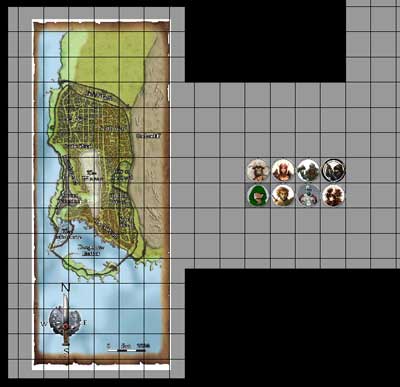
We started off with everyone being able to see their tokens on a small map (with an image of the map of Waterdeep on the page), and I explained how MapTool worked.  As a player, the only things they really needed to know were how to move their token (click and drag), how to move around the map (right click and drag; zoom with the mouse wheel) and how to deal with their macros (just click them).  That went pretty easily.

We also spent a little time talking about the future of the group.  We’re going to split in two – one with me as the DM playing at level 1 and one with another person from the group as the DM, playing at some higher level in order to get to paragon tier faster.  But since I had put everything together for this evening with the plan of having eight players, we would still play the adventure together.  (It was the Living Forgotten Realm module that I’ll be running in my local store next Saturday – WATE1-1 Heirloom.)

I should also point out that, in addition to having MapTool open with everyone impersonating their characters in order to talk in-character (way cool), we also had Skype open for voice chat.  Let me give a huge shout-out to Skype – this software is awesome.  We had excellent call quality with eight active lines (two of the players were together at one computer), no lag – it was just fantastic.

Anyway, I used audio to communicate with my players most of the time, and they used a mixture of audio and text.  The adventure started off with a lengthy skill challenge to track down a thief who had stolen a family heirloom (hence the title of the module, “Heirloom”).  Mixed in the middle was a quickie combat encounter with some drunken sailors, which ended in one action – the party’s invoker walking up and unleashing an encounter power that just about wiped them out (whereupon the sailors that were still up surrendered and staggered away).

At the end of the skill challenge, the party confronted the thief and his cronies in their underground lair.  This battle was much more interesting, with some good movement, creative use of marks, and SO many conditions to keep track of!  It’s easier in MapTool than in real life – I can’t imagine running this encounter with eight PCs around a real table.

We took a five-minute break before diving into the final encounter, where the party faced the person who had hired the thief to steal the heirloom.  The party did a good job of achieving surprise, and it became clear that I could either have the bad guys fight smart – keeping their guard drakes in front of the door to the room and making it hard for the party to do anything – or have them fight fun – letting the drakes shift back into the room so the melee fighters had something interesting to do.  I went with fun, and I’m glad I did.

The best part of the evening was the very end of this encounter.  I had some bad guys, who were hidden at the time, go out the window of the room they were in, trying to escape.  Hilarity ensued as the party tried to go after them.  Lots of falling out windows, landing on people who had already fallen (dealing improvised damage – why not?), and so on.

Looking back, it was clear that the encounters were not all that challenging for the party, since no one ever ended up making death saving throws.  But you know what?  For a party of eight, that’s okay.  The encounters were long enough already, and making them tougher would have made them take longer.

The most important thing was that everyone legitimately seemed to have a great time.  A couple of people who were planning to go play in the high-level game reached out to me to say that they were having so much fun that they were considering staying low-level.  That’s really gratifying to hear – “I’m having so much fun that I want to keep playing in your game.”  Is there a better feeling as a DM?  Not to mention the fact that one of the players is an Englishman playing in his first-ever tabletop RPG, and he played with us from 1:00 AM to 5:30 AM his time.  How’s that for dedication!

It will be a little sad to break up the group, but I honestly don’t have the energy for an eight-PC campaign.  I can handle four or five, but beyond that I think it’s just a little too much.  Still, just to run a game this big one time was worthwhile.  It was, quite frankly, an unqualified success, and I can’t imagine it having gone any better.  This is what I live for as an online dungeon master!

Online D&D game – Final prep for first session

I wish I had time to put up as in-depth a post as I would like, but I spent far longer than I planned to last night getting everything ready for this evening’s session of my online D&D game.  I’ll at least summarize what was involved.

  • Creating the encounter maps in MapTool (I ended up re-doing them all on one map so that the players wouldn’t have to flip between multiple maps in the campaign)
  • Updating the properties for the campaign per the suggestion of one of my more MapTool-experienced players (pretty minor changes)
  • Creating tokens for all of the bad guys, including their stats and macros for their powers
  • Creating tokens for all of the players (well, except the two who will be bringing their own), including THEIR stats and power macros
  • And of course making sure that I’ll know what I’m doing when I actually run the adventure
PC Tokens

Top row: Alayne, Thorfin, Faebs. Bottom row: Landon, Fudrick, Jaks

All of this ended up taking somewhere close to 10 hours over the past few days – and that was for an adventure that was already pre-written and for which I had previously created encounter maps and enemy token images!  I shudder to think how much time I’ll have to put in once I start creating my own adventures.

On the bright side, I’ll no longer have to change properties or create PC tokens (or at least not very often), and the more I create monster tokens the more efficient I get at it (using templates for them, for instance).  I’m guessing that the prep work for a typical future session within MapTool (once I’ve already decided what the encounters will look like, what bad guys to use, etc.) will probably take about three hours instead of ten.  Just a guess, though.

Now all that’s left to do is get the group together and run the game!  It sounds so easy when I write it like that…

Online game recruiting

As I mentioned in my last post, I’ve started an online D&D Fourth Edition game, complete with recruiting players online (as opposed to my current game that started with an in-person game and morphed online due to distance between players and DM).  I thought my experience might be useful for anyone else who wants to start a game online, so I’m sharing it here in “real time.”

The game began with another poster on EN World, Palacer, putting up a post announcing that he really wants to play more D&D and is interested in an online game.  Several others chimed in to say that they wanted the same thing, and I said that I was also interested in either playing or DMing.  Well, no one else stepped up to DM, so I was recruited!

I put up a post in the thread laying out the overview of the game:

  • Sign-ups were now open
  • I was planning on a 5-PC campaign, starting off with more focus on combat but incorporating more role playing over time
  • Interested players should put a post in the thread and send me an email
  • Players should include their EN World handle, the name they would like to go by in the game, their preference for starting level (level 1 versus level 6), their available times to play and their thoughts on what characters they would like to play

Seven people followed the instructions, putting posts on the forum and sending me emails.  At the end of the day I put up another post saying that I would leave sign-ups open for one more day and then close them.

This evening I had seven players – well, eight if you count a couple that may be playing one character or two.  I sent an email to the group with more details:

  • We’ll get together for our first session this Friday evening
  • We’ll be on Skype and MapTool – I shared my contact information for both of those
  • I laid out character creation guidelines (no Eberron or Dragon Magazine, standard starting gold, actual characters preferred over min-maxed beasts)
  • I asked everyone to start sharing their characters in email and to send me their Character Builder files (partly so I could program up some MapTool macros for them)
  • Also, we’re going to play a session at level 1, then jump to 4, then probably to 7.  The players generally want to get to higher levels more quickly, but some players (and I) are pretty new and want to start off slowly.

So far so good!  I’ve got seven players and we’ve found a time that, in theory at least, will work for all of us.  Next step: Getting together all at the same time!  Oh, and I need to devise a campaign (little details…).  I’m thinking this may be the time to update my campaign that I discovered from years ago, at least as a good starting point.

If you have any advice on this new adventure, I’d love to hear it in the comments.

Online D&D from scratch

I knew I would eventually get to this point, given the focus of my blog, but I wasn’t sure exactly how or when it would happen.  Well, it’s here.

I’m starting a D&D campaign online from scratch.

As you probably know, I’ve been running an online D&D game for a few months now, but that game started with some friends at a wedding in Florida.  We played together in person for an evening, and since we wanted to keep the game going despite the fact that we were far apart, we started playing online.

Now I’ll be starting a game entirely online, including the recruiting process.

Another poster on EN World (Dan, who goes by the handle Palacer) started a thread yesterday, basically saying that he’s hungry to play some more D&D and was interested in an online game.  Several other people on the thread said that they felt the same way, and I chimed in to say that I would also be interested in playing or DMing.  Dan reached out to me and said, “Great – DM this game!”

All right, I’m in!  I’ve posted on that thread, saying that I’m happy to serve as DM.  We’ll use MapTool and Skype, since I know and love those programs for D&D.

I plan to use this blog in part to talk about the whole process of creating an online game.  I fully expect that the biggest challenge will be organizing the players – getting everyone to commit to the game and to show up regularly and on time.  I’ll do my best to keep everything organized.

Part of my plan is to recruit extra players.  It’s quite likely that there will be at least one or two players who want to play but then can’t for whatever reason.  Backups are a good thing!  I’ve also sent invitations to a few people whom I know personally but who don’t live near me, since this would be a good way for us to game together.

If anyone reading the blog is interested in playing, check out the thread on EN World and chime in!  Leaving a comment here on the blog is fine, too, or drop me a line at my gmail.com account – the address is OnlineDungeonMaster.

And if anyone has any advice for me on this new adventure, please let me know in the comments.

MapTool states – bloodied, slowed and more

When I first discovered MapTool, I was excited to see that you could set states on tokens very easily, especially compared to Gametable and OpenRPG.  My first post about MapTool showed some examples of putting states on a token, and my second showed the set of states that I had programmed up.  Later, when I started looking at pre-made campaign frameworks, I realized that there were better ways to go with states.

I should clarify that when I say states, I’m using the MapTool lingo for what a lot of people would call conditions.  These are things like being bloodied, slowed, marked, dazed, etc.  A lot of people who play D&D 4e with minis will use some type of colored rings (tiny rubber bands, pipe cleaners, etc.) or beads to indicate various conditions on a PC or monster mini, but these are fiddly to deal with (though the rings are better than the beads).  With MapTool, you can make little images appear on top of the token image for the PC or monster, and they move along with the token.  Piece of cake.

My first pass at setting up states on tokens used some of the default state indicators that come with MapTool.  These are basically shapes – a big circle, square, triangle or X over the image, or a dot in a corner.  This would work fine, of course, but knowing that a blue square means “slowed” while a yellow triangle means “dazed” would get annoying.

When I opened up Rumble’s 4e campaign framework in MapTool (as described here), I found that he was using a different approach for setting states on tokens.  Specifically, he was primarily using the “grid image” option for his states.  I loved it.

So how do you set up states in MapTool?  First, go to Edit – Campaign Properties, then click on the States tab.  By default, you’ll see a window like this:

MapTool States WindowFrom here, you can modify or delete existing states or add your own new states.  Let’s talk about adding a new state first, since it’s a little bit confusing to do.  You have to start by clicking on one of the existing states, then go up to the Name field and start typing the name of the new state you’re working on.  If you don’t first click on an existing state, just typing a new name into the Name field will not activate the Add button that you’ll need in order to put a new state on the list.  Why?  I don’t know.  I’d call it a minor bug in MapTool and move on.

Let’s take the example of creating a state called Slowed.  We click on an existing state, then type “Slowed” into the Name field.  For Type, we’ll select “Grid Image” from the drop-down menu.  Let’s change the Grid Size field to 3×3 – this means that there can be up to nine little state squares displayed on a token at a time (2×2, the default, would only let us have four).  We should also set the opacity correctly – if the image is totally opaque, we won’t be able to see the token behind it.  I like to go with opacity of 75%, but feel free to experiment.

We’ll then need to specify what image we want to appear in a square on this invisible 3×3 grid that overlays the token when we turn on the Slowed state for it.  To do that, we click Browse and find a suitable image.  The big MapTool image download (which I’ll talk about more in a future post) has some nice state images, so we’ll use the Slowed image from that download.  Once we’ve selected it, we click Add.  The new state is now ready to use.

You’ll notice that this particular icon is a little greenish square with an hourglass on it.  All of the default icons that come with the big image download for MapTool are similarly built, and I decided to go ahead and use them.  The States window for my campaign looks something like this (there are more that are beyond the bottom of the window):

MapTool All StatesAlso, you can download the States file here and import it into your own campaign if you like.

Once you have all of these states defined, you can turn them on or off for any given token by right-clicking on the token, pointing to States, and then clicking on the appropriate state name.  Alternatively, if you’re setting a bunch of states at once, you can double click on the token to bring up the Edit Token window, go to the States tab, and then check the boxes next to all of the states that you want to turn on for that token.

If you turn on a whole bunch of states on a particular token, it will look something like this:

This is how I use states in my campaign, but I love the fact that it can be completely personalized.  If you want to do something different in your campaign, MapTool lets you do that.  It’s a pretty awesome program!