War of the Burning Sky Session 2

All right, now this is more like it!  I got together with my online group last night for our second session in the War of the Burning Sky campaign (our third overall session as a group).  The first WotBS session didn’t go all that well in part because we had to wrap up early when one player got called into work but mainly because I was underprepared and didn’t feel ready to wing it when needed.

This time, I was ready.  With this session, I started intentionally deviating from the campaign as laid out in the published module, and I’m glad I did.  There are some spoilers for the campaign ahead, just so you’re warned.

I started the party off in session 1 as scripted, meeting their contact, Torrest, in a closed-down inn at New Year’s Eve in the town of Gate Pass as the world was on the brink of war.  I ran the bounty hunter ambush battle more or less as scripted, though I ran it badly.  The players did well to think quickly and try to lure the lead bounty hunter to the Resistance – a cool idea.

I then ran some of the mini-quests as written as the party made its way from the inn to the bank tower to meet their next contact.  The party helped heal a burned family, caught a panicked woman who was jumping from a burning building, and shared in the panic in the crowd as a huge winged figure swooped overhead in the night.  That’s where we ended things last time.

Next, I ran the much-maligned “Animal Crossing” encounter, in which a rich man begs the party to help him find his Kiki, who, it turns out, is his pet dire weasel (see photo to the left).  I had Torrent clearly be uninterested in helping, and I would have awarded XP for simply the group deciding that this was a waste of time, but the soft-hearted warlock in the party helped persuade the others that this poor man was in need of their help.  So, the weasel hunt was on, and for me at least it was a ton of fun.  They tracked the weasel through the streets, into a closed temple, out a side door, down an alley and into a locked sewer grate.  The druid in the party used a fabulous Nature check to calm Kiki down, at which point she climbed out and snuggled into his arms for safety (I essentially role-played Kiki as one of my cats).  I showed the party the picture I had made for Kiki, and the druid was sorely tempted to keep her (she IS pretty adorable, if a bit dire), but the group ultimately returned the cute little dire weasel to her rightful owner.  They then spent a surprising amount of time trying to get out the box of treasure that they spotted alongside Kiki in the sewer grate, ultimately blasting the crap out of the lock on the sewer grate with a bunch of magic.

Fun aside: At one point the gnome in the party tried to squeeze through the sewer grate, which was an untrained Acrobatics check.  The dwarf fighter assisted by shoving him through with a great Athletics check.  Unfortunately, the gnome’s Acrobatics roll was a natural 1, so I ruled that he got his knee caught on the grate, the fighter’s shove cause him to bang up that leg, dealing him 1d6 damage. Ah, the dangers of assisting!

At this point I made my first major deviation from the published story.  As published, the party encounters a character in the bank who appears to be their contact, Rivereye, but who is really a good-aligned spy from a nearby eladrin country.  The spy has secretly subdued the real Rivereye and taken a potion to disguise himself as Rivereye.  He has taken the case of secret information that Rivereye was supposed to be giving to Torrent (that is, the MacGuffin) and sent it with some of his eladrin allies to another part of town because the real Rivereye has convinced the spy that the case is rigged to blow up if it’s opened without the proper pass phrase.  The encounter is scheduled to go like this:

  • The party arrives and meets the fake Rivereye
  • The fake Rivereye doesn’t realize who Torrent is and slips up in his charade
  • When Torrent catches him in the slip-up, the spy flees with his wisp solon partner
  • The party then has a long series of encounters helping the Resistance and tracking down the case, possibly becoming allies with the eladrin along the way

This struck me as overly complicated and, more importantly, no fun.  I don’t like the “meet a bad guy and keep him from fleeing” encounter, especially since it seemed like it would be easy for him to get away.  So I completely revamped it.

In MY version (available here as a PDF), the fake Rivereye is a doppelganger counter-spy from the evil empire that Rivereye has been spying on.  The doppelganger and his gang of half-orc goons have been tailing Rivereye in the hopes that he’ll lead them to his contacts in the Resistance.  As in the published version, the fake Rivereye tries to pass himself off as the real one and ultimately slips up.  However, in this version he doesn’t HAVE the MacGuffin – it’s locked in a bank vault and he needs Torrent to get it out.  When he fails in that, he and his goons attack.  He ultimately tried to flee at the end of the battle, but I had him use a potion of teleportation to try to get away – which, when combined with the Burning Sky teleportation issues, fried him to a crisp.  Add in the lightning trap that I had jumping around the battlefield, and it was a more fun encounter (at least for me).

I considered running the Flaganus Mortis encounter after this one, but I ultimately decided not to bother as it felt too random.  I had the party go to a safe house (which I made into the Dagger’s Rest Inn from their first session, transplanted from Waterdeep) and rest for the evening.  In the morning, they started their plans to escape the city.  I gave them the option of trying to work with a city council member as written in the published module, but that seemed boring to me, so I presented them with another option: Escape via the sewers.  Happily for me, they went with the sewers

I skipped most of the rest of Act Two, Act Three and Act Four as written, but I took the Dead Rising encounter from Act Two and said that in order to get from the sewers into the natural cave system that would take them out of the city, the party would have to fight through an ancient crypt of undead.  I ran this one exactly as written (except with an exit out the back of the crypt, and the fact that the entrance came from the sewer), and it was pretty darn brutal – but the players made it in the end.  I did soften the death explosion of the Dwarven Boneshard Skeletons to be 1d6+4 damage rather than 3d6+4 – they were crazy-powerful enough without dealing insane damage on death.

We called it a night as this point, as the party got ready to delve into the natural cavern system (which is not part of the published adventure at all).  I’m very happy with the changes I made to the adventure, and I personally am having much more fun than I did in the first WotBS session (mainly because I feel like I know what’s going on now and am free to make changes as I see fit).  I’ve already put together what I think is an interesting trek through the natural caverns, after which I will likely pick up some of the published threads of the adventure (probably using Act Five more or less as written and then moving on to the second published adventure).

What do you think of the changes I’ve made so far?  Was running the weasel hunt worthwhile?  Do you have any suggestions for a trek through some caverns in an effort to escape the city?  I have some ideas of my own, but I’m always looking for more input!

Signing up to run a convention game

Since I had such a good time running a Living Forgotten Realms game at my local store this past weekend, I decided to answer the call when the organizer of LFR games for a local convention, TactiCon, asked the group of LFR players and DMs from my store if anyone was interested in running an LFR game or two (or ten) at the convention over Labor Day weekend.I’ve never been to a gaming convention before, and information about TactiCon is surprisingly difficult to find online.  However, I was lucky to find a hard-copy brochure for the convention at my friendly local game store.  It looks like a fun way to spend a weekend, frankly.  There will be tons of D&D games, as well as other RPGs like Pathfinder.  There are also lots of board games, which I happen to love, too.  I’m guessing this might be a place where I could get some minis – even though I’ll be using my homemade tokens for bad guys when I run games, I’d like to have my own minis for use when I’m a player rather than a DM.

The particular LFR game I signed up to run is CORM 1-1.  I picked it because of the time it’s scheduled (Saturday morning) and the fact that it’s a low-level adventure (I’m not sure I want to dive into higher-level stuff at a convention).  As it turns out, CORM 1-1 is “The Black Knight of Arabel,” which is the first LFR game I had ever played!  I’ve only played in three LFR games, and now I will have run two of those same games.  What are the odds?

In any case, I’m looking for advice from my blog audience.  How does a convention game compare to a game in your local store?  Are there particular things I should look out for?  And as a first-time convention-goer (even though it’s a small convention), what things should I especially be looking to do when I’m there?

War of the Burning Sky – First session

This past Friday evening I ran my online group through our first session of EN World’s War of the Burning Sky campaign.  It did not go as well as our session from the previous week, where I had run them through a Living Forgotten Realms adventure, and it’s my fault: I just wasn’t as prepared as I should have been, and it showed.

The session started off well, with the players talking about some back story for their characters and possible connections with one another and with the campaign setting.  I really enjoyed this part of the session, and it’s given me some good ideas for the future.

Then we got into the actual adventure itself (WARNING: SPOILERS AHEAD).  Some of this was okay and some… less so.  The party begins by meeting a woman named Torrent in a tavern that has been closed by the city guards because the owner is a magic user and there’s a coming crackdown on magic (“The Scourge”).  Torrent is there to bring the party into “The Resistance.”  Great, no problem.

V. Shane's awesome depiction of Torrent from the War of the Burning Sky

As they finish chatting, they’re ambushed by bounty hunters.  Now, this is laid out as a pretty exciting encounter in the published adventure, and I totally biffed it.  There’s a warning of something coming, with the sound of creaking floorboards overhead in what is supposed to be an empty building.  Then some bounty hunters come barging in the front door, with the goal of forcing the party out the side door. (I was totally unable to accomplish this.)

Then a bomb hits the building and flames burst out all over the place.  Then the ceiling starts collapsing in places.  This would have been a good way to force the players out of the building and into the alley, but I failed to play it that way.  They basically ignored the chaos and beat the crap out of the bounty hunters.  I decided to have the leader of the bounty hunters (who wisely stayed outside) tell his men to retreat, but the party kept beating them on the way out (and really, who can blame them?).

We then had an interaction with the lead bounty hunter, Kathor, which, as I played it, didn’t make any sense.  Kathor is supposed to be ambivalent about being a bounty hunter, and that came across okay, but it was tough for me to reasonably play it so that the players would accept his withdrawal without attacking him further.  We worked it out so that the players are trying to recruit him into the resistance (a cool idea on the party’s part), but I admit that I didn’t handle this encounter very well.

We next played a few vignettes as the party made their way through the now-burning city toward their rendezvous with a gnome who is supposed to have information that they’re to take out of the city.  These little scenes were a bit out of place, but the party role-played them well.

Then we had to abruptly cut off the game, as one of the players got called into work unexpectedly.  I was okay with this, frankly, as it will give me more time to prepare for the next session.

After much reflection, I’ve decided that I have no interest in running a pre-packaged campaign through to completion.  A pre-packaged adventure, sure, but not a whole campaign.  I need to be able to wing it on the fly and change NPC motivations, all sorts of crazy things, and that’s tough with a published campaign.  So, I’ll be using the published campaign for inspiration and nothing more.  For one thing, I’m interested in getting the party into an underground area of some sort for some cool battles, and I don’t see anything like that in the near future for this campaign.  Easy solution: Change it!

My lessons from this time around are:

  • BE PREPARED!  If you’re not prepared as the DM, things aren’t going to go well.
  • Maintain flexibility.  Unless you’re the kind of DM who can run a party closely to a script, don’t hew too closely to a published adventure path.  You need to be able to adapt on the fly.
  • When you’re given cool material (like the burning, collapsing building that the party is fighting inside) make the most of it!  Describe it vividly, and let it affect the characters in whatever way seems most appropriate to you.

Next session is going to be better, I can already tell.  I’ve already made some big changes to the next combat encounter, which will take the adventure mildly off the published path.  I’m anxious to start working with my player characters’ backgrounds, too, and I have some interesting ideas on how to do that.

War of the Burning Sky – the online campaign

After last Friday’s successful inaugural session with my new online D&D group, we did split the eight-player group in two.  Five of the players are remaining in the game with me as DM, continuing at level 1.  We started last week by running a one-shot Living Forgotten Realms adventure, which was fun and all, but I don’t really want to stay in the Realms for the rest of the campaign (mainly because I don’t know Forgotten Realms very well).

I was planning to go with a homebrew adventure that I had written eight years ago under 3.0 rules, but I abandoned that idea when I discovered that the plot hook for my adventure is exactly the same as the plot hook for last week’s adventure – the party is hired by a noble to recover a family heirloom that was stolen.  Seriously, the SAME THING!  I also realized that the setup was the best part of my own adventure, and yet that was the one part that would really need to be changed.

War of the Burning Sky logoIn searching for another campaign idea, I came across the War of the Burning Sky.  This is a campaign published by the people at EN World and free to any “community supporter” on the site (that is, a subscriber).  I had read good things about the campaign, and glancing at the materials myself, it looked pretty interesting. I proposed it to the party, and they were fine with the idea.

And so our story begins: OnlineDM’s online game delves into…

WAR OF THE BURNING SKY!

Stay tuned for recaps of how it all goes.  And if anyone has run this campaign before and has advice for me, I’d love to hear it!

Online campaign – What a rush!

It’s amazing that I have the energy to write tonight, given that I just spent four and a half hours running a D&D adventure online for EIGHT PLAYERS, but it was such a rush.  I can’t believe how well it all went!  Seven of the players were already logged in before the scheduled start time, and the eighth ran about 10-15 minutes late (no big deal).

Starting Screen

We started off with everyone being able to see their tokens on a small map (with an image of the map of Waterdeep on the page), and I explained how MapTool worked.  As a player, the only things they really needed to know were how to move their token (click and drag), how to move around the map (right click and drag; zoom with the mouse wheel) and how to deal with their macros (just click them).  That went pretty easily.

We also spent a little time talking about the future of the group.  We’re going to split in two – one with me as the DM playing at level 1 and one with another person from the group as the DM, playing at some higher level in order to get to paragon tier faster.  But since I had put everything together for this evening with the plan of having eight players, we would still play the adventure together.  (It was the Living Forgotten Realm module that I’ll be running in my local store next Saturday – WATE1-1 Heirloom.)

I should also point out that, in addition to having MapTool open with everyone impersonating their characters in order to talk in-character (way cool), we also had Skype open for voice chat.  Let me give a huge shout-out to Skype – this software is awesome.  We had excellent call quality with eight active lines (two of the players were together at one computer), no lag – it was just fantastic.

Anyway, I used audio to communicate with my players most of the time, and they used a mixture of audio and text.  The adventure started off with a lengthy skill challenge to track down a thief who had stolen a family heirloom (hence the title of the module, “Heirloom”).  Mixed in the middle was a quickie combat encounter with some drunken sailors, which ended in one action – the party’s invoker walking up and unleashing an encounter power that just about wiped them out (whereupon the sailors that were still up surrendered and staggered away).

At the end of the skill challenge, the party confronted the thief and his cronies in their underground lair.  This battle was much more interesting, with some good movement, creative use of marks, and SO many conditions to keep track of!  It’s easier in MapTool than in real life – I can’t imagine running this encounter with eight PCs around a real table.

We took a five-minute break before diving into the final encounter, where the party faced the person who had hired the thief to steal the heirloom.  The party did a good job of achieving surprise, and it became clear that I could either have the bad guys fight smart – keeping their guard drakes in front of the door to the room and making it hard for the party to do anything – or have them fight fun – letting the drakes shift back into the room so the melee fighters had something interesting to do.  I went with fun, and I’m glad I did.

The best part of the evening was the very end of this encounter.  I had some bad guys, who were hidden at the time, go out the window of the room they were in, trying to escape.  Hilarity ensued as the party tried to go after them.  Lots of falling out windows, landing on people who had already fallen (dealing improvised damage – why not?), and so on.

Looking back, it was clear that the encounters were not all that challenging for the party, since no one ever ended up making death saving throws.  But you know what?  For a party of eight, that’s okay.  The encounters were long enough already, and making them tougher would have made them take longer.

The most important thing was that everyone legitimately seemed to have a great time.  A couple of people who were planning to go play in the high-level game reached out to me to say that they were having so much fun that they were considering staying low-level.  That’s really gratifying to hear – “I’m having so much fun that I want to keep playing in your game.”  Is there a better feeling as a DM?  Not to mention the fact that one of the players is an Englishman playing in his first-ever tabletop RPG, and he played with us from 1:00 AM to 5:30 AM his time.  How’s that for dedication!

It will be a little sad to break up the group, but I honestly don’t have the energy for an eight-PC campaign.  I can handle four or five, but beyond that I think it’s just a little too much.  Still, just to run a game this big one time was worthwhile.  It was, quite frankly, an unqualified success, and I can’t imagine it having gone any better.  This is what I live for as an online dungeon master!

Online D&D game – Final prep for first session

I wish I had time to put up as in-depth a post as I would like, but I spent far longer than I planned to last night getting everything ready for this evening’s session of my online D&D game.  I’ll at least summarize what was involved.

  • Creating the encounter maps in MapTool (I ended up re-doing them all on one map so that the players wouldn’t have to flip between multiple maps in the campaign)
  • Updating the properties for the campaign per the suggestion of one of my more MapTool-experienced players (pretty minor changes)
  • Creating tokens for all of the bad guys, including their stats and macros for their powers
  • Creating tokens for all of the players (well, except the two who will be bringing their own), including THEIR stats and power macros
  • And of course making sure that I’ll know what I’m doing when I actually run the adventure
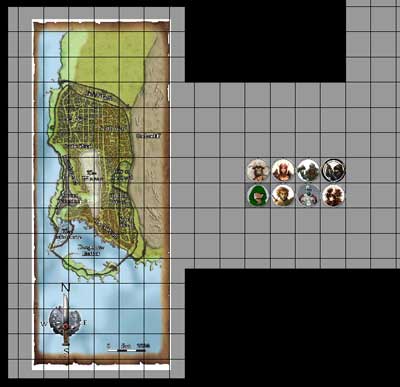
PC Tokens

Top row: Alayne, Thorfin, Faebs. Bottom row: Landon, Fudrick, Jaks

All of this ended up taking somewhere close to 10 hours over the past few days – and that was for an adventure that was already pre-written and for which I had previously created encounter maps and enemy token images!  I shudder to think how much time I’ll have to put in once I start creating my own adventures.

On the bright side, I’ll no longer have to change properties or create PC tokens (or at least not very often), and the more I create monster tokens the more efficient I get at it (using templates for them, for instance).  I’m guessing that the prep work for a typical future session within MapTool (once I’ve already decided what the encounters will look like, what bad guys to use, etc.) will probably take about three hours instead of ten.  Just a guess, though.

Now all that’s left to do is get the group together and run the game!  It sounds so easy when I write it like that…

Online game recruiting

As I mentioned in my last post, I’ve started an online D&D Fourth Edition game, complete with recruiting players online (as opposed to my current game that started with an in-person game and morphed online due to distance between players and DM).  I thought my experience might be useful for anyone else who wants to start a game online, so I’m sharing it here in “real time.”

The game began with another poster on EN World, Palacer, putting up a post announcing that he really wants to play more D&D and is interested in an online game.  Several others chimed in to say that they wanted the same thing, and I said that I was also interested in either playing or DMing.  Well, no one else stepped up to DM, so I was recruited!

I put up a post in the thread laying out the overview of the game:

  • Sign-ups were now open
  • I was planning on a 5-PC campaign, starting off with more focus on combat but incorporating more role playing over time
  • Interested players should put a post in the thread and send me an email
  • Players should include their EN World handle, the name they would like to go by in the game, their preference for starting level (level 1 versus level 6), their available times to play and their thoughts on what characters they would like to play

Seven people followed the instructions, putting posts on the forum and sending me emails.  At the end of the day I put up another post saying that I would leave sign-ups open for one more day and then close them.

This evening I had seven players – well, eight if you count a couple that may be playing one character or two.  I sent an email to the group with more details:

  • We’ll get together for our first session this Friday evening
  • We’ll be on Skype and MapTool – I shared my contact information for both of those
  • I laid out character creation guidelines (no Eberron or Dragon Magazine, standard starting gold, actual characters preferred over min-maxed beasts)
  • I asked everyone to start sharing their characters in email and to send me their Character Builder files (partly so I could program up some MapTool macros for them)
  • Also, we’re going to play a session at level 1, then jump to 4, then probably to 7.  The players generally want to get to higher levels more quickly, but some players (and I) are pretty new and want to start off slowly.

So far so good!  I’ve got seven players and we’ve found a time that, in theory at least, will work for all of us.  Next step: Getting together all at the same time!  Oh, and I need to devise a campaign (little details…).  I’m thinking this may be the time to update my campaign that I discovered from years ago, at least as a good starting point.

If you have any advice on this new adventure, I’d love to hear it in the comments.

Online D&D from scratch

I knew I would eventually get to this point, given the focus of my blog, but I wasn’t sure exactly how or when it would happen.  Well, it’s here.

I’m starting a D&D campaign online from scratch.

As you probably know, I’ve been running an online D&D game for a few months now, but that game started with some friends at a wedding in Florida.  We played together in person for an evening, and since we wanted to keep the game going despite the fact that we were far apart, we started playing online.

Now I’ll be starting a game entirely online, including the recruiting process.

Another poster on EN World (Dan, who goes by the handle Palacer) started a thread yesterday, basically saying that he’s hungry to play some more D&D and was interested in an online game.  Several other people on the thread said that they felt the same way, and I chimed in to say that I would also be interested in playing or DMing.  Dan reached out to me and said, “Great – DM this game!”

All right, I’m in!  I’ve posted on that thread, saying that I’m happy to serve as DM.  We’ll use MapTool and Skype, since I know and love those programs for D&D.

I plan to use this blog in part to talk about the whole process of creating an online game.  I fully expect that the biggest challenge will be organizing the players – getting everyone to commit to the game and to show up regularly and on time.  I’ll do my best to keep everything organized.

Part of my plan is to recruit extra players.  It’s quite likely that there will be at least one or two players who want to play but then can’t for whatever reason.  Backups are a good thing!  I’ve also sent invitations to a few people whom I know personally but who don’t live near me, since this would be a good way for us to game together.

If anyone reading the blog is interested in playing, check out the thread on EN World and chime in!  Leaving a comment here on the blog is fine, too, or drop me a line at my gmail.com account – the address is OnlineDungeonMaster.

And if anyone has any advice for me on this new adventure, please let me know in the comments.

Eat what you kill

There was a post on EN World asking how people have taught the rules of D&D Fourth Edition to new players.  I shared my story there, and since it ended up being a pretty long reply, I thought it would make for a good blog post.  I’ve told a little bit of this story in my first blog post, but here’s the extended version.

I was at a wedding in Florida (I live in Colorado).  The wedding was in the morning, and the festivities were done by mid-afternoon.  I was a pretty new D&D player at that point and hadn’t DMed at all, but I had brought the DMG 2 to read on the trip.

One of my friends, Zach, noticed the book and asked about D&D.  He had played World of Warcraft and knew a little bit about D&D.  I talked to him, and he was into the idea of playing, as was his wife, Lane.  She had never played anything like D&D.  My wife, Barbara, had been playing in a game with me for about three sessions at that point, so she at least knew the rules.

I helped Zach and Lane roll up some characters in the Character Builder on my laptop, guiding them through the process.  Then the bride and groom showed up and wanted to play, too, so I had Zach guide the groom through character creation on his laptop (CB is a free download for levels 1-3, woo hoo!) while I helped the bride.  Once they all had characters, I helped transfer their stats to sheets of paper in an abbreviated format (no printer, you see).  My wife used her character from our session at home (which we saved on the laptop).

Zach drew up a battle grid (freehand) on two sheets of letter-sized paper that we had on hand, and we fished around for coins and little dried fruits to use for PCs and monsters.  I found a free adventure to run (Keep on the Shadowfell), and we dived right in, right there in the hotel room.

So picture it: Six people seated around a hotel end table that’s been pushed to the middle of the room.  Four are sitting on beds, two on chairs.  There are a couple of laptops around, one of which is mine that I’m using to run the game.  People are busting out their cell phones to use online dice rollers (we had no dice, you see).  The PCs (coins) are attacking the monsters (little dried blueberries and pineapple chunks), enjoying the pleasure of eating what they kill (if you haven’t tried this, I highly recommend it).

As for teaching the game, it went something like this:

“On your turn, you have three actions you can spend – a standard action, a move action, and a minor action.  Most of the time you won’t have anything that’s a minor action, but you can use it for drawing a weapon, for instance.  Your standard action is usually going to be an attack, and I’ve laid out your options for those on your sheets of paper.  Your move action can be moving up to your speed or, if you’re standing next to a bad guy, you might want to just move one square – if you move away from a bad guy at full speed, he gets to smack you.”

“When you attack, you pick which bad guy you’re attacking and which of your powers you’re using for the attack.  You roll a twenty-sided die and add a number to it (the number is on the power).  I’ll let you know if your total is high enough to hit the bad guy.  If it is, your power will tell you to roll a different die and add another number, which will be the damage you’ve dealt to the bad guy.”

“You have a hit point total, which is how much damage you can take before you end up unconscious and start to die.  You’re trying to wipe out the bad guys before they wipe you out.”

That was it in a nutshell, and it was enough to get us through two encounters.  We didn’t do a lot of role playing, of course, but everyone seemed to get the gist of what they could do on their turn, and they had fun beating up kobolds and goblins.  It led to a recurring online game after we went home to Colorado, so I’d call it a success!

MapTool states – bloodied, slowed and more

When I first discovered MapTool, I was excited to see that you could set states on tokens very easily, especially compared to Gametable and OpenRPG.  My first post about MapTool showed some examples of putting states on a token, and my second showed the set of states that I had programmed up.  Later, when I started looking at pre-made campaign frameworks, I realized that there were better ways to go with states.

I should clarify that when I say states, I’m using the MapTool lingo for what a lot of people would call conditions.  These are things like being bloodied, slowed, marked, dazed, etc.  A lot of people who play D&D 4e with minis will use some type of colored rings (tiny rubber bands, pipe cleaners, etc.) or beads to indicate various conditions on a PC or monster mini, but these are fiddly to deal with (though the rings are better than the beads).  With MapTool, you can make little images appear on top of the token image for the PC or monster, and they move along with the token.  Piece of cake.

My first pass at setting up states on tokens used some of the default state indicators that come with MapTool.  These are basically shapes – a big circle, square, triangle or X over the image, or a dot in a corner.  This would work fine, of course, but knowing that a blue square means “slowed” while a yellow triangle means “dazed” would get annoying.

When I opened up Rumble’s 4e campaign framework in MapTool (as described here), I found that he was using a different approach for setting states on tokens.  Specifically, he was primarily using the “grid image” option for his states.  I loved it.

So how do you set up states in MapTool?  First, go to Edit – Campaign Properties, then click on the States tab.  By default, you’ll see a window like this:

MapTool States WindowFrom here, you can modify or delete existing states or add your own new states.  Let’s talk about adding a new state first, since it’s a little bit confusing to do.  You have to start by clicking on one of the existing states, then go up to the Name field and start typing the name of the new state you’re working on.  If you don’t first click on an existing state, just typing a new name into the Name field will not activate the Add button that you’ll need in order to put a new state on the list.  Why?  I don’t know.  I’d call it a minor bug in MapTool and move on.

Let’s take the example of creating a state called Slowed.  We click on an existing state, then type “Slowed” into the Name field.  For Type, we’ll select “Grid Image” from the drop-down menu.  Let’s change the Grid Size field to 3×3 – this means that there can be up to nine little state squares displayed on a token at a time (2×2, the default, would only let us have four).  We should also set the opacity correctly – if the image is totally opaque, we won’t be able to see the token behind it.  I like to go with opacity of 75%, but feel free to experiment.

We’ll then need to specify what image we want to appear in a square on this invisible 3×3 grid that overlays the token when we turn on the Slowed state for it.  To do that, we click Browse and find a suitable image.  The big MapTool image download (which I’ll talk about more in a future post) has some nice state images, so we’ll use the Slowed image from that download.  Once we’ve selected it, we click Add.  The new state is now ready to use.

You’ll notice that this particular icon is a little greenish square with an hourglass on it.  All of the default icons that come with the big image download for MapTool are similarly built, and I decided to go ahead and use them.  The States window for my campaign looks something like this (there are more that are beyond the bottom of the window):

MapTool All StatesAlso, you can download the States file here and import it into your own campaign if you like.

Once you have all of these states defined, you can turn them on or off for any given token by right-clicking on the token, pointing to States, and then clicking on the appropriate state name.  Alternatively, if you’re setting a bunch of states at once, you can double click on the token to bring up the Edit Token window, go to the States tab, and then check the boxes next to all of the states that you want to turn on for that token.

If you turn on a whole bunch of states on a particular token, it will look something like this:

This is how I use states in my campaign, but I love the fact that it can be completely personalized.  If you want to do something different in your campaign, MapTool lets you do that.  It’s a pretty awesome program!