4e Home Encounters – first encounter

NewbieDM had an idea a few months ago: Wouldn’t it be great if there were a version of D&D Encounters that players could use at home?  Wizards of the Coast has this nifty weekly program on Wednesday nights where players can drop it at their local store and play a single encounter; as they come week after week, the encounters build into adventures and small campaigns.  Unfortunately, WotC does not release these encounters for home use, even after the season is over.

So, NewbieDM and his colleagues decided to start a program for those of us who can’t get to our store on Wednesday nights (for instance, I can’t ever go because that’s my bowling night).  They call it 4e Home Encounters, and the first encounter has just been posted.  It’s very cool that they’ve gotten this off the ground!

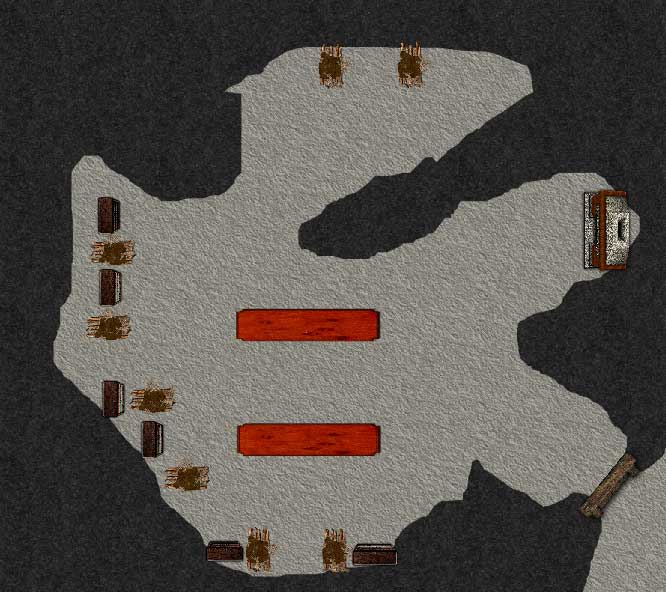
Now, the one thing that they wanted to have for the encounters was a map that players could use – an actual JPG that could be loaded into a program like MapTool or printed out on paper to lay on the table.  Unfortunately, their cartographer had to drop out of the program, so they’ve put together an encounter map using Dungeon Tiles (which, for copyright reasons, they can’t provide high-quality JPGs of).

If I ever run these encounters (and I certainly might), I’d obviously be re-creating the maps in MapTool.  So, as a service to the community, here is my attempt at a JPG version of the first 4e Home Encounters map as drawn by me in MapTool.  Feel free to use it in your own adventure if you like!

4e Home Encounters 1 Map - original scale


4e Home Encounters Map 1 - full one-inch square scale

And finally, a PDF of the map that’s printable for use at a home table.

Images for use with MapTool

Edit September 5, 2014: It appears that sometime in the last 4 years, rptutorials.net has gone away so this post is significantly less useful now. Alas, my apologies.


I’ve talked at length about how much I love MapTool, but it’s important to understand that having the MapTool software itself is only half the battle. You also need images.

MapTool comes with a few images pre-installed, but if you want maximum power and flexibility in creating maps and running games, you’re going to want a larger library of images.  This includes images of objects such as tables, stairs, roofs, etc.  More importantly, though, it includes textures – dirt, grass, stone, snow, water, fire, wood and many more.  With textures, you can easily draw great-looking maps.

So where do you get these images?  Why, at rputorials.net!  What you’re looking for is a big file with a lot of data – and that means a torrent.  No, not some illegal pirated stuff – this is just a big file put together to share for the role-playing game community.  The link to that file is here.

Once you have the file downloaded and saved to your MapTool directory (or wherever you like), you’ll need to tell MapTool where to find it.  Open MapTool and go to File – Add Resource to Library.  Browse to the location of the library on your computer, and voila!  You’ve got images!

The folks over at rptutorials.net have put together videos about drawing maps and so on, which I won’t even bother to try to replicate – they’ve done it right the first time!  Here instead are just a few basic pointers for creating nice-looking maps in MapTool.

  • Start with a new map, picking a good background color or texture.  I’ll often pick a grass texture for an outdoor map and either a gray color or stone texture for a dungeon map.
  • Click on the Drawing Tools icon and select the Background Layer from the window that pops up.  This is important!  You don’t want your floors and walls in the same layer as your tokens – the tokens should be on top.
  • To make a building, click on the top left box in the drawing window and browse to a stone texture.  Click on the top right box and browse to a wood plank texture.  Set the line width (the stone) to about 40% of your grid box (I use 20 pixel walls for a 50 pixel grid).  Select the rectangle tool from the top menu.  Click on a spot, let go, drag out a box, and click again.  Poof – it’s a building with stone walls and a wood floor!
  • The same process works with irregular filled shapes, too (cavern rooms, lakes, lava pools, pits, etc.).  If you don’t want a border (I usually don’t when drawing caves, for instance), left click on the white box with the red slash through it (this will set your border color to “none”).  Use the freehand line tool instead of the rectangle tool to draw these.
  • To just draw lines, right click on the white box with a red slash through it (that will set your fill color to “none”) and left click on the top left box.  Select the line texture you want.  Select the line width you want.  If you want freehand lines or straight lines, select the appropriate tool from the upper toolbar.
  • For objects, go back to the Interaction Tool (the default tool on the upper left toolbar, to the left of Drawing) and select the Object layer.  Browse to things like doors, stairs, beds, etc. and drag them onto the map.  Resize them by clicking on the box in the lower right corner and dragging.
  • Don’t use TOO many objects in maps that people will be accessing online.  The more different types of objects you have on your map, the longer it will take to load.  Try to draw background objects (such as pits) rather than using an actual object image whenever possible.
  • Feel free to add multiple maps to your campaign file and set them as not visible to players, then make them visible as needed during the game session.  This seems to help with loading times as well.

That should get you started on the path to creating great maps in MapTool!

United Kobolds of the Living Forgotten Realms

This evening I ran a Living Forgotten Realms game at my friendly local game store, Enchanted Grounds.  The amazing thing is that it wasn’t a big deal.

You might remember my post from July where I ran my first LFR game at the store.  That was a big deal to me.  I spent a month preparing for that game.  I talked on the blog and on EN World, asking for advice about running a game in public.  I had to work to create paper maps and tokens for the bad guys.  I read and re-read the adventure to make sure I understood the ins and outs (even though I had been through it already as a player).  I over-prepared.  And to be fair, I had a blast running the game.

This time I realized at some point over the weekend – oh yeah, I’m running a game on Tuesday!  No problem.  It helps that I had already run this particular adventure at TactiCon and I therefore had all of the files I needed on the laptop in MapTool, ready to run with the projector.  (This is TYMA 2-1 Old Enemies Arise.) Still, I really didn’t stress about it.

Fortunately, I didn’t need to stress.  Aside from my accidental unplugging of the projector during the game (twice – but fortunately never in combat), it all went very smoothly.  The party battled some kobolds by the side of the road.

They met with some farmers to investigate the kobold menace.

They fought in a cave full of spike traps.

And they battled the big bad guy in another part of the cave.

The first battle was fair – the defender took some serious damage, but never dropped.  The spike cave battle was lots of fun – I got to push and pull players into spikes all encounter long, when they weren’t stumbling into them on their own.  The final battle was kind of boring – I really need to find a way to spice up that encounter if I ever run this adventure again.

Part of what I enjoyed about this particular adventure was that two of my players are DMs whom I respect – Rich and Aarun.  You might remember Aarun’s name from my very first experience with Living Forgotten Realms – he was the dungeon master for my first game, and I absolutely LOVED the experience of playing under him.  He mentioned this evening that the blog post where I mentioned his name (with its unique spelling) shows up when you Google that name.  Well, Aarun – here’s another Google hit for you!

Anyway, it’s great to run a game for people you respect and for them to clearly have a good time.  I also hung around the store afterward to chat with Wes, another DM I greatly respect.  I’ve already signed up to play in some LFR games in December, and I specifically sought out games that Aarun and Wes are running.  If I can run a game for that type of person and they have a good time, I feel good about my dungeon mastering!

New campaign: Homebrew all the way!

As I mentioned in my last post, I’ve volunteered to take the next shift as dungeon master with the group I’ve been playing with here in Colorado for most of this year (my first real Dungeons and Dragons experience).  I had considered three options for this campaign:

  • War of the Burning Sky, which I am already running for my online campaign (though I would have to adjust for the fact that the in-person campaign is starting at level 5)
  • An adventure setting from Nevermet Press that I’ve volunteered to playtest (called Brother Ptolemy and the Hidden Kingdom)
  • A total homebrew campaign, based on an adventure I had written but never run for D&D Third Edition

War of the Burning Sky was originally my first choice, but after starting to work on the adjustments I’d have to make for the level issue and after talking to my current players and getting their thoughts on the matter, I decided that it didn’t seem like it would be as much fun for me (even though it would be a LOT less work).

The playtest game intrigues me a great deal, but the adventure would span several sessions, and I really didn’t want to commit to anything like that without having the time to really get to know the material first (the whole document is over 100 pages in length).

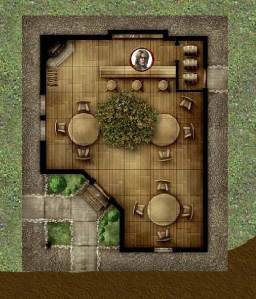
The more I thought about it, the more I realized that homebrew was what I really wanted.  Having discovered my adventure from years ago that never saw the light of day, I felt like I had to give it a go.I began by transferring my map of what was originally a goblin stronghold (the adventure was written for first-level characters) into MapTool.  It’s now an orc stronghold, since these characters are higher level.  I kept the geography pretty much the same as I had created it years ago, removing only a couple of pointless storage rooms (I like verisimilitude, but rooms that have no bearing on the adventurers at all should be cut).  I sketched out the whole complex, only making a couple of edits… and then realized that the party wouldn’t be STARTING in the stronghold, but out in a town where they’ll get the chance to find out about this thing.

So, I needed to back up and draw some more.  I started with a tavern, using a Dungeon Tile image.  I called it the Shady Maple Inn and built it around a huge maple tree in the middle of the place.  It was built and owned by an elf who loved the tree and made it part of his establishment (this made me very happy for some reason).  The players had the possibility of meeting some bandits along the road, so I created a bridge encounter map.
There was also going to be an attack by some insects during a night spent camping in the forest, so I put together a forest encounter map with trees and bushes.

This would be everything the party would face, at least for the first session.  I figured that we would get through some decent fraction of the maps I had prepared.  After all, there was a lot to get through in the first session:

  • Character introductions
  • Determining how the party members know one another – past adventures together, etc.
  • Meeting the NPC who would ask for the party’s help
  • Getting from the tavern to the manor house where a minor noble was looking for aid (likely encountering bandits along the way)
  • Meeting the minor noble and learning about the family heirloom that had been stolen
  • Investigating near the manor house to learn more about the thieves
  • Tracking the thieves through the forest
  • Battling creatures overnight in the woods
  • Getting to the stronghold
  • Dealing with the front door defenses
  • Working their way into the depths of the keep

Now, I don’t know if it was the efficiency of running the game in MapTool with the projector or what, but we got through a LOT in one session!

We started playing at about 4:15 this afternoon.  We spent about 30 minutes on character introductions and party backgrounds.  Then the action started, and the players jumped on it.  No gallavanting about, chatting with random NPCs – they heard about a mission, pounced on it without asking questions and started to complete it.  They wisely figured out that they could take a boat up the river to the manor house, which meant that they could skip the bandit encounter at the bridge.  At the manor house, they investigated the theft of the family heirloom efficiently and moved on to the forest.

Here, they were set upon by some creepy crawlies at night.  The luck of the dice had this encounter happen during the first watch, which meant that everyone would be taking an extended rest afterwards (some of them had just started doing so).  This worked out pretty well, actually – since the extended rest was coming, everyone was free to blow daily powers and action points.  The attack came from some centipedes and rot grub swarms (set to appropriate levels for the party, of course).  Even after I brought in some extra centipedes in the second round, the PCs had no trouble beating them all up.

The next morning we had a little skill challenge to continue the navigation through the forest to the orcs’ lair.  The party just barely failed this skill challenge, which made for a cool encounter.  Instead of being able to walk right up to the front door and trying to figure out how to get through, their failure meant that orc archers in the guard tower saw them coming and got a surprise round on them.  This was excellent, because the archers with surprise were pretty darn scary.  Even though these are only level 4 creatures, they have a burst 1 attack (a hail of arrows, basically) that deals d10+6 damage to everyone in the burst that it hits, and I rolled a 9 and a 10 for damage for the two archers who fired into the group.  Suddenly our healer was down to 12 hit points (out of a maximum of 43) and the party was legitimately scared.

Despite the fear, the party had the right tools to handle this problem: Area attacks.  By the rules of the game, an area attack only requires that the spellcaster have line of effect to the origin square of the area burst (which the arrow slit grants), and then enemies inside the tower would not have cover from the area attack because it’s originating inside the tower.  Unleashing a few of these helped bring the archers down before they could raise the alarm.

The door to the stronghold was trapped, and I allowed some active Perception checks to notice the trap before just setting it off on everyone’s heads.  This was a bit generous on my part, but our games haven’t involved a lot of traps in the past and I felt like it was unfair to shock them TOO much by springing a trap when they would never think to look for one.  Now they’ll think about it!

Once inside, the party used some good Stealth to sneak up on the orc minions (two-hit minions, as is usual in my games) in the next room, who were distracted by their dice games.  For this battle, the minions went to the far side of the bridge and pulled it back across, attacking mainly from range (even though they’re not great at range).  I made it clear that the river is nasty and the party does not want to fall into it.  Again, the PCs beat up the bad guys before they could raise a further alarm.

The last battle of the evening took place in the orcs’ sleeping chamber.  This area was dark, as the night shift orcs were sleeping.  One orc was awake – the cook over in the kitchen area, preparing a foul-smelling stew.  The party again made good use of Stealth, letting the party’s Monk get a surprise attack on the cook.

This battle was a little more interesting, as the orcs who had been asleep quickly woke up and did their best to sneak toward the party in the dark.  The Monk ended up bloodied a couple of times, and the Warlock/Sorcerer got a little bit beat-up as well, but since the baddies kept clustering, they were mowed down by burst and blast attacks.  Who says you need dedicated controllers in a party?At this point it was a little after 9:15 PM.  It had been five hours since we had started playing, and we had taken about an hour-long break for dinner in the middle.  We played through four combat encounters, plus the background stuff and some role-playing, investigations and skill challenges.  And this was all with brand-new characters and players who were still figuring out what those characters can do.  I was amazed at how far the party had gotten.  This was as much of the adventure as I had prepared, so we called it a night at that point (playing a few games of Zombie Dice first).

Today was a great start for a new campaign!  I feel like everyone had a good time, and the MapTool / projector combo continues to be a big hit.

DM Lessons

  • Once you’re comfortable as a dungeon master, run your own homebrew games whenever possible.  Time constraints may make this hard, but don’t let a lack of confidence stand in the way.
  • Drop future adventure hooks liberally – even if you haven’t figured out exactly where they’ll lead yet.  See what piques your players’ interest, and run with those, abandoning the others.
  • Preparation is huge.  Know the layouts of combat areas and how the enemies will use them before the battle starts.  If you can do the mapping in advance (such as with MapTool, or even pre-drawing the maps on battle mats or paper) it will save a lot of time at the table.
  • Be prepared for players to come up with ways to skip over combat encounters, and let them do it if they find a way.  Don’t get too attached to a battle.  You can probably find an excuse to use it again at some point in the future!
  • If you’re comfortable with it, technology at the table can automate the boring parts and help everyone get to the fun faster.
http://onlinedm.wordpress.com/2010/08/03/two-hit-minions/

Simultaneous skill / combat encounter: Burning grove

In the second part of my online party’s recent session (part 1 is here), they attempted to help a dragonborn sorcerer remove the magical fire from a dryad’s grove.  This was mainly a skill challenge, with some combat thrown in.
I decided to use lots of color when drawing the map in MapTool, and I’m happy with how it turned out.  My only minor regret is that I used a lot of objects rather than just drawing on the map (the trees and flames are objects, for instance) and that meant a long load time for my players (about 3 minutes for some of them).  Lesson learned: Don’t overload MapTool with too many objects (unless you don’t mind some loading time for the party, which might not be a big deal).  Also, given the way the encounter played out, I would want to move the dryad and her children from the far left side of the map to a spot that’s a bit closer to the center.

When the encounter began, the sorcerer went to the altar in the middle of the grove to begin the ritual.  The players gathered around him, and those with Arcana training attempted to assist.  After a couple of minutes the ritual started to have an effect.  The burning grass died down, and the dryad screamed and started running toward the lake in the lower right corner.  A couple of players went over to assist her and her children, but most stayed near the altar.

Shortly after that, catastrophe struck.  A rift opened near the far left side of the map, separating the children from their now-running mother.  The four big trees surrounding the altar came to life, with vines attacking the players and force barriers going between each pair of trees.  And then the ground directly beneath the altar collapsed, casting the sorcerer down into a cave below.

It was clear to the players that the first priority was rescuing the children – the sorcerer seemed to be unconscious but alive at the bottom of the cave below.  The characters outside the force barriers started to use skills to get to the children and calm them down while those inside started working on the trees.  I was curious to see what they would try, and they ended up using skill checks to try to disable the magic of the angry trees.  Nature and Arcana eventually worked (hard DCs), and a crit on the third tree disabled both it and the fourth one.

Now the whole party was trying to help the children, and they did all right (barely).  Since we were in initiative order, it was a little awkward having the children so far out to the left, since players used their turns double running just to get partway over to them, and then had to do lots of running to get back to the lake.  It was awkward, but I hand-waved some of the distance in the end.

Two of the characters felt like there wasn’t much they could do to help the children, so they started working on rescuing the fallen sorcerer.  One set up pitons and a rope in the ground (good dungeoneering check) and then tied the rope to herself while the other held the rope and lowered her down.  She made it okay, tied the rope to the sorcerer and then moved into hiding (she’s a tiefling warlock who recently multiclassed to rogue).  Unfortunately, as the other character began pulling the sorcerer up, some fungus creatures came out of the darkness and cut the rope.

My favorite part: This is where we ended the session.  I love ending on a cliffhanger. The dryad children have been rescued (though the mother died in the effort), but now the warlock is alone in the lower cave with just the unconscious sorcerer for company and some fungus creatures coming out of the darkness.  I’ve already changed this next encounter up from the published version, and I’m excited to try it out next week!

LFR Maps – Finished products

Amazingly enough, I think I’m now ready for the Living Forgotten Realms game that I’ll be running in three weeks (WATE1-1 Heirloom), at least in terms of putting together the materials.  I blogged yesterday about the tokens I’ve created for the enemies and the day before about the maps that I drew in MapTool.

To bring things full circle, I thought I’d share the finished map files in all three forms:

I’m excited about the prospect of running this adventure now!  If our in-person game on Monday runs out of prepared material (unlikely, but you never know), maybe I’ll bust this out as an impromptu game.  More likely, I’ll ask if we can run it some future weekend before I run it for real.

Living Forgotten Realms DM Preparation – Maps

As I mentioned in my last post, I’ll be a first-time DM for a Living Forgotten Realms (LFR) session at my local store on July 24, 2010.  I’ve gotten the adventure module (WATE1-1 Heirloom) and read through it once, which is a good start.  The things I haven’t been certain about are what to do about maps and what to do about tokens.  I’m pretty sure I’ll follow Ismael_DM’s suggestion in the comments of using the tutorial on Newbie DM’s blog to make flat tokens using metal washers.  More on that as I actually give it a shot.  (Thanks for the tip, Ismael_DM!)

As for maps, I’m pretty sure I’m going to stick with what I know: MapTool! While I’d love to set up a projector with my laptop to project a MapTool screen onto the tabletop (and there is a person at the local store who does exactly this), I’m not ready to lay out the cash required to build that sort of thing.

I’m pretty sure, though, that I can build my maps in MapTool and then print them out as “posters” to put on the table for my players to use.  DM Samuel has talked on his blog about doing this, building the maps in a program called GridMapper (which I probably would have loved a few weeks ago before I learned how to really use MapTool) and then printing them out to scale using a program called PosteRazor.  I haven’t tried the printing part yet, but I figured I’d start by building the maps in MapTool.  Printing can come later.

There are three combat encounters in the module I’ll be running (no real spoilers here).  There’s a battle outside of a random inn on a random street, a battle inside a shop and the room beneath it, and a battle that can take place either in a room in an inn, next to a stable, or on the city streets depending on what has happened earlier in the adventure.

The adventure describes how to build each encounter area using Dungeon Tiles.  Now, I don’t have any Dungeon Tiles myself, but Wizards of the Coast has a program called Dungeon Tiles Mapper that you can download for free and which contains images for a bunch of different tiles (not all of them, but a good variety).  Combining that with the big MapTool image download that I have, I was able to recreate the maps pretty well (in my humble opinion).  In some cases I tried to be as faithful as possible to the original, but there were some cases where I decided to make my own improvements.

First, I created a map that serves as both the inn exterior for the first battle as well as for the last battle (the downstairs part of the inn).  I used a texture to paint the cobblestone streets, a Dungeon Tile image for the inn itself, a stairs object from the big MapTool download and a roof object from that same download to represent the building next door.Inn Exterior

Next, I created the main room of the shop from the second encounter.  This was dead simple – one Dungeon Tile image.

Shop Interior

After that, I created the hideout beneath the shop.  This one was much more involved.  I used some Dungeon Tiles for the spiral staircase, the blue rune, the wooden stairs and the trap door.  I used some flooring from the Dungeon Tiles to paint the stone floor as well as the wooden platform floor.  I used images from the MapTool download for everything else (tables, bookshelves, chair, chest).  I think it turned out really nicely.

Hideout

Next up was the room in the inn.  Nothing here was from Dungeon Tiles.  The stairs, beds and windows were from the MapTool download and the floors and walls were painted using various wood textures from that download.

Inn Room

Finally, the exterior of the stable.  It’s a lot like the inn exterior with the streets and the roof.  The horse and cart came from the big MapTool download.

Stable Exterior

My next task will be to try to print these out using the correct scale in PosteRazor.  Wish me luck!  And as always, I’d love to hear your feedback, whether about the maps themselves or about the general idea of printing these out to use at the table (probably on card stock).

Treasure from the past

As I mentioned in my introductory post, I had tried playing a little bit of D&D years ago, under Third Edition (3e) rules.  My wife and I bought the 3e starter kit and later the core books (Players Handbook, Dungeon Master’s Guide, Monster Manual).  We played through some of the starter kit dungeons (I was the DM, she ran several characters) and had a good time.  One of the people she worked with was a regular D&D player, as was his girlfriend, and they were interested in playing with us.  We set up a session where I would DM and the three of them would play.

I remembered that I had run them through a pre-packaged module where they had quickly taken it off the rails, and I was unprepared as a first-time DM to deal with it, so that ended badly.  They also fudged their dice rolls to get extra crits, which I also didn’t know how to deal with.  That turned us off of D&D for years until we picked it up again in early 2010.

Now that I’m running my Fourth Edition party through the Keep on the Shadowfell I’m having a better time keeping my wits about me when the unexpected happens (and no one is fudging their dice, either, which helps).  I’ll admit that I’m starting to get a little tired of the Keep, though, and I’m thinking ahead to what might come next.  I had come up with lots of neat little ideas, trying not to put too much effort into any of them because I don’t know what direction things will go.  And then I remembered something:

Didn’t I do some prep work for my own Third Edition adventure way back when?

I found my old manila folders for D&D 3e stuff.  There was a folder full of character sheets for characters that both Barbara and I had rolled up.  I learned two things here:

  • Wow, we sure rolled up a lot of characters, especially without Character Builder!
  • I think the old way of rolling ability scores must have been overpowered – those characters had some amazing stats.

That was a nice trip down memory lane (ah yes, Barbara’s elf Druid named Lyssiah Stormwhisper!  I remember her…), but what I really wanted was in the next folder:

  • The printout of the ill-fated pre-packaged adventure that I ran
  • A map for a world of my own creation that I had drawn in colored pencils (two drafts, one on graph paper)
  • An arena dungeon with multiple levels that I had created myself (two drafts, one on graph paper)
  • A cavern-style dungeon with even more levels that I created myself (again two drafts, one on graph paper)
  • A typed, four-page write-up of a full-on adventure through the cavern-style dungeon, complete with monsters, traps, difficulty classes to find doors and so on, read-aloud text…

I was blown away by the amount of time I must have put into creating this stuff – and I never used any of it!  None!  The full adventure write-up amazed me.  It’s not quite up to the quality of a professional module, of course, but it’s not completely amateurish, either.  I remember devising this dungeon and the back story now that I’ve re-read it, and I remember that I thought hard about verisimilitude when I crafted the dungeons.  For instance, I thought about why these creatures would be living where they did, why secret doors would be hidden, where the creatures slept and spent their awake time, and so on.

The question now is, what do I do with this?  I don’t think I’d use the “published adventure” that I wrote as-is since it was customized for the characters who were in the party at the time.  I could totally see myself using the dungeon maps, though, just with new monsters and even the same general logic of what types of monsters can be found where.  They still seem like pretty cool encounter areas.

What do you think?  Is something like this worth re-using?  To give you an idea of what I’m talking about, I’ve put the world map that I drew below (click to enlarge).  If you’re interested in seeing the other maps and the adventure I had written, let me know.

Ervallen Map

Improvisation is important

Barbara and I are now in Boston for a business trip of mine, so what do we do on our first day in town?  Play D&D online with our friends in Florida, of course!  Hey, we’re all on the same time zone now, so we might as well.

At 11:00 AM, we all met online to play.  I called Zach and Lane via Skype, which worked great.  My maps in Gametable were ready to go, so I loaded up a map and hit Host.  I checked my IP address and told it to Zach… and realized that we can’t use Gametable when the host doesn’t own the internet router that they’re connecting to.  As you may recall from my earlier article about connecting to your players via Gametable, I had to go into my router settings and forward internet traffic that came to my IP address to my computer in particular, rather than to Barbara’s computer or some other device on our network.  Since I didn’t own the hotel router that I was connecting to, I couldn’t go into its settings to forward internet traffic to my computer.  Zach and Lane could host on their computer, but that wouldn’t work since they’re not the DM.  I could send them the complete map with all of the monsters revealed and everything, but that’s a less fun experience for them.

So, I improvised.  Back in the earliest days of my blog, I thought we were going to be using OpenRPG rather than Gametable for running our online games.  Gametable is far easier to build maps in, but OpenRPG is easier on the networking side.  As long as everyone can connect to the same server, OpenRPG is good to go.  So, we could play via OpenRPG – but all of my maps were in Gametable.  What to do?

I started by asking Lane and Zach to give me 20 minutes to get everything set up.

  • I then opened up Gametable, set the view to show the first area of the Keep on the Shadowfell (the entry chamber guarded by goblins) and took a screenshot.
  • I pasted the screenshot into Photoshop Elements.
  • I trimmed the canvas so that the top left corner was on the top left corner of a grid square, and the same for the top right.
  • I resized the map image so that the grid squares were 64 pixels wide (that’s where they started, but I had to zoom out in order for enough of the map to show up on my screen shot).  In order to do this, I counted the number of squares across in the image, multiplied that number by 64, and resized the image (keeping the proportions constant) so that the width equaled the number of squares times 64 pixels.
  • I erased the areas of the map that weren’t part of this first encounter.
  • I saved this image file on my Dropbox public directory (more on Dropbox in a later post).
  • I opened OpenRPG.
  • I set the General property of the map so that the map was plenty large enough for my new image.
  • I set the background color of the map to gray (not necessary, but nice).
  • I set the grid size to 64 pixels and made the grid lines invisible (since my image file had the grid lines from Gametable).
  • I loaded my new map image as the background, using the public URL from the Dropbox directory.
  • I also copied all of my Gametable character and monster pogs to my Dropbox public directory so that I could load them into OpenRPG. (I suppose I could actually do the same with environmental pogs… hmm…)

Once I had this set up, I opened a new room on an OpenRPG server, called Lane and Zach back and told them how to connect to my room in OpenRPG.  I assigned them the role of Player, and they could then move their minis around the map.  Huzzah!

The map image I created is below.  It’s messy, because I had to manually erase the parts of the map that I didn’t want the players to see, but that’s okay.

Entry chamber

We played through the entry chamber and the torture chamber (which I created in the same manner and had to load as a separate background image when they went into that area), and I have to say that it all went pretty well.  I had to manually add each monster as they encountered them rather than revealing them from the private map as I would have done in Gametable, but that was easy enough to do.

It’s worth mentioning that the party ripped through the bad guys like a knife through butter!  Zach’s rogue successfully stealthed down the stairs and got a sneak attack with a sling on the first goblin warrior, then rolled the highest initiative and finished the warrior off with more sneak attack damage before he had a chance to warn his friends.  I had already removed the pit trap and the swarm of rats from the encounter in order to level it down for a party of three PCs, and I was planning to remove one of the goblin sharpshooters as well.  But since the party was handling everything so skillfully, I left the second sharpshooter in the battle, and the PCs had no trouble at all.  The torture chamber was a little more challenging, but it was awesome when Barbara’s swordmage shoved a goblin into the iron maiden and slammed it shut on him to start the battle.  I removed just one goblin from the battle, and that was all I did to level it down (well, I also forgot about the daily power of the hobgoblin’s magic armor, but oh well).  After the two battles, we had played for two and a half hours (including technical difficulty time) and decided to call it a day.  The party did decide to release Splug, cautiously, which should be interesting!  Best of all, they were still excited about the game and want to get together tomorrow evening to continue!  I’d call that a success.  They were within a few XP of leveling up, so I awarded them a few extra points for good roleplaying and general cool moves so that they could begin tomorrow with level 2 characters.

Since I’ve now had a little more time to prepare to run the game in OpenRPG, I’ve figured out the fog of war function and decided to use it for tomorrow’s battle.  I created an image of the entire first level of the Keep on the Shadowfell (even though there’s no way the party will get to all of it tomorrow), loaded it into OpenRPG, and used the fog function to hide everything that the players haven’t discovered yet.  This is a little imperfect, as Barbara can see my screen (we only have the one laptop here in the hotel room), but that’s okay – she’s good at playing based on what her character knows rather than what she as a player knows.  Tomorrow should be even smoother!

My artistic skills are developing!

I’ve mentioned before that I am not artistic by nature.  Okay, singing and acting, sure, but not the visual arts.  However, being an online dungeon master (hey, that’s the name of the blog!) has forced me into the visual arts on a small scale, and I have to admit that I’m having a lot of fun with it.  Gametable comes with a lot of pre-made artwork to use – dungeon walls, trees, character and monster minis, etc. – which helps a lot.  But if I want my game to look right, I have to do some artwork.

Sometimes this involves drawing large, freehand features like rivers, roads and mountains.  These don’t need to be too detailed, so a rough outline of what they should look like is all I really need.  Witness the maps from my first online session:

Kobold Lair Exterior Kobold Ambush

However, we’ll soon be getting into the Keep on the Shadowfell itself, which deserves higher-quality artwork, in my humble opinion.  Having the dungeon walls pre-made helps.  I was able to add some simple features like doors.  I shared in an earlier post (and on my downloads page) some basic game elements like tables, prison bars and stairs.  For the next part of the dungeon, though, I needed some artwork.  Specifically, I needed a rune that appears several times on the floor of one section of the dungeon.  The runes are background elements, but they’re important.  I really wanted to get them right.  There’s an illustration in the adventure manual of what they should look like, roughly, but not the type of illustration that I could cut and paste to use in the game.  No, this time I had to actually draw the runes in Photoshop:Rune from Keep on the ShadowfellOkay, I know I’m not a pro, but come on – that’s a badass-looking rune!  And I really did have to draw it more or less freehand.  I first drew the top triangle-thingy, then copied and rotated it so that I had three of them, then drew the other symbols in part using the line tools in Photoshop and in part just freehanding it. I learned a lesson about combining layers in Photoshop, too.  By default, every time you draw a new shape, Photoshop Elements puts it on a whole new layer.  This is convenient much of the time, when you want to enlarge or rotate just one piece of the drawing (you don’t have to worry about selecting it perfectly – it’s on its own layer).  It got annoying, though, when I wanted to shift and resize the hand that I drew and I found that each finger was on its own layer, as was the palm.  Eventually I just merged all of the visible layers and selected the hand independently, which worked just fine.  And now I have a rune!

I also have some new environmental elements, most of which started with photos online that I resized or modified in some way.

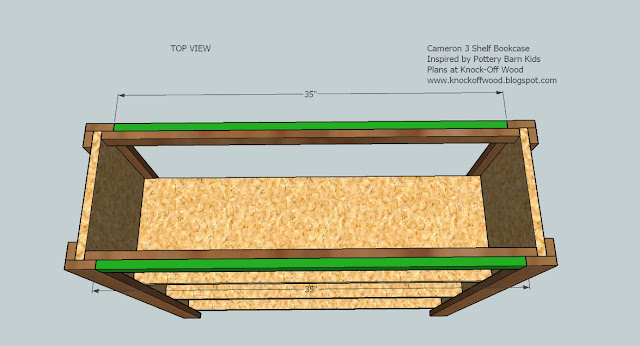
ShelfThis shelf, for instance, started from a schematic of a bookshelf that I found online.  It’s surprisingly hard to find overhead views of lots of the items I’m looking for in the game, so the schematic below was where I started:

Bookshelf schematic

From there, I used the eyedropper in Photoshop to pick up some of the brown color, then used the line tools to make the top solid, then got a little creative with making the 35″ measurement on the front of the middle shelf disappear.  Sure, my dungeon shelf has particle board, but that’s okay!

I also needed some suits of armor.  There are tons of great pictures of suits of armor online, but again, it’s hard to find one from overhead.  Fortunately, I was able to experiment with the tools in Photoshop to distort the image of a straight-on picture of armor so that it more or less looks like it’s coming from overhead.  I started with the picture on the left and ultimately turned it into the image on the right.  It’s not great, but it’s better than nothing (and it looks fine at its usual 64 by 64 pixel size).

Suit of armor - original Suit of armor - overhead

Finally, I created a few other miscellaneous minis that I’ve shown below without full write-ups.  These are things I’ve created from images I found online.  From left to right, my improved fire pit, a coffin, a tent, a blue slime (I love Dragon Warrior!), an ochre jelly and two kruthiks (yeah, I had no idea what I kruthik was, either).  Also, an awesome giant rat.

Fire pit Coffin Tent Blue Slime Ochre Jelly Kruthik - full body Kruthik - face close-up Giant rat

I’m pretty happy with myself, I have to say!  I hope we get to play this dungeon soon.  Lane, Zach and Barbara have said that they want to play sooner rather than later, even if we can’t get our full group of five players together.  We may run some more side quests – perhaps even some that I’ll try to build myself – or we may delve into the main keep and pick up other players for future adventures.  Frankly, I’m getting a little too excited about what I’ve created in the keep NOT to run it!  But we’ll see how things play out.  Barbara and I will be traveling next week, and we realized that there’s nothing keeping us from playing our online game while we’re on the road.  We’ll have the laptop, and that’s all we really need.  Plus, we’ll be in Boston, so we’ll be in the same time zone as our friends in Florida (as opposed to Mountain Time here in Colorado), so that might even be easier.  Our next session will likely be played from our hotel room!