Hotel room Dungeons and Dragons part 2

I’m hoping to get up two posts today, as I’ve had two different sessions of D&D in the last two days.  I’ll start with Wednesday evening, when Barbara and I in our hotel room in Boston got online with Lane and Zach from their home in Florida to continue our adventures in the Keep on the Shadowfell.  In our first session in the Keep this past Sunday, we had to improvise in a hurry as we learned that we wouldn’t be able to use Gametable due to networking issues in the hotel, and I switched things over to OpenRPG in a rush.  This time, I was prepared – I had already converted the maps over to OpenRPG and was ready to go (the OpenRPG map of the first level of the Keep is available here or on the downloads page – but my players shouldn’t go poking through it just yet!).  We called each other on Skype, connected to the appropriate room on an OpenRPG server, and we were gaming!

We started with some back story.  When we first began playing together, it was a big rush and no one had any ideas on back story for their characters, why they were adventuring together, etc.  I had thought about this over the past few days and filled in the party (since they were willing to hear my thoughts).  All of the characters are female, so I explained that they had all been approached when they were younger girls (the human equivalent of 10-12 years old) by a Deva named Juni Lamplighter (or one of her allies) to come to the Academy of Adventure.  Juni, being a Deva, remembered times when the world was not so dark and chaotic and wanted to bring some light and order to the world, so she decided to set up a place where individuals with talent, primarily girls who felt like outcasts, could train to become adventurers and work to do good in the world.  The PCs were all pupils at the Academy, and Juni had sent them to Winterhaven after they finished the main body of their training as a way to get started in making a difference.  Yes, it’s a bit Hogwarts-esque, but that’s not a problem.  The players seemed fine with this, and it provides both a reason for adventuring as well as some future plot hooks, so we’ll run with it.

At the end of the previous session, the party had just cleared out the goblin torture chamber and decided to rescue Splug, a goblin prisoner who had been put in a cell for cheating (or as he called it, “being good at playing cards against”) the other goblins.  He offered to serve as a porter for the party and tell them what he knows of the Keep if they would free him.  They let him out, and he told them about the excavation where goblins were digging for some unspecified treasure (but hadn’t found anything), the stairs that lead down to some caves, the main door and the secret door to the chamber of the goblin leader, and the door that led to the deeper part of the Keep, where Splug had never been.

Balgron the Fat

Balgron the Fat

The PCs decided to use the secret door to sneak into the sleeping quarters of the goblin boss, Balgron the Fat, to surprise him while he was asleep.  Zach’s rogue rolled great on her Stealth checks to get into the bedchamber, and they decided to try to tie up Balgron while he slept in order to interrogate him about the rest of the Keep.  This was awesome – the players were thinking outside the box!  They had rope in their packs, so I ruled that this would require a Dexterity check (figuring that Balgron would probably wake up while being tied).  Well, the dexterity roll was crazy high, so I ruled that they succeeded in tying up Balgron, but he woke up as they finished.  Balgron was confused for a moment, but as soon as they started asking him questions, he yelled for his guards and we rolled initiative.

There was only one other goblin in the room with Balgron, and I had that guy poke his head into the curtained area that surrounded Balgron’s bed, see the situation, and run for the door to get the other troops.  The door was locked, so it took him a little time, during which time the PCs attacked him to try to stop him.  Lane’s character had been hanging back, keeping an eye on Splug, but when the battle began and Lane’s character ran into the fray, Splug skedaddled.  The party wasn’t able to stop the goblin guard before he opened the door and raised the alarm.  A bunch of other guards came running down the hall, and the party decided to try to close and re-lock the door rather than just fighting (creative!).

I ruled that Balgron had another copy of the key on him, and since the rogue had decided to sneak attack the crap out of him while he was tied up (not very nice, but brutally effective), Balgron decided to cooperate to save his own hide.  He told the PCs where the key was, and they locked the door.  Naturally, the goblins began trying to bash it down, and wouldn’t you know it, one of the little minions got a critical hit in throwing himself at the door, so I ruled that it broke off its hinges and was now open again.

Balgron was willing to answer some questions now, and also willing to tell his guards to go away, which they did.  The party started asking him about the Keep, who hired him (Kalarel), what he was doing there, etc., and he answered more or less honestly.  Then the party opened up his treasure chest and he started bargaining for his life.  The chest had some gold, an enchanted short sword (which Zach’s rogue coveted) and some potions of healing (which the party had none of, and I figured they could use them).  Balgron was willing to give up the potions in exchange for his life.  The rogue held out for the sword, and Balgron grew enraged, burst out of his ropes and called the guards back in.

The ensuing battle was actually not all that interesting.  Balgron was already badly bloodied, and the fact that all of the goblins were coming down a narrow passageway made them easy fodder for Barbara’s swordmage’s enlarged dragon breath.  A few got into the bedroom and Balgron did his goblin shuffle once, but that was all she wrote. There was barely any damage to any of the PCs.  They rolled really well, and used smart, creative tactics.

Next up, the party knew about the excavation going on, but they weren’t interested in taking on those goblins – they wanted to go down into the caves.  They wanted the digging goblins to leave peacefully and debated whether to charge in and fight them, try to reason with them by telling them that their leader was dead and they were free, or something else.  They decided to leave Balgron’s severed head (yuck) where the goblins would be able to see it when they left the excavation chamber, and then head into the caves, figuring that the goblins would see the head as a sign to get out of there.

Well, I had the goblins roll Perception to see if they noticed the head while they were still working, and they did.  As the adventurers started heading down the stairs, the goblins quietly moved into position and started throwing Alchemist’s Fire.  The battle was on.

Guard Drake

Guard Drake

Two guard drakes charged up to the top of the stairs, and the PCs were basically hemmed in on a stairway.  They came perilously close to backing into the caves at the bottom of the stairs, at which point they very well may have been set upon by more enemies from the back, but they just barely stayed on the staircase and thus only had to face the goblin bombardiers and guard drakes.  This battle was tougher, and Barbara’s swordmage actually fell to zero hit points before being healed by Lane’s druid.  It was a close call, but once the drakes were dead, things turned in the party’s favor.  The last goblin bargained for his life, offering a dirt-covered object that he had dug up in exchange for being allowed to leave.  The party agreed (though not before the rogue observed that they could just kill the goblin and take the item), and the goblin was escorted out of the keep.  I’ve decided that he was named Steek.  The item turned out to be an enchanted totem with some healing powers, which is useful for Lane’s druid.

At this point, we called it a night.  I have to say that this adventure is beginning to feel like a success.  The players seem to be having a good time, and the technology is pretty much transparent (though I’m feeling like the OpenRPG dice roller tends to roll on the high side quite a lot; probably my imagination).  The players are definitely thinking creatively, and I feel like I’m doing pretty well at rolling with the creativity.  They’ve now gone through four encounters with no extended rest and only using one daily power.  I’m pretty sure I need to ramp up the challenge level a little bit (though we discovered that we had been playing Zach’s rogue a little bit wrong on Sunday, letting her get combat advantage too easily with the sling), but everyone seems to be having a good time, so I don’t want to go nuts.  Zach and Lane are going on a two-week vacation soon, so it might be a while before we get to play again, but our in-person game in Denver was just canceled for Sunday, so who knows?  Maybe we can play one more time then.  I’m up for it!

Improvisation is important

Barbara and I are now in Boston for a business trip of mine, so what do we do on our first day in town?  Play D&D online with our friends in Florida, of course!  Hey, we’re all on the same time zone now, so we might as well.

At 11:00 AM, we all met online to play.  I called Zach and Lane via Skype, which worked great.  My maps in Gametable were ready to go, so I loaded up a map and hit Host.  I checked my IP address and told it to Zach… and realized that we can’t use Gametable when the host doesn’t own the internet router that they’re connecting to.  As you may recall from my earlier article about connecting to your players via Gametable, I had to go into my router settings and forward internet traffic that came to my IP address to my computer in particular, rather than to Barbara’s computer or some other device on our network.  Since I didn’t own the hotel router that I was connecting to, I couldn’t go into its settings to forward internet traffic to my computer.  Zach and Lane could host on their computer, but that wouldn’t work since they’re not the DM.  I could send them the complete map with all of the monsters revealed and everything, but that’s a less fun experience for them.

So, I improvised.  Back in the earliest days of my blog, I thought we were going to be using OpenRPG rather than Gametable for running our online games.  Gametable is far easier to build maps in, but OpenRPG is easier on the networking side.  As long as everyone can connect to the same server, OpenRPG is good to go.  So, we could play via OpenRPG – but all of my maps were in Gametable.  What to do?

I started by asking Lane and Zach to give me 20 minutes to get everything set up.

  • I then opened up Gametable, set the view to show the first area of the Keep on the Shadowfell (the entry chamber guarded by goblins) and took a screenshot.
  • I pasted the screenshot into Photoshop Elements.
  • I trimmed the canvas so that the top left corner was on the top left corner of a grid square, and the same for the top right.
  • I resized the map image so that the grid squares were 64 pixels wide (that’s where they started, but I had to zoom out in order for enough of the map to show up on my screen shot).  In order to do this, I counted the number of squares across in the image, multiplied that number by 64, and resized the image (keeping the proportions constant) so that the width equaled the number of squares times 64 pixels.
  • I erased the areas of the map that weren’t part of this first encounter.
  • I saved this image file on my Dropbox public directory (more on Dropbox in a later post).
  • I opened OpenRPG.
  • I set the General property of the map so that the map was plenty large enough for my new image.
  • I set the background color of the map to gray (not necessary, but nice).
  • I set the grid size to 64 pixels and made the grid lines invisible (since my image file had the grid lines from Gametable).
  • I loaded my new map image as the background, using the public URL from the Dropbox directory.
  • I also copied all of my Gametable character and monster pogs to my Dropbox public directory so that I could load them into OpenRPG. (I suppose I could actually do the same with environmental pogs… hmm…)

Once I had this set up, I opened a new room on an OpenRPG server, called Lane and Zach back and told them how to connect to my room in OpenRPG.  I assigned them the role of Player, and they could then move their minis around the map.  Huzzah!

The map image I created is below.  It’s messy, because I had to manually erase the parts of the map that I didn’t want the players to see, but that’s okay.

Entry chamber

We played through the entry chamber and the torture chamber (which I created in the same manner and had to load as a separate background image when they went into that area), and I have to say that it all went pretty well.  I had to manually add each monster as they encountered them rather than revealing them from the private map as I would have done in Gametable, but that was easy enough to do.

It’s worth mentioning that the party ripped through the bad guys like a knife through butter!  Zach’s rogue successfully stealthed down the stairs and got a sneak attack with a sling on the first goblin warrior, then rolled the highest initiative and finished the warrior off with more sneak attack damage before he had a chance to warn his friends.  I had already removed the pit trap and the swarm of rats from the encounter in order to level it down for a party of three PCs, and I was planning to remove one of the goblin sharpshooters as well.  But since the party was handling everything so skillfully, I left the second sharpshooter in the battle, and the PCs had no trouble at all.  The torture chamber was a little more challenging, but it was awesome when Barbara’s swordmage shoved a goblin into the iron maiden and slammed it shut on him to start the battle.  I removed just one goblin from the battle, and that was all I did to level it down (well, I also forgot about the daily power of the hobgoblin’s magic armor, but oh well).  After the two battles, we had played for two and a half hours (including technical difficulty time) and decided to call it a day.  The party did decide to release Splug, cautiously, which should be interesting!  Best of all, they were still excited about the game and want to get together tomorrow evening to continue!  I’d call that a success.  They were within a few XP of leveling up, so I awarded them a few extra points for good roleplaying and general cool moves so that they could begin tomorrow with level 2 characters.

Since I’ve now had a little more time to prepare to run the game in OpenRPG, I’ve figured out the fog of war function and decided to use it for tomorrow’s battle.  I created an image of the entire first level of the Keep on the Shadowfell (even though there’s no way the party will get to all of it tomorrow), loaded it into OpenRPG, and used the fog function to hide everything that the players haven’t discovered yet.  This is a little imperfect, as Barbara can see my screen (we only have the one laptop here in the hotel room), but that’s okay – she’s good at playing based on what her character knows rather than what she as a player knows.  Tomorrow should be even smoother!

Private maps in Gametable

Today I’d like to focus on an important tool within Gametable – the ability to set up your map with some items hidden and then reveal them to your players as they explore and discover new things.  This isn’t very hard to do, but it’s important to do it right.

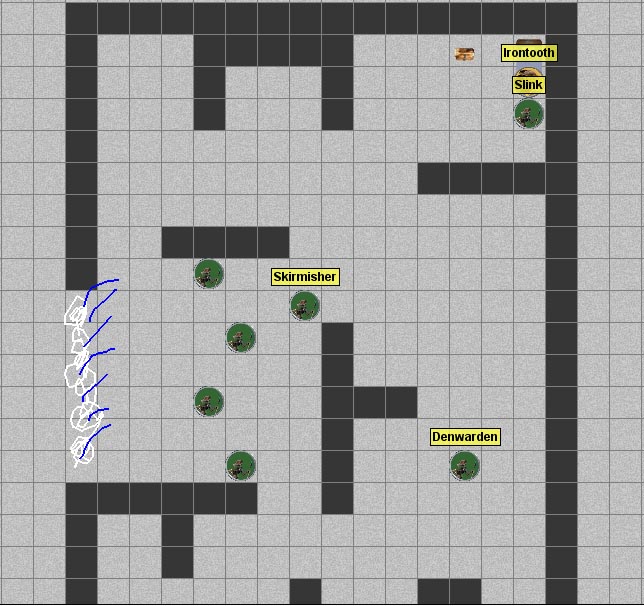
As my example today, I’ll use the Irontooth encounter map that my party went through last weekend.  Here is the completed, fully revealed encounter map (and the map file is at this link):

Kobold Lair Interior - Complete

This is a pretty straightforward battle map.  I started by setting the map background to gray.  I then created a few underlay images of dark gray walls to serve as the cavern walls.  You’ll note that these are actually square images, not rectangles.  If you make them rectangles, Gametable will want to center them within their squares, which is really not what you’re looking for.  When creating images that you want to appear off-center in the game (such as a 2 by 1 square wall that you want to show up in the bottom two squares of a four-square box, rather than across the middle of the four-square box), make the image a transparent square and then color in only part of the square, as I’ve done below.

ThickWall_1 ThickWall_2 ThickWall_3 ThickWall_4

After using these thick walls for the cavern layout, I brought in several copies of my homebrew kobold pogs along with the pre-packaged goblin pog (for Irontooth).  I labeled the kobolds who weren’t minions by left clicking on each and and choosing “Set Name.”  (I also do this in-game to denote a creature who is bloodied, prone, marked, etc.)  I brought in my homebrew minis for Irontooth’s bed and treasure chest.  I also drew the waterfall entrance on the left side of the map by hand (I’m not much of an artist, but I can spice things up with a little color).  This gave me a complete map – well, except for my PCs’ minis.

Now, when the party comes through the waterfall, I don’t want them to see the entire map all at once.  I certainly don’t want them to know where Irontooth and his treasure are, for instance.  I don’t even want them to know how big the cavern is at the start.  Here is what I want them to see when they first walk in:

Kobold Lair - Initial View

This just shows what the players could see when they first walk through the waterfall.  There are four kobold minions and a kobold skirmisher in front of them, and they can see the cavern walls that are immediately around them.  So, what happened to the rest of the cavern?  It’s on the private map.

Kobold Lair - Private Map

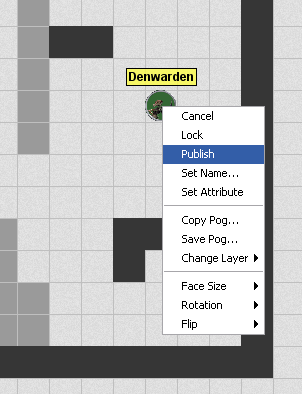
To get to the private map, either go to Map – Edit Private Map, or simply hit Ctrl+F.  You’ll note that the public map now appears in a shaded-out form, while the parts that are hidden from the players are in full color.  You can now edit this map as you would the main map (add or remove items, move them around, draw on the map, etc.).  To reveal something to the players, you simply need to publish it.  To publish an individual item, such as a monster or a treasure chest or a single section of wall, you can left click on the item you want to reveal and click Publish.

Publishing the Denwarden

Alternatively, you can use the mass publisher tool.  This tool can be found on the toolbar at the top of the screen (and can be turned on by pressing Ctrl+9):Publish Tool

The publish tool will let you drag a box around areas of the map that you want to publish, and they will all appear at once.  This is also the way to go when you are getting your map set up for your players – you can start with your complete, revealed map and then selectively use the publish tool to move some items to the private map.  So, when you’re on the private map the publish tools moves items to the public map, and when you’re on the public map it moves things to the private map.  It toggles their public/private status.

There’s one other important point to understand about the public and private maps – they are separate map files in Gametable.  I learned this lesson the hard way, before I really understood the private map.  In my earlier post about my map of the first section of the Keep on the Shadowfell, I showed an image of the complete keep (so far):

Keep on the Shadowfell Map 1

I was so proud of myself for setting up this detailed map.  I then moved most of it to the private map (so that it would be ready to go for my players) and saved the map file.  I then cleared off the map and started drawing my map for the outdoor kobold ambush.  When working on that map, I started moving things to the private map and realized that all of the private items from the map of the keep were there, which I obviously didn’t want outdoors, so I cleared it all off the private map.

Imagine my chagrin when I later opened what I thought was the complete map of the keep that I had drawn, only to discover that it only contained the small section that I wanted to be revealed to the players when they first entered:

Keep on the Shadowfell - Revealed

Crap!  The private map was completely empty.  It turns out that I had to save it as a totally separate file and then load that file when I had toggled my view to the private map view.  So, here is how I set up map files now:

  • Start by saving a new map file as “NameOfMap_Complete.grm”
  • Go to Map – Clear Map
  • Build the new map, with everything revealed
  • Save the map
  • Go to the private map (Ctrl+F)
  • Save this map as “NameOfMap_Private.grm”
  • If there’s some private stuff on here from a previous map, go to Map – Clear Map
  • Toggle back to the public map and start unpublishing whatever you want to hide using either the Publish tool or by left clicking on each item and choosing Unpublish (for finer control)
  • Toggle back to the private map, and you’ll see your unpublished items
  • Once you have everything set the way you want it, save the private map as “NameOfMap_Private.grm” (you’ve already set it up under this name) and save the public map as “NameOfMap_Public.grm”
  • When you’re ready to use this map, you’ll need to toggle to the public map view and load “NameOfMap_Public.grm,” then toggle to the private map view and load “NameOfMap_Private.grm”

So, remember that you’re actually editing two different maps, one public and one private, and you’ll be all right.  Once you understand how this tool works, it’s fantastically useful.  I love being able to set up my entire map in advance and then reveal little bits at a time.  If you set up a whole dungeon level this way, you can simply save the public map and private map as they exist at the end of your session (with the player characters saved wherever they happen to be standing and everything) and pick up right where you left off at the last session.  This is one area where the online game has some advantages over the in-person game!

Also, I’ve saved the public, private and complete versions of my maps on the Downloads page, so you can see this in action with maps that are ready to use.  I’d love to hear any comments you have regarding ways to improve this process, experiences you’ve had with this type of map online or in real life, etc.

Troll druids are nasty

We had our in-person D&D game yesterday, where my wife Barbara and I went to our friends Nate and Bree’s house to play D&D with the two of them and with our friend Kyle.  Kyle couldn’t make it, so I ended up running his character for him.  This was an interesting experience.  My character is an eladrin wizard, and Kyle’s is a tiefling bard.  Making matters a little more interesting, we only had Kyle’s original level 1 character sheet, and we’re now at level 3.  I leveled the character up based on my best recollection of the choices Kyle had made (though I’ll admit that I did change the level 2 feat to suit my own preferences) and ran with it.

Our characters started off in a rebel camp in a forest outside of a huge city.  Our party had decided to help the resistance against the overlords of the city, and we were getting ready to head off to a tunnel that the rebels were building to get in and out of the city to rid it of a cave troll.  Before we could leave the camp, however, we were invaded by two trolls and three ogres.  These guys were coming after us because of some run-ins we had with the authorities in the city before we got out to the rebel camp.  We later figured out (thanks to some fantastic intuition on Barbara’s part) that they were able to find us by tracking an enchantment on an item that we had stolen from them (oops, our bad).

The battle in the camp was pretty interesting.  The lead troll was clearly the guy we needed to focus on.  He started off by grabbing my bard (well, Kyle’s bard) by the head in the first round and hanging onto him throughout the whole battle.  The bard had a tough time escaping a grab, but he fought pretty well for a guy with his head being squeezed by a troll!  The rest of the party battled well and was ultimately helped by some of the other rebels joining the fray to finish off the bad guys.  We took down the lead troll and the three ogres, but the second troll – a druid of some sort – escaped into the woods.  Despite the fact that we had spent our daily powers and were not in the best shape in terms of hit points, we decided that letting him get away to warn other giantfolk would be a bad idea.  So, we chased him into the woods.

The chase was handled as a skill challenge, which we just barely succeeded on, and we found the troll druid in the woods.  Here’s where things got ugly.  This particular guy was a Troll Vinespeaker (from Monster Manual 2), which is normally a Level 14 creature but which Nate had scaled down to Level 6.  I think this means that he lowered the hit points, attack bonuses, defenses and damage output, but he didn’t fundamentally change any of the powers.  I think this was a mistake.  During the battle in the camp, the Vinespeaker had buffed his allies with some temporary hit points (fair enough), backed out of melee to shoot vine attacks at individual PCs (no problem) and then, just before he ran away, shot an area attack at a few of us.  The area attack created a nine-square area of vines that:

  • attacked each PC in the area when it was created
  • dealt 1d10+2 damage to each PC that was hit
  • IMMOBILIZED each PC that was hit (save ends)
  • dealt 1d8 damage to each PC that began its turn in the area or entered the area
  • served as difficult terrain (you move through it at half speed)
  • and the area persisted until the end of the encounter

Okay, a few things here.  First, I know that Nate scaled down the bonus to hit with this attack (at level 14, it was +18 versus Reflex, and I know that this troll’s bonus to hit was way lower).  So that’s good.  Second, I don’t believe he altered the damage dealt by the beginning of turn / enter the zone attack.  That’s not so good.  Even with all of that, though, we only saw this druid use the ability once in the camp, so we assumed it was an encounter power – once per battle.

Nope – it was at-will.

Think about that for a minute.  Every single turn, this troll (who started the battle in the woods about 10 squares away from us, with the PCs clustered together) can create an area of thorns around several PCs that, if it hits (which it usually did), deals a bunch of damage right there, then immobilizes the character until the end of their next turn at best (if they make their first saving throw), then deals additional damage at the beginning of the character’s next turn – and the one after that if they miss their save, and then the one after that if they miss that save…  It was ugly, ugly, ugly.

The troll quickly created four of these zones that pinned down most of the party.  The other party members were trying to pull the immobilized creatures out, but it wasn’t happening.  My wizard and my bard both went unconscious, still sitting in thorns (so taking 1d8 every turn until the end of the encounter).  Bree’s warden pulled the wizard out, but getting the bard out looked hopeless.  Barbara’s ranger then had the bright idea to try to scare off the troll by shooting some fire arrows at it.  The arrows missed, but the troll was scared of the fire and ran.  Now that he wasn’t generating new zones, the warden and ranger were able to pull the bard out, barely.  The unconscious characters were carried back to the rebel camp and healed, and we took an extended rest and chased after the troll druid the next morning, where we found him and finished him off (though Kyle’s bard almost died again to some stupid little plant creatures – sorry Kyle!).

The battles were intense and draining.  I’m glad we prevailed, and almost everything was great – except, in my humble opinion, the way the Troll Vinespeaker was converted from level 14 to level 6.  The Dungeon Master’s Guide (DMG) has some advice on changing the level of a monster.  It says that, to lower the monster’s level you should decrease its attack rolls and defenses by 1 per level and decrease the damage it deals with its attacks by 1 per every two levels.  You also adjust its hit points according to its role.  However, it also says that this process really only works for changing a monster’s level by 5 or less, and that beyond that you should pick a different monster to work from.

In this case, the Vinespeaker needed to be bumped down by 8 levels.  This means that its attack roll and defenses should all be lowered by 8, and its hit points should be lowered by 64 – and I think Nate did this exactly.  Its damage should be reduced by 4 – and I think Nate did this, but only for attacks that dealt dice damage plus static damage.  So, the damage from being hit by the thorny area attack was originally 1d10+6, and I think Nate lowered it to 1d10+2, which is reasonable.  He did not, however, change the damage dealt by the thorn area each turn or whenever a character entered the zone.  It was 1d8, the same as it would have been at 14th level.  This should have been no more than 1d4 (reducing the maximum damage by 4), although that’s only reducing the average damage by 2 rather than 4 (1d8 averages 4.5, whereas 1d4 averages 2.5).  I guess it really should have been reduced to a fictional die that rolls either a 0 or a 1 (average of 0.5).  So, that’s a big problem – we took a lot of damage from those thorns!

Furthermore, I think the point in the DMG about just abandoning this idea for monsters that are more than 5 levels away from what you’re seeking is important here.  A monster 8 levels above another monster is going to have mightier powers – not just in terms of the attack bonus or damage dealt, but also in terms of special abilities.  In this case, there’s no way a 6th level monster should have an at-will ability that creates a zone that deals damage and immobilizes when it hits, deals damage each turn that you stand in it or whenever you enter it, serves as difficult terrain and lasts until the end of the encounter.  If that were an encounter power, that would be fine.  Maybe even a power that recharges on a 6.  Alternatively, it could be an at will that creates a zone that persists for one turn.  But all of that together is just too much for a 6th level monster.

Let me be clear on something – I like Nate a lot.  I think he’s actually a fantastic DM.  And I think that the troll druid was a way cool enemy.  But I don’t think the troll druid ended up being what Nate intended him to be – a tough supporting character in an encounter led by a bigger, nastier troll and backed by some smaller ogres.  He ended up being nearly a solo monster.  If we had fought him one on one after an extended rest, with our daily powers charged, it would have been a fair fight (thanks in part to the wizard having access to Flaming Sphere).  So, that’s a lesson for us as players – charging after a bad guy when you’re exhausted from a tough battle may be a bad idea.  But if that thorny area attack had been an encounter power (as we thought) rather than at will, I think we would have handled him pretty easily, even when exhausted.  I think Nate chose to have the troll flee from the ranger’s fire arrows out of pity, honestly.  By that point in the battle we had given up on attacking the troll and were just trying to flee, but we couldn’t get our fallen comrades out of the thorns without the troll just creating more.  The troll couldn’t really have been that afraid of a couple of fire arrows (especially when they both missed him).

What have I learned?

  • As a player, I’ve learned not to make assumptions about what is an at-will power and what’s an encounter power!
  • I’ve also learned that chasing a fleeing baddie when you’re exhausted can be a bad idea – although, as I said, had the thorn zone been an encounter power I think we would have been fine mopping up a lone troll druid.  I think you should pursue the weakling before he can alert his big friends.  This guy, as it turned out, was no weakling.
  • As a DM, I’ve learned that you have to be very careful when adjusting monster levels.  I think that I’ll start by sticking to the DMG’s advice when I do this sort of thing, and not try to re-level a monster by more than 5 levels (and probably not even that much).
  • Rewarding players for being clever is extremely important and satisfying for everyone.  The fire arrows were smart, as was the discovery that the stolen item let the authorities track the party, and we were rewarded for both of those and felt good about it.
  • You have to be open to the possibility that you’ve made a mistake.  As a player, I realized that I made a huge mistake in assuming that the thorny area power was at will.  When I did, I changed my thinking to, “Let’s get out of here!” but it was too late.  As a DM, I think I should be open to the possibility that one of my ideas isn’t working, as with the power level of the troll druid in this case.  When that happens, I think I would want to fix it on the fly rather than let the consequences play out as written.  This is absolutely a situation I could see myself getting into as a DM, and I think I’ve learned something important about how to handle it.

I’ve heard it said that people learn more from failures than successes, and I think that’s true here, too.  Our party’s decision to go after this monster was a mistake, and I think I’ve learned from it.  The power level of the troll was a mistake, too, and I’ve learned from that as well.  The good news is that despite everything, our party pulled through and had a good time doing it.

One other note: It looks like schedule conflicts and upcoming travel plans are going to make it so that I won’t be able to play my online D&D game with my friends until late June (it’s mid May as I write this).  That’s disappointing, but it’s not the end of the world.  We may get the small group together (four of us) once or twice for a quick-hit adventure, but we’ll probably just put things on hold.  Hey, that give me more time to get some challenges ready for everyone!  I can live with that.

Second gaming session – the Irontooth battle

As we planned on Friday, I got together Saturday afternoon online with Barbara, Lane and Zach to finish up the side quest of ridding Winterhaven of the kobold menace.  There was only one encounter to run: the infamous Irontooth battle.  From reading about the Keep on the Shadowfell adventure online, I knew that other DMs said that the Irontooth battle could be a total party kill (TPK), especially if the players were unlucky or if they were still new to the game and not understanding what they could do.  The battle is set up as a sixth-level encounter for a party of first-level players.  Encounters that are a level or two above the players are totally reasonable but challenging, and three or four levels above them should be highly threatening.  Five levels above?  Now you’re just trying to kill your friends, and that’s not fun.

So, in addition to scaling the battle down to work for three players, I wanted to scale it down a little farther still in order to be more like a fifth level encounter.  This is a good time to talk about scaling encounters for smaller parties.

Wizards of the Coast tries to help out DMs when it comes to scaling battles up or down for party size or character level (on pages 56-57 of the DMG1).  Every monster has an experience point value, and an encounter of a given level for a given party is made up of monsters whose XP total equals the XP for a monster of that level times the number of PCs in the party.  If you want a first-level encounter for three players, you see that a first-level monster has XP of 100, so you want monsters that total 300 XP (100 XP times three players).  If it were a third-level battle for a party of six characters, you’d see that a third-level monster has XP of 150, so you want 900 total XP in the encounter (150 XP times six players), and so on.  That could be made up of a whole bunch of tiny little minions or just a couple of higher-level baddies.

The Irontooth battle as written is worth 1,250 XP – a sixth-level encounter for a party of five players.  I wanted it to be more like a fifth-level encounter for a party of three players, which meant I was aiming for more like 600 XP.  That meant I had a lot of slashing to do.

  • The encounter calls for 10 Kobold Minions at 25 XP each.  I cut this down to 4 minions (100 XP)
  • 3 Kobold Skirmishers at 100 XP each became just one (100 XP)
  • 2 Kobold Denwardens at 125 XP each became one (125 XP)
  • 1 Kobold Wyrmpriest at 150 XP was eliminated, which I hated to do but I had to do something (0 XP)
  • Irontooth himself is built to be worth 300 XP.  I cut his hit points from 106 down to 80 and removed his hit point regeneration ability (getting back 5 HP per turn once he’s bloodied seems too strong), but left his damage and other abilities alone.  I figured this made him worth about 250 XP (250 XP).
  • In addition, a Kobold Slink escaped the previous battle to go into the cave to warn the other kobolds, so he was going to show up here.  However, he was beaten up from the earlier battle and doesn’t have any healing surges, so I started him at his bloodied hit point value and shaved his XP from 100 to 75 (75 XP).

All together, this adds up to 650 XP, which is slightly above a fifth-level encounter for this party.  Hoo boy!  This could be tough.  The map is below (and the Gametable .grm file is at this link, as well as on the Downloads page with my other maps).

Irontooth Battle

The Irontooth battle, scaled for three players

Fortunately, the party’s tactics were sound.  The battle is set up in two waves, with a second group of enemies (including Irontooth) coming into the fray three rounds after the first wave.  The party finished off the first wave (four minions and a skirmisher) during round three, just in time for the second wave (Irontooth, the denwarden and the bloodied slink) to show up.  Had they still had parts of the first wave running around while they were trying to deal with the second, it could have gotten ugly.  As it stood, they did a good job of saving their daily powers and action points for the second wave, where things got challenging.  The Healing Word power that I had given to Lane’s druid, Kana, was used up early on, and everyone’s second winds were used, too, but they ultimately finished off Irontooth with single-digit hit point totals remaining.

My favorite part of this day’s session was the excitement when the treasure chest came into view.  Zach’s character seriously considered ignoring her allies in battle (all three characters are female, even though Zach is male) so that she could sneak over to the chest and try to pop it open during battle.  Cooler heads prevailed, and she decided to keep fighting and pick the lock on the chest later (no one thought to try using the key from Irontooth’s pouch, but the lockpicking went off without a hitch).

We’re going to try to get together on Friday nights, starting this coming week, with the whole group of five adventurers.  This time, they’re ready to take on Shadowfell Keep itself.

First actual online gaming session – it rocks!

We have a success!  Tonight my friends and I tried playing D&D online together for the first time, and it worked.  Not only did it work, but we had so much fun that everyone wants to get together again tomorrow to finish the adventure.  Huzzah!

The day started off with bad news for gaming.  The group is supposed to be six of us.  I (Michael) am the DM and my wife Barbara is playing our defender, a dragonborn swordmage.  We’re in Colorado, a bit south of Denver.  Lane and Zach, who live in Tallahassee, Florida, are a deva druid and an eladrin rogue, respectively – a controller and a striker.  Jen and Eric, who live in Bradenton, Florida, are a gnome wizard and a half-elf cleric – another controller and a leader.  However, a few hours before we were supposed to start, Jen called to say that Eric had to work late and they weren’t going to be able to play tonight.  Should we cancel?  Should we just do a technology check?

Screw that – we’re playing!  This was actually Barbara’s suggestion, which made me very happy.  Also, since we were planning on waiting until 9:00 PM Eastern time to get started in order to give Eric time to get home from work, with Eric not playing we were able to start closer to 8:30 Eastern.

In preparing for today’s session, I had to get myself a webcam so I could talk to everyone on Skype.  Well, I could have just gotten a microphone, but the webcam only cost $30 and it works just fine as a microphone, so that’s what I got.  I also had to get my maps ready.  You may recall my last post, where I put up the detailed map of the first few areas of the Keep on the Shadowfell itself, all finished and ready to go.  Well, since we were going to start with a smaller group, I decided that we should try a side quest first.  When we first played in person in Florida the night of Jen and Eric’s wedding, the group charged right through the first kobold ambush and a quick stop in Winterhaven before making a beeline for the keep, which is where we stopped, halfway through the first battle.  I missed the fact that I was supposed to send a second kobold ambush at them when they left town, and I didn’t roleplay anyone in the tavern to give them a chance to explore (I was a bit rushed as far as prep time went – that is, I had none!).  So this time, I rolled back the clock and gave them the second kobold ambush, then sent them back to town.  In town, I railroaded them a bit into a side quest to seek out the source of the kobolds.

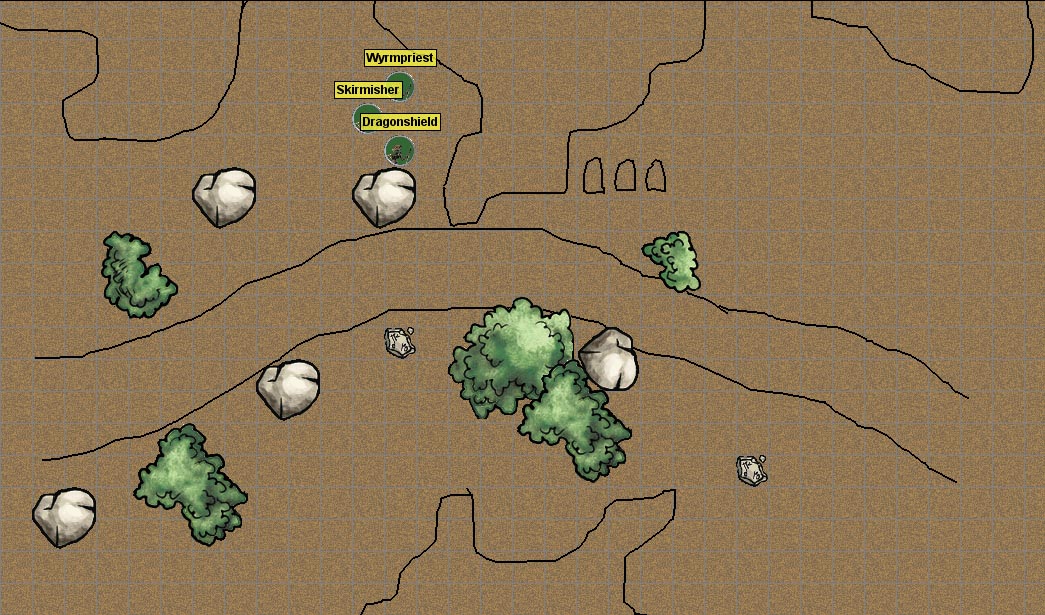
First thing first: the kobold ambush.  Here is the map I used, with enemies displayed.

Kobold Ambush

Gametable map for a kobold ambush encounter

Okay, so this one isn’t as fancy or detailed as the Keep on the Shadowfell map I shared yesterday.  This is partly because I wasn’t using the nice, pre-created dungeon walls that come with Gametable this time and partly because I was in a hurry.  I drew this last night (after realizing that the party might want to try a side quest), but I didn’t have much time to do it.  Fortunately, it wasn’t hard.  I took the same kobold image that I used for my OpenRPG mini in an earlier post, added a green background, and used TokenTool to make a pog.  I’m still torn on the “little statue” mini versus “round pog” mini debate, but I have to admit that the round pogs look pretty good and are easy to distinguish from one another at a glance, especially if I give them different background colors.  These guys are all kobolds, so I used the same minis, but I set their names differently to distinguish them.

Combat was surprisingly interesting.  The party didn’t have much success with their Perception checks, so the kobolds got a surprise round on most of them.  Two out of the three PCs were bloodied, one getting down as low as 4 HP, but they prevailed.  My favorite moment of the night was when Lane’s character wanted to claim the holy symbol from around the Kobold Wyrmpriest’s neck.  She was into it!

After heading back to town (on rails), the party found their way to Lord Padraig to get hired to clear out the kobold home base.  Barbara’s character was savvy enough to do some negotiating, getting a little extra gold for their fee (if they succeed, of course).  They decided to sleep in the inn for the night and then headed toward the kobold lair (Paddy drew them a map).  This brought them to the next encounter:

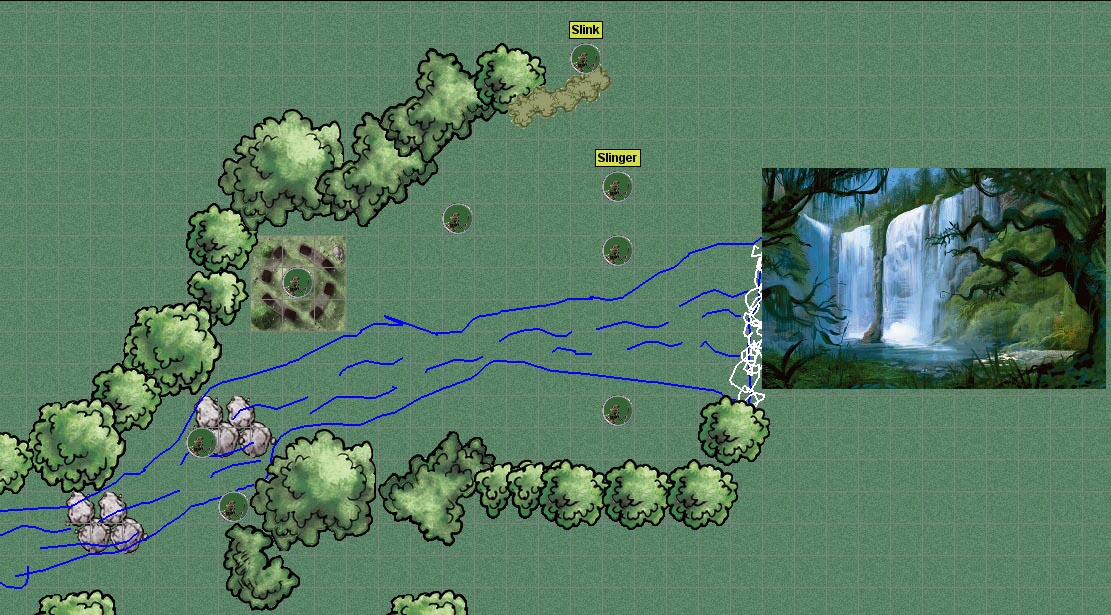
Kobold Lair Exterior

The exterior of the kobold lair in the waterfall valley

This is, obviously, another map that I drew in a hurry last night.  I used pre-packaged trees and rocks, drew a stream and some foam at the bottom of the waterfall, and pasted in the image of the waterfall valley from the Keep on the Shadowfell PDF, just so the players could see what it looked like.  I also used a circle of stones from Dungeon Tiles (available for Masterplan via the Dungeon Tiles Yahoo group).  Quick and easy, and it worked just fine.  This time, the party tried to be stealthy and had some good success with it.  Kana, the fragile druid, managed to get herself surrounded by minions (the kobolds with no labels) but wisely used some area of effect spells to get out of trouble.  The slink got low on hit points and managed to escape into the waterfall to warn his buddies.

After this encounter, even though it was 11:30 PM Eastern time, Zach and Lane were really tempted to keep playing.  I suggested pausing until tomorrow, since we all have some free time tomorrow.  This would also give me time to put the next map together!  Very important.  So, we’re getting together online again tomorrow afternoon.

A good time was had by all tonight, and I’m excited!  I’d like to share a few things that I learned this evening.

First, a little prep time goes a long way with Gametable.  It doesn’t take too long to put together a totally serviceable map that’s way fun for play.  I wouldn’t have a problem with drawing on the fly if I had to.

Second, scaling encounters meant for five players down to three players isn’t that hard.  I simply brought the total XP of the baddies down by 40%, eliminating enemies as needed.  It worked like a charm – a good challenge, but one that the party can handle.  We’ll see how that goes with the big boss battle tomorrow – one that I’ve heard should be adjusted even with five players (it’s a level 6 encounter for level 1 characters – I plan to tone it down).

Third, if you’re missing an important role in your party (in our case, a leader to heal characters), you can get creative.  We gave our druid the cleric’s Healing Word power and changed her Wild Shape power to a free action.  Having Healing Word mattered a LOT, and I’m glad we did it.  If we continue much longer with a three-character party, we’ll have to establish a more permanent way of getting a healing feature, but this patch worked great for tonight.

Fourth, I’ve learned how to use the private map effectively – but that’s for another post.

Fifth, keeping track of initiative and hit points in an Excel spreadsheet is awesome.  I love it.  If I were DMing a game in real life, I would still want to use it.  Again, that’s a post for another day.

Sixth, the dice rolling macros in Gametable are fantastic.  That’s another topic for a post of its own.  But I’ve decided that I want to set up macros for each day’s encounters in advance – every bad guy’s attack and damage rolls – and it will make combat super-easy.

I’ll also start a Downloads page on this blog for posting my Gametable map files, dice macros, images, etc.  If there’s something you’ve seen me mention on the blog that you don’t see on that page, please let me know.  I want that page to be a good source for other DMs who want to run adventures in Gametable.  I’m loving it!

First map in Gametable – game on!

I haven’t posted in a couple of days, but that doesn’t mean I haven’t been working on my online D&D game!  Our group is tentatively scheduled to meet online tomorrow (as I post this) for the first time.  We plan to try connecting to one another with Gametable and Skype and maybe, if the technology works out okay, try to get some gaming in.

I don’t have much of an audience for this blog (yet), but I could see my players checking it out from time to time.  This is interesting because I really want to share the work I’ve done so far, but I don’t want to spoil any surprises for the players.  Since it’s unlikely that my friends will be checking this before we play – and because I’m just anxious to share what I’ve learned – some lessons are below.

First of all, I should point out that I’m using a published D&D adventure (The Keep on the Shadowfell) for this first game.  I’m an inexperienced Dungeon Master, and my more knowledgeable brethren have told me to stick with pre-published adventures, at least at first.  This means that I can build maps in advance using Gametable.  I’ll jump to the punch line and show you the finished product (at least, finished so far):

Keep on Shadowfell Map 1

My first detailed map in Gametable, ready for adventure!

So, what’s all this?  It’s the first five areas of the Keep on the Shadowfell, fully revealed.  I used a few pre-packaged items and a whole bunch of items that I’ve created myself, so let me share with you a little bit about what I’ve done.

The basic building block of the dungeon is the dungeon wall.  Gametable comes with four walls – short (2 square) and long (4 square) horizontal and vertical walls.  These are easy to use for the basic dungeon layout.  It also comes with a bunch of pogs – that is, minis to use for characters and monsters.  I’ve used their Goblin mini (quite liberally) and one of their character minis (for one of my player characters).

Long vertical wall Long horizontal wall Short vertical wall Short horizontal wall

Above are the four dungeon wall graphics that come with Gametable; below are the monster and player pogs I’m using that came with the program:

Goblin pog

Goblin

Skeleton pog

Skeleton

Skeleton Lord pog

Skeleton Lord

Female character

Female character

Male character

Male character

Now, if you look at my map graphic, you’ll notice a whole lot of other things on there.  Everything aside from the stuff I just listed is something I made – usually using images I found online, but occasionally using my own skills of an artist.  My wife Barbara is the one who usually uses Photoshop Elements, but for this project I’ve had to get at least a little bit familiar with the program.  (By the way, if you own any of the images I’ve used and would like me to take them down, just let me know).

If you’re going to make graphics using Photoshop Elements for something like Gametable, you’re probably going to want them on a transparent background.  That way, if your new item (such as a treasure chest, a table, a stairway, etc.) doesn’t take up every pixel of its square, the pixels around it will match the dungeon background or the other elements you’ve put it on top of.  That’s a good thing.  The best way I’ve found to get a transparent background is to start with a new file, specifying that you want it to be transparent.

New Photoshop File

Note that the Transparent box at the bottom is checked

This will give you a file with a gray and white checkerboard background – that’s Photoshop’s indication that the background is transparent.  I don’t know of a way to do this in regular old MS Paint, so I’ve migrated to Photoshop Elements.

To turn an image online into a useful Gametable element, start by copying the image into Photoshop Elements.  You can do this by simply clicking on the image, dragging it down to Photoshop in your taskbar, waiting for the Photoshop window to open, and then releasing the image inside of Photoshop.  For instance, I need to get an image of a zombie (a monster my players will be encountering soon), so I’ll begin by searching for promising images using Google.  Here’s one that I like, from a blog called Great White Snark (this is actually a picture of a cake!):

Zombie large

I copied this to my clipboard, then went into Photoshop Elements and selected File – New – Image from clipboard.  Now I have the image open in Photoshop exactly as you see it above.  I don’t want the whole thing for my zombie mini – specifically, I don’t want the white walls in the background, nor do I want to see the edge of the table that the cake is sitting on.  So, I use the Magnetic Lasso tool to highlight just the parts of the image that I want (yes, this can be very painstaking) and then go to Edit – Copy.  Now that just the zombie itself is on my clipboard, I create a new blank file with a transparent background as described above and paste my zombie image into that.

Zombie2

Finally, I need to get my zombie image to the size that I want.  I described in an earlier post a program called TokenTool that helps you generate pogs like those that come with Gametable – round, with some kind of border encircling them.  Those are fine, but I’ve discovered that I actually prefer my minis to be like little statues with transparent backgrounds rather than filled-in circles.  This way, if they ever end up on top of each other, you can still see some of the mini that’s hidden behind the other.  Also, I try to make them square so that I can anticipate how they’ll look.  Finally, I’m starting to feel like I want my minis to be a little bit smaller than the full size of the square, just so that they don’t overlap with the edge of a wall or anything like that.

I’ll start by making the image a square.  To do that, I want to pad the canvas size in the horizontal direction so that it matches the vertical direction.  I go to Image – Resize – Canvas Size, and I see that my image is currently 333 pixels by 489 pixels.  I want some extra space around the mini, so I’ll resize to 525 pixels by 525 pixels (the canvas, remember, not the image), and I’m left with this:

Zombie3

Now all that’s left to do is to shrink this down to the size of a mini for Gametable – 64 by 64 pixels (if it were a large creature, it would be 128 by 128 pixels, and so on for bigger sizes).  I go to Image – Resize – Image Size (as opposed to my earlier Canvas Size) and choose 64 by 64 pixels.  With that, I have my finished zombie mini (note that Gametable uses PNG files for its images, not JPGs):

Zombie Mini

To make the other items you see on the map, I used pretty much the same procedure.  This includes crates, chests, three different tables, plank bridges and a torture rack, all of which are below:

Crate mini

Crate

Chest mini

Chest

Small table

Small table

Tall table

Tall table

Long table

Long table

Plank bridge

Plank bridge

Torture Rack

Torture Rack

There were a few items that I drew myself in Photoshop.  The biggest pain in the butt was actually the stairs, because I wanted them to be open rectangles that showed the dungeon background through them, rather than filled-in rectangles (which Photoshop draws by default).  In Paint this is an easy change to make, but in Photoshop it’s a huge pain.  I ended up using this article from About.com in order to make the stairs work, but boy, what a hassle!  They did turn out looking great, but SO MANY LAYERS!  I used a more freehand approach to draw the curtain, which I end up changing within Gametable so that it has a face size of 2 squares (with just 1 square, it sits in the middle of the square – I wanted it to go across the border of the squares).  The pillar was easy (just a gray circle), and the prison bars were also simple (a few gray squares copied over a few times – also changed within Gametable to have a 2 square face size).  The bed was a little bit trickier – I used the wood from the plank bridge as the headboard and then some rounded rectangles for the bed itself and the pillow.  The bedspread needed texture – a flat color looked awful – so I picked one from within Photoshop.  I freely admit that my fire pit looks like a pizza – I guess I should have searched for a good image of that online, but oh well!  And the iron maiden’s fancy artwork is all me, baby.  Yes, I am a crappy artist, but it kind of looks like an overhead view of an iron maiden, doesn’t it?  Kind of?  A little?

Stairs

Stairs

Curtain

Curtain

Pillar

Pillar

Prison bars

Prison bars

Bed

Bed

Fire pit

Fire pit

Iron Maiden

Iron Maiden

I also created a couple of custom monster and character minis – I’ll probably need to make a few more characters before tomorrow night’s session, for the rest of my players.

With that, I’ll call it a day.  I’ve discovered several more features of Gametable, such as how to hide areas and monsters from your players until the players encounter them, but I’ll save those lessons for another day.  If you’re running your own games in Gametable or similar software and you’d like to use any of the graphics I’ve created, please feel free – I hope I can save you some trouble!

Lessons from my real-life DM

Even though I’m a D&D 4e blogger, I’m still relatively new to the game.  I’ve been playing since early 2010 in a game with my wife Barbara and our friends Nate, Bree and Kyle.  Nate is our DM, and based on my admittedly limited experience, I think he’s really good at it.  I plan to think about the things that Nate does that make our games so much fun, and try to take those lessons to heart in my own DMing.

First of all, I think Nate has taken a lesson from the fourth edition Dungeon Master’s Guide to heart – the goal of the Dungeon Master (in person or online) is to help everyone playing the game to have fun.  I’ve heard that earlier editions of D&D pitted the DM against the players in a contest to see who would “win,” where “winning” as the DM basically meant killing off the party.  In fourth edition, the focus is on fun.  If certain aspects of the game aren’t fun for your particular group of players, then try to avoid those aspects if at all possible.  Wiping them all out probably won’t be much fun for the party, for instance, so try to avoid that!

We’ve played for about five sessions now (just leveled up to level 3 – woo hoo!), and I can tell that Nate is trying hard to observe what we like and dislike when we play.  It helps that our group gels really well – we like each other outside of our D&D time, too, which is a big plus.  So even if something weren’t going well at the table, we would still have fun spending time together. Still, things have been going quite well at the table.

At the end of the session, Nate asked specifically if we felt like we had the right amount of combat in the session.  We played for about five hours, during which time we had some discussions of how we would disguise ourselves to get out of the city we were in, a tense encounter at the city gate to see if we could escape, a pair of back-to-back combat encounters in a forest, and some open-ended role-playing time in a small rebel camp. So, combat in the middle with non-combat at the beginning and end.

It was great!  Nate was careful to let us run with our suggestions, but still helping us look for flaws in our plans (such as the fact that some of our characters were on “Wanted” posters in the city we were escaping and would therefore probably want some disguises in order to get past the authorities at the city gate without a fight).  The fights were tough but fair (boy, spiders that can jump on you from 30 feet away are vicious!).  And the roleplaying at the end had some conversations with NPCs that led into our two magic users spending time helping a wizard examine a magical sword to figure out its properties while the other two characters had an entertaining (non-combat) time hunting in the woods.  There was something for everyone, both inside and outside of combat.  We even had an NPC of a much higher level fighting with us, but she didn’t completely take over combat or anything like that.

So, what lessons have I learned so far?

  • Watch your players to see what they like and don’t like.  This will probably be more challenging online, since I won’t be able to see their faces, but we should have audio chat.  I’ll have to listen carefully and ask questions.
  • Make sure everyone has something they can do, whether in combat or out.
  • Go with the players’ ideas for how to solve problems, but provide coaching as needed, especially for new players.
  • Don’t feel obligated to hand out loot if it doesn’t make sense to do so.  If your characters kill some wild animals (like those darn spiders) in the wilderness, they probably won’t have any treasure on them, and that’s okay.  It’s fine to give extra loot at some points and none at others – it all balances out.
  • Reward characters for creative thinking – even if the reward is just the chance to play out a crazy scenario, with no XP or gold.

I think I can use these lessons in my own games as I start DMing.  On that point, by the way, we have set up this coming Friday as our targeted first session for our online game.  We’ll be using Gametable for the map and dice rolling and Skype for audio chat.  For this first time, we plan to mainly try a technology check to make sure we can all hear each other and see the map, but I’m hoping we have time for at least a little bit of adventure!

My (very brief) history of Dungeon Mastering

My name is Michael, and I am a beginning Dungeon Master (DM) for Dungeons and Dragons, fourth edition (D&D 4e).  This blog will serve three purposes:

  • Chronicle my development as a DM, with a focus on the online aspects
  • Share my thoughts about how to be a better DM
  • Host my files for use in my online D&D games

First, some background.  I became interested in Dungeons and Dragons while in college around 2000, and I briefly played the game with my wife Barbara and some of our acquaintances. We were excited about the game, and I read all of the third edition rulebooks.  However, when it actually came time to play, we had a lousy time, largely because the people we were playing with were doing things like fudging their dice rolls.  “Cheating” at a game like D&D doesn’t make any sense to me – it’s not like you can “win” or anything.  So, that didn’t last long.

Fast forward to 2010, when my friend Nate talked about his and his wife’s adventures in D&D and offered to host a game.  Nate is a first time DM but a long-time gamer and professional game designer, so he’s a great dungeon master.  We’re having a blast with our campaign, even though we’ve barely gotten to level 2 with our characters.

I knew right from the start that, while I love playing as a player character (PC), I would also love DMing.  Strangely enough, I got my chance at a wedding.  One of our college friends was getting married in Florida (we live in Colorado), and since the wedding was at 10:00 AM, we had lots of free time in the evening to hang out with the bride and groom and some of our other friends.  I had brought the Dungeon Master’s Guide 2 with me (reading it for fun), and one of my friends noticed and asked about it.  Soon, he had rolled up a character, and the rest of the gang joined in.  We started playing a pre-made adventure right there in the hotel room, despite the lack of a printer, a battle grid, minis or anything else – and we had fun!  My friends asked if we could keep it going online, and that’s where things stand today.

That’s enough background for one post. I hope to share my thoughts and learnings about being a good DM, especially for an online game, with anyone who is interested.  I’ll be using a program called OpenRPG to host the game and probably Skype for audio chat.  Let me know if you have any suggestions or comments, either advice for me or things you would like to see me address.