MapTool Macros – Multi-Target Attacks

Edit 7/19/2010: Since I first wrote this post, I have learned more about MapTool macros, and you can find the improved information at this post.  However, I’ve left the original post below for posterity – and as an example of how to learn how to improve your macro writing, rather than just giving the finished product.

Building on my recent post in which I described how to create a rather complicated macro to accurately run a basic attack, it’s time to talk about a somewhat more complicated attack – one that targets multiple enemies.  Some characters in D&D Fourth Edition might only rarely have one of these attacks, but a controller like a Wizard or Druid or even a character like Barbara’s Swordmage with her close burst 1 attacks will run into these a lot.

If you have an attack that targets every enemy within a given burst, you could program the attack a few different ways.  The simple approach would be to click the button once per enemy, and only use the damage roll from either the first or the last click (since in D&D 4e multi-target attacks generally only have a single damage roll).  Alternatively, you could create separate macro buttons for the attack (which you would click once per enemy) and the damage roll (which you would only click one time at the end).  You might prefer this latter approach to begin with – separate attack rolls and damage rolls – even for single-target attacks, since lots of players do it that way in real life (only rolling damage if they hit).

My preferred approach is a little more elegant, I think.  It’s a macro that you click one time for the multi-target attack, which then asks you how many targets you’re attacking.  It then gives you an attack roll for each target and a single damage roll.  It also handles telling you the the max damage amount for any attack rolls that are critical hits.  The macro essentially starts with the basic attack macro from my earlier post and builds from there.

First, a recap of the basic attack macro:

[h: SkillMod=FLOOR((getProperty(“Strength”)-10)/2)]

[h: DamageDie=getProperty(“MeleeDamageDie”)]
[h: HalfLevel=FLOOR(getProperty(“Level”)/2)]
[h: Prof=getProperty(“MeleeProficiency”)]
[h: Enh=getProperty(“MeleeEnhancement”)]

[h: AttackBonus=SkillMod+HalfLevel+Prof+Enh]
[h: DamageBonus=SkillMod+Enh]

[h: d20roll=d20]
[h: DamageRoll=roll(1,DamageDie)]

[h: AttackRoll=d20roll+AttackBonus]
[h: MaxDamage=DamageDie+DamageBonus]
[h: RegularDamage=DamageRoll+DamageBonus]

<b>Melee Basic Attack</b><br>
Attack: [d20roll] + [AttackBonus] = <b>[AttackRoll]</b> versus AC<br>
[if(d20roll==20), CODE:
{<font color=Red>–CRITICAL HIT–</font><br>
Damage: [DamageDie] + [DamageBonus] = <b>[MaxDamage]</b> damage
};
{Damage: [DamageRoll] + [DamageBonus] = <b>[RegularDamage]</b> damage}
]

This macro figures out the attack bonus based on the appropriate skill modifier, weapon proficiency bonus, weapon enhancement and character level.  It gets the weapon damage die, and it calculates the damage bonus based on the skill modifier, weapon enhancement and character level.  It rolls the attack and the normal damage as well as calculating the max damage for a crit.  It tells you what the result of the attack roll was.  If it was a crit, it tells you so and gives the max damage amount.  If it wasn’t a crit, it just tells you the rolled damage amount.

The guts of the multi-attack macro will be the same.  It gets the appropriate skill modifier (which may be something other than Strength, of course), proficiency, enhancement, level and damage die.  It calculates regular and max damage in just the same way.  The difference only comes on the attack roll – it has to generate one attack roll per target.

To do this, we define a variable with no value – and MapTool will then ask the user to input a value.  Here’s what this part of the macro looks like (for the Sword Burst attack from Barbara’s Swordmage named Surina):

<b>Sword Burst</b><br>
[h: x=NumberOfTargets]
Attacking [x] adjacent
[if(x==1,”enemy.”,”enemies.”)]
<br>

When MapTool executes the line that reads [h: x=NumberOfTargets], it will pop up a box that looks like this:

Input BoxThe user then enters a number.  If you enter something else (like a word), you’ll get an error message.  Assuming you do enter a valid number – let’s say 4 – MapTool will store this as the value of x. It then confirms for the user the number that was entered for x and has a little extra piece of code to say that you’re attacking “5 enemies” but “1 enemy” (the first version I wrote could have you attacking “1 enemies,” which annoyed me).

It then moves on to the following bit of code:

[h: i=1]
[WHILE(i <= x, “<br>”), CODE:
{
…MORE CODE WILL GO HERE IN A MINUTE…
}
]

As you may have guessed, where you see “…MORE CODE WILL GO HERE IN A MINUTE…” we will soon be putting more code.  First, though, I wanted to show you the structure of this loop.  I begin by introducing a new variable, i (for “iteration”) and set its value to 1.  The first open bracket before the word “WHILE” is paired with the closed bracket at the very end of the code above.  The open curly bracket on the line below the WHILE statement is paired with the closed curly bracket two lines below it.  The expression [WHILE(i <= x, “<br>”, CODE: {…}] means:

  • Check to see if i is less than or equal to x
  • If i is indeed less than or equal to x, then do whatever is in the {…} section (note that you had better have something in the {…} section that increases the value of i!)
  • Put in a line break (that’s the “<br>”)
  • Come back to check and see if i is still less than or equal to x
  • If so, repeat what’s in the {…} section, then insert another line break
  • Do this process up until i is greater than x, then move on past the closed square bracket

This is what’s often known in other programming languages as a DO loop.  MapTool also has a FOR…NEXT loop function as well as a COUNT function that can also handle looping through lines multiple times, but this WHILE loop is the easiest to explain (the numbering on the other versions gets a little weird).

Now that we’ve set up the structure of the loop and we know it will keep repeating until we don’t want it to repeat any more, we need to put the guts of the attack roll and its result in between those curly brackets.  That means we need to roll an attack and print out the result of that attack roll first:

[h: d20roll=d20]
[h: AttackRoll=d20roll+AttackBonus]
Target [i]:   [d20roll] + [AttackBonus] = <b>[AttackRoll]</b> versus Reflex

Simple enough.  The only thing different here from our basic attack macro, aside from the fact that this particular power goes after Reflex instead of AC, is that we have it print “Target [i]” instead of just “Attack” before the attack roll.  The [i] in brackets will show whatever the value of i currently is – starting at 1, and going up from there (Target 1, then Target 2, and so on).

Next, we put in the same type of code that we saw in the basic attack to check for a critical hit, only this time we’ll put a line with the max damage right next to the attack result (no line break) since the crit will only apply to that particular attack roll:

[if(d20roll==20), CODE:
{<font color=Red>  –CRITICAL HIT–</font> [DamageDie] + [DamageBonus] = <b>[MaxDamage]</b> force damage};{}
]

Finally, we need to increase the value of i by 1 so that the loop will eventually end (otherwise it would repeat infinitely with i=1):

[h: i=i+1]

At this point, we’ve reached the end of the looping code, so we have the closed curly bracket and the closed square bracket to end the loop.  We then move on to printing out the regular damage roll, with a couple of line breaks before it:

<br><br>
Damage: [DamageRoll] +[DamageBonus] = <b>[RegularDamage]</b> force damage

Putting it all together, the macro looks like this:

[h: SkillMod=FLOOR((getProperty(“Intelligence”)-10)/2)]

[h: DamageDie=6]
[h: HalfLevel=FLOOR(getProperty(“Level”)/2)]
[h:Prof=getProperty(“MeleeProficiency”)]
[h: Enh=getProperty(“MeleeEnhancement”)]

[h: AttackBonus=SkillMod+HalfLevel+Enh]
[h: DamageBonus=SkillMod+Enh]

[h: d20roll=d20]
[h: DamageRoll=roll(1,DamageDie)]

[h: MaxDamage=DamageDie+DamageBonus]
[h: RegularDamage=DamageRoll+DamageBonus]

<b>Sword Burst</b><br>
[h: x=NumberOfTargets]
Attacking [x] adjacent
[if(x==1,”enemy.”,”enemies.”)]
<br>
[h: i=1]
[WHILE(i <= x, “<br>”), CODE:
{
[h: d20roll=d20]
[h: AttackRoll=d20roll+AttackBonus]
Target [i]:   [d20roll] + [AttackBonus] = <b>[AttackRoll]</b> versus Reflex
[if(d20roll==20), CODE:
{<font color=Red>  –CRITICAL HIT–</font> [DamageDie] + [DamageBonus] = <b>[MaxDamage]</b> force damage};{}
]
[h: i=i+1]
}
]
<br><br>
Damage: [DamageRoll] +[DamageBonus] = <b>[RegularDamage]</b> force damage

You’ll note that it’s a little different from the basic attack macro in that it doesn’t check the character sheet to get the size of the weapon damage die, since the damage die is defined in the power itself.  That’s typical for a lot of multi-target attacks in D&D 4e.  This particular macro can have pretty much any value you want for NumberOfTargets (it’s fun to run with 50 attacks, for instance), but for a number such as 4, the output will look something like this:

Sword Burst
Attacking 4 adjacent enemies.
Target 1: 20 + 4 = 24 versus Reflex –CRITICAL HIT– 6 + 3 = 9 force damage
Target 2: 3 + 4 = 7 versus Reflex
Target 3: 17 + 4 = 21 versus Reflex
Target 4: 1 + 4 = 5 versus Reflex

Damage: 5 +3 = 8 force damage

I hope this macro is helpful for you. You can use the same structure for monster multi-attacks, of course, though I wouldn’t bother with looking up attack and damage bonuses from the monster’s character sheet since there’s not much point in HAVING a monster character sheet!  Just hard-code those values in.

I’m always interested to hear about other people’s macros, and I’m also interesting in helping to program other MapTool macros that I haven’t thought of yet.  If you have macros of your own to share or would like some help in writing new macros, please leave a comment below or send me a message via email.
Living Forgotten Realms – my first time

While I mainly use this blog to talk about my efforts at serving as a Dungeon Master for my own online games of D&D, I do like to play D&D, too.  At the moment I am between campaigns in real life.  I don’t mean that I have no prospects for my next campaign – the next one will start in a couple of weeks with my same play group, just with a different person taking a turn as DM (as I discussed in my post about the death of my wizard character, Zod).  The online game that I DM is also on hiatus as two of the three players are currently on vacation.  This has given me lots of time to learn about MapTool, for instance, which is great – but I miss playing D&D.

Fortunately for me, I live within walking distance of a fantastic local game store called Enchanted Grounds.  This is a game store / coffeehouse.  I mainly go for the games – formerly a lot of Magic: The Gathering and German-style board games like Pandemic and Settlers of Catan, and more recently of course for Dungeons and Dragons books and dice.  In addition to selling D&D stuff, Enchanted Grounds also runs organized D&D events.  They’ve been running D&D Encounters on Wednesday nights, which I’d love to check out but which unfortunately conflicts with the bowling league that Barbara and I are in (yes, we both play D&D and bowl).  They also have Living Forgotten Realms, or LFR, which I only vaguely understood.  I knew it was a D&D Fourth Edition game, but it’s set in a campaign world that I know nothing about.  Also, I wasn’t sure about the rules for creating a character, getting into a game, etc.  When I finished work Thursday evening, I had a hankering to play some D&D, so I printed out the character sheet for one of the three potential characters I had rolled up for the campaign that we’ll be starting with our friends in a couple of weeks (a character that I was pretty sure I was not going to play in that campaign) and headed off to the store.

I had checked the store’s web site and their LFR Yahoo Group before leaving, and I knew that players had to basically reserve their spots in the game in advance.  There were going to be two tables of players – one in an adventure for level 4-7 characters and one for level 1-4 characters.  I introduced myself to Rich, the man who coordinates the LFR games at Enchanted Grounds, and said that I had never played LFR before and would be watching and learning this evening.  However, when game time rolled around, one of the six seats at the low-level game table was empty because one of the scheduled players hadn’t shown up.  Lucky me – I would get to play!

I introduced myself and my character (Rohgar, the half-elf Paladin) to the group, and we were on our way.  The group had five first-level characters and one second-level.  We were a technically balanced party, though a little heavy on healing.  My Paladin was the only defender, and he was a healing-focused guy.  We also had two Clerics, one of which was a mega-healing pacifist.  We had a controller – a Psion, which I hadn’t seen in action before – and two strikers (a Ranger and an Avenger).

The adventure began with the local king charging our group with the task of investigating some evil activities in the area around the city, and we soon encountered an old man with a broken cart by the side of the road.  As we approached to help him, some shadow creatures came out of the trees and attacked us.  We beat them up without much trouble, fixed the man’s cart, then headed off in pursuit of a black-clad knight we had seen on a nearby ridge during the battle.

From here, the night turned into a long stretch of role playing, which was kind of fun (though mixing in a combat encounter along the way might have been more fun).  We were on horses and had to follow the knight’s trail down a steep slope, which was problematic for me as I was terrible at Athletics.  Most of us ended up breaking our horses’ legs in the descent (so sorry, Starshine!) and had to continue on foot.  We found the knight, who had a skull for a face, in a glade of white-painted trees, which a Religion check revealed were designed to ward off evil spirits.  We talked to the knight instead of attacking, and it turned out that he was a guy from town who had been falsely accused of treason, cursed by his father, and banished from the city.  The skull face was just a mask he used to hide his identity from the townsfolk who hated him (smart choice, going with a skull face).  We wanted to help him clear his name, so we took him back to town with us.

We arrived to find a big, torch-wielding mob freaking out about the evil activities and the approaching (unscheduled) lunar eclipse.  Our knight friend skedaddled.  We dispersed the crowd, repaired a holy obelisk, talked to the knight’s father (who definitely seemed fishy to us), tracked town the town official who had banished the knight (he was incompetent), tracked down some reports about the evil activities that the town official had hidden (they would help to clear the knight’s name) and finally ended up at a temple to an evil goddess.  The cult leader, naturally, was the knight’s father.  We dispersed the cultists and engaged the leader, who was about to sacrifice his baby son on the altar.  Our strikers teamed up on the cult leader while the rest of us handled the shadow creatures that were trying to get into the temple.  Again, it was a fairly easy combat.  We saved the baby, got a new hearing for the knight (I’m sure he’ll win) and were awarded the king’s favor.

My verdict on Living Forgotten Realms as a player is that it’s definitely a way to get that D&D fix when I can’t get it any other way.  I believe this store runs games three times a week, so there are plenty of opportunities to play if I so desire.  I was surprised at the low level of challenge in the battles, but the role playing was quite fun.  Our pacifist Cleric basically stood up and gave a fire-and-brimstone speech to the mob in the city, which had the odd effect of convincing the townsfolk to try to incinerate their lamps, but it was way cool.  My Paladin was supposed to be quite diplomatic, but I sort of stunk when it came to actually talking rather than rolling dice.  I’ll work on it, though.  I definitely prefer the home games with friends, but LFR is something I could see myself playing from time to time.

The magic item system for LFR is a little confusing.  During the adventure we came across a few different magic items, and we had to divvy them up for use during the adventure.  However, at the END of the adventure we could each take one magic item, and multiple players could pick the same thing.  To make matters more complicated, you can only USE a magic item up to four levels higher than your character (so, as a first-level character I could use up to a fifth-level magic item), but you can HAVE any level magic item.  Also, if it’s an enchanted weapon of a particular type, you can transfer the enchantment to any weapon you want.  In my Paladin’s case, I took a seventh-level magical dagger and transferred its enchantment to my longsword, but I can’t actually use that enchantment until I move up to level three.  Confusing, I know.

I could see myself playing LFR again in the future – hopefully with Barbara joining me – but I’m pretty sure I don’t want to play my Paladin again.  He did exactly what he was supposed to do – bring the enemies to himself, absorb damage, dish out healing, punish the enemies he calls out when they attack his allies – but it just wasn’t that much fun.  I really didn’t move around at all in either battle – I stood there and traded blows with bad guys.  It worked for the party, but it was kind of dull.  I know I’m going to play an Avenger in my main campaign with my friends, so I might try LFR again with a Warlord that I’ve rolled up.  We shall see.

How about DM lessons?  Aarrun, the DM for the game Thursday night, was a great DM in my opinion, and I feel like I could learn a lot from him.

  • He knew the rules forward and backward.  For instance, he knew what my Paladin’s powers could do much better than I did.
  • He kept the game moving, letting the table know whose turn it was and who would be up next.
  • He got into the role playing in a good way.  He had a favorite NPC – a batty old lady who ran a book and bird shop – who really came alive with Aarrun’s acting.
  • He let the players try whatever they wanted, even if it was stupid.  Hilarity often ensued.

I have a long way to go before I can be a DM on par with Aarrun, but I feel like I can get there one day.

MapTool Macros – Basic Attacks

Edit 7/19/2010: Since I first wrote this post, I have learned more about MapTool macros, and you can find the improved information at this post.  However, I’ve left the original post below for posterity – and as an example of how to learn how to improve your macro writing, rather than just giving the finished product.

Warning: Though this post is about “basic” attacks, it’s rather epic in length.  I go through a detailed exercise of building a moderately complex macro from scratch here, which takes time to explain.  You have been warned! 🙂

Continuing my series on writing MapTool macros, it’s time to finally get to something more interesting – player attacks.  I’ve created macros for a player’s melee basic attack and ranged basic attack (very similar to one another), which can be used as the foundation for most attack powers that only target a single enemy.  I’ll talk about multi-enemy attacks in my next post.

In this post, I’ll walk you through the entire process of developing a basic attack macro, starting from a simple macro that rolls a d20, adds the hard-coded attack modifier, rolls the hard-coded damage die and adds the hard-coded damage modifier.  That macro would have to be different for every PC, and it would have to be manually changed every time the PC changes their weapon, goes up a level, etc.  We’ll end up with a generic macro that can be used for almost any PC and that will change with the character.

We’re going to write a Melee Basic Attack macro for Violet, a second-level Ranger who wields a non-magical longsword.  She has Strength of 17 (a +3 modifier) and a +3 proficiency bonus to hit with the longsword.  She’ll also get +1 to hit from half of her level.  Her total attack bonus is therefore +7.  The longsword does d8 damage (plus Violet’s +3 Strength bonus) on a hit.

To create a new macro for a Violet, we’ll click on Violet’s token on the MapTool map.  One of the windows we should see at the bottom of the screen is the Selection window (if you can’t see it, go to Window – Selected).  This window will show the token image and name, with a little bit of text below it that reads, “No Macros.”  We’ll right click where it says “No Macros” and choose Add New Macro.  This will create a new button in that window labeled (new).  Right click on the (new) button and choose Edit.

Now we’re editing the macro.  Start by changing the name from (new) to Melee Basic Attack.  Down in the Command box we’ll type the following:

Attack: [d20+7]
Hit: [d8+3]

When we then click the Melee Basic Attack button, we get:

Violet: Attack: 25 Hit: 11

Now, we could call it a day here.  This works.  If Violet’s player (or anyone else) hovers their mouse over the 25 for the attack roll, it will show a ToolTip that explains this comes from a d20+7 roll (18+7=25).  The same goes for the damage roll.  We can do better, though.

Let’s start with some basic formatting.  Having Violet spout off with a couple of numbers in the chat window works, but it might be nice for her to mention that this is a Melee Basic Attack, that it’s attacking Armor Class, and that it’s dealing regular damage.  It might also be nice to have some line breaks added between the attack roll and the damage roll.  Here is a “prettified version” of the macro:

<b>Melee Basic Attack</b><br>
Attack: <b>[d20+7]</b> versus AC<br>
Hit: <b>[d8+3]</b> damage

The <b> and </b> HTML tags put whatever is between them in bold face.  I’ve put the name of the attack and the numeric results of the rolls in bold face to make them stand out.  I’ve also added <br> tags at the end of each line (except the last one) to create line breaks.  I’ve also added the note that the attack is versus AC and that the hit roll is damage.  Now the output will look more like this:

Violet: Melee Basic Attack
Attack: 21 versus AC
Hit: 7 damage

So, this looks nice now and it works.  If you want to keep things simple, you can stop now.  But every time anything changes for Violet, we’ll have to manually edit the numbers within her attack macros individually.  In an ideal world, we would have Violet’s character sheet in MapTool and our macro could look to that sheet to figure out her Strength modifier, her weapon proficiency, her weapon damage die, any magical enhancement on the weapon and the half-level value.  That way whenever Violet gets new equipment or levels up, we only have to modify that character sheet, not every one of her attack macros.

Fortunately, MapTool does have Properties for tokens.  If you double click on a token and click on its Properties tab, you will see the default basic properties for a token in MapTool listed.  These might be great for some games, but for D&D Fourth Edition I’ve found a different set to be useful.  To change the available properties for your tokens, go to Edit – Campaign Properties.  Click on Basic on the left side of the window that pops up, delete the existing block of properties and replace them with the following:

@Level:1
*@HitPoints:10
*@ArmorClass:10
*@Fortitude:10
*@Reflex:10
*@Will:10
*@Speed:6
*@Initiative:0
*@Strength:10
*@Constitution:10
*@Dexterity:10
*@Intelligence:10
*@Wisdom:10
*@Charisma:10
@MeleeEnhancement:0
@RangedEnhancement:0
@MeleeProficiency:0
@RangedProficiency:0
@MeleeDamageDie:6
@RangedDamageDie:6
@MagicEnhancement:0

The @ symbol in front of each property means that only the owner of the token and the GM (that’s you, Sparky) will be able to see the property’s value.  The * in front of some properties means that the property and its value on the character’s stat sheet that will pop up when you mouse over the token (though they will only be visible to the token’s owner, of course).  The colon with a number after it sets the default value for the property (and as far as I can tell is the only way that you can make the values editable for any given token).  The reason that I’ve made the properties visible to the owner and GM only is that I will be using them for monsters as well as PCs, and I don’t want the PCs seeing the monsters’ defenses, hit points, etc.

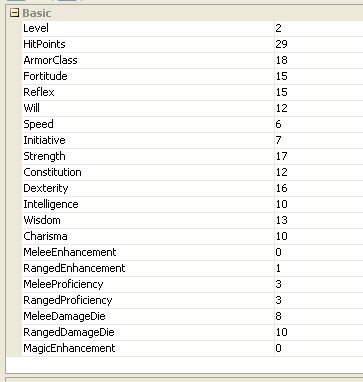
Once you’ve saved these as your default properties, you can double click on your PC’s token (Violet in this case) and change the values.  The important ones for this macro are Strength (17), MeleeDamageDie (10), MeleeProficiency (3), MeleeEnhancement (0) and Level (2).  I’ve set the rest of them as well, as you can see in this image of Violet’s token properties.

Token Properties

Now that Violet has values for Strength and so on, we can use them in our macro and then just edit Violet’s properties when she levels up or gets a new sword.  This requires somewhat fancier programming in the MapTool macro – beginning with the idea of a variable.

To establish a variable in a MapTool macro, you can do something as simple as writing: [MyVariable=10].  This would establish a variable called MyVariable and assign it a value of 10, which you could then use later in your macro (such as [MyOtherVariable = MyVariable + 5], giving MyOtherVariable a value of 15).  If you write it just like that, though, MapTool with send a message to the chat window with the value of the variable.  So a random “Violet: 10” would pop up.  Since we don’t want to actually send anything to the chat window when we declare the variable, we will denote this line as being hidden from chat by putting h: at the beginning of the declaration:

[h: MyVariable=10]

Technically this h: is a “roll option” in the MapTool lingo.  Remember that these macros are fundamentally constructed to roll dice, though you can also send text to the chat window and do more complex things.  There are lots of roll options you can use at the beginning of your bracketed code, such as gm: or just g: to show the result of the roll in the chat window for the GM but to hide it from the players.  In any case, we’ll be using lots of hidden lines in our macros since we don’t want every calculation showing up in chat – just the results.

Next, we need to know how to get the value of the properties that we’ve set for Violet so we can use them in our macro.  Fortunately, MapTool has a function called getProperty that does exactly this.  To figure out Violet’s melee proficiency bonus (which goes into the calculation of the attack bonus), we use the following code:

[h: Prof=getProperty(“MeleeProficiency”)]

This creates a variable called Prof, which is equal to the value of the property called MeleeProficiency.  Yes, the quotes and the parentheses are required.

What about Violet’s strength modifier?  We need to get the value of the Strength property, subtract ten from it, divide that by two and then round down.  Here’s the code to do all that:

[h: SkillMod=FLOOR((getProperty(“Strength”)-10)/2)]

The FLOOR function does the rounding down (CEIL or CEILING would round up).  Note that I’m calling this SkillMod to make it easier to re-use this code for other attacks that might use other skills, such as the Ranged Basic Attack that would use Dexterity.  Using similar logic to get some other properties, we’re able to write code that will let us calculate the attack bonus and damage bonus for the melee basic attack:

[h: SkillMod=FLOOR((getProperty(“Strength”)-10)/2)]

[h: DamageDie=getProperty(“MeleeDamageDie”)]
[h: HalfLevel=FLOOR(getProperty(“Level”)/2)]
[h: Prof=getProperty(“MeleeProficiency”)]
[h: Enh=getProperty(“MeleeEnhancement”)]

[h: AttackBonus=SkillMod+HalfLevel+Prof+Enh]
[h: DamageBonus=SkillMod+Enh]

Now we can go back to our earlier prettified macro and substitute in the AttackBonus and DamageBonus variables.  We can also use the ROLL function to take advantage of the fact that the damage die is now a variable rather than hard coded.  With the ROLL function, you tell MapTool the number of dice and the number of sides on each die you want to roll, so a d20 would be [ROLL(1,20)].  Put the lines of code above first, followed by these:

<b>Melee Basic Attack</b><br>
Attack: <b>[d20+AttackBonus]</b> versus AC<br>
Hit: <b>[ROLL(1,DamageDie)+DamageBonus]</b> damage

The output will look exactly the same as before, but now we shouldn’t have to touch the macro when things change for Violet.

There’s still one little wrinkle in our plans here, though – what happens if the d20 for the attack roll comes up on a natural 20?  That, my friends, would be a critical hit and should result in maximum damage.  It’s entirely possible to roll a natural 20 with this macro and not notice, in which case you might just take the regular result of the damage roll rather than taking the maximum possible damage.  To fix this, we need to get a little fancier.

I’ll start by saying that I like the ToolTip mouse-over function that shows players the breakdown of the die roll.  It’s not just a 22, it’s a d20 that came up on 15 plus an attack bonus of 7.  We’re getting into some programming that is going to have to roll the attack one time and then store the result as a variable, which means that when we show that variable, we’ll lose the d20 ToolTip.  So, things are going to look a little different because I’m going to start explicitly printing out the breakdown of the attack and damage rolls.

We’re going to need to roll the d20 for the attack once and store the result.  While we’re at it, we might as well roll the damage die once and store the result, along with figuring out what the max damage would be in case of a crit.  Below the earlier lines where we were defining variables, we add these lines:

[h: d20roll=d20]
[h: DamageRoll=roll(1,DamageDie)]

[h: AttackRoll=d20roll+AttackBonus]
[h: MaxDamage=DamageDie+DamageBonus]
[h: RegularDamage=DamageRoll+DamageBonus]

Now we’ve defined the result of rolling a d20 for the attack as a variable called d20roll and the result of rolling the damage die as a variable called DamageRoll.  This means that we can output the result of the attack roll and then check to see if there was a critical hit.  If there was a crit, we want to call out this fact and make sure the damage is maxed.  If not, we want to print the normal damage roll output.  This means that we need to get into the IF function in MapTool.  I won’t go into all of it here – I’ll just show the final version.  The gory details of using IF statements in MapTool can be found in the excellent MapTool wiki, so I won’t rehash them.

<b>Melee Basic Attack</b><br>
Attack: [d20roll] + [AttackBonus] = <b>[AttackRoll]</b> versus AC<br>
[if(d20roll==20), CODE:
{<font color=Red>–CRITICAL HIT–</font><br>
Damage: [DamageDie] + [DamageBonus] = <b>[MaxDamage]</b> damage
};
{Damage: [DamageRoll] + [DamageBonus] = <b>[RegularDamage]</b> damage}
]

Yes, this is a little bit complicated.  Basically, I print the name of the attack and the result of the attack roll (broken down into the d20 and the attack bonus).  I then check to see if there was a crit.  If there was, I print –CRITICAL HIT– in red (that’s the <font folor=Red> and </font> HTML tags) and then print the max damage breakdown.  If there wasn’t a crit, I print the normal damage breakdown.  The square brackets, curly brackets, parentheses and colons all have to be handled just right, and the CODE statement is a little touchy, too.  The wiki can explain it all.

In the end, we’re left with a snazzy little macro that efficiently handles melee basic attacks with critical hits, getting all of its information from the character token’s properties.  I haven’t included code to check for extra damage from a magical weapon on a critical hit, but that would be easy enough.  It would require a new property that tells you what the bonus damage die from your weapon is and then some extra code in the MaxDamage calculation to account for it.  As they say in textbooks, this is left as an exercise for the reader. Similarly, making this into a macro for Ranged Basic Attack is as simple as replacing the word Strength with Dexterity and Melee with Ranged in the macro code.

I hope you find this macro construction process to be helpful.  In my next macro article, I’ll show you how I’ve programmed in multi-attack abilities.   The final version of the Melee Basic Attack macro is below.

[h: SkillMod=FLOOR((getProperty(“Strength”)-10)/2)]

[h: DamageDie=getProperty(“MeleeDamageDie”)]
[h: HalfLevel=FLOOR(getProperty(“Level”)/2)]
[h: Prof=getProperty(“MeleeProficiency”)]
[h: Enh=getProperty(“MeleeEnhancement”)]

[h: AttackBonus=SkillMod+HalfLevel+Prof+Enh]
[h: DamageBonus=SkillMod+Enh]

[h: d20roll=d20]
[h: DamageRoll=roll(1,DamageDie)]

[h: AttackRoll=d20roll+AttackBonus]
[h: MaxDamage=DamageDie+DamageBonus]
[h: RegularDamage=DamageRoll+DamageBonus]

<b>Melee Basic Attack</b><br>
Attack: [d20roll] + [AttackBonus] = <b>[AttackRoll]</b> versus AC<br>
[if(d20roll==20), CODE:
{<font color=Red>–CRITICAL HIT–</font><br>
Damage: [DamageDie] + [DamageBonus] = <b>[MaxDamage]</b> damage
};
{Damage: [DamageRoll] + [DamageBonus] = <b>[RegularDamage]</b> damage}
]

MapTool Macros – Basic dice macros

As promised, it’s time I share some of what I’ve learned in putting together MapTool macros for my D&D Fourth Edition campaign.  My characters are a dragonborn swordmage, a deva druid and an eladrin rogue adventuring through the Keep on the Shadowfell.  They’re second-level characters, so they don’t have too many powers yet, but they have enough powers to require me to write some interesting macros for their attacks.

Before I go farther, I should mention that the MapTool wiki has great macro writing resources.  That’s how I learned most of what I’ve figured out so far.  So, be sure to check that resource out as well.

I’ll start with some simple campaign macros – about as simple as MapTool macros can get.  Every macro in MapTool is tied either to a token (token macros), a campaign (campaign macros) or to your MapTool program itself (global macros).  I personally haven’t created any global macros yet, and most of the really interesting macros I’ve made so far are tied to tokens (mostly the player character tokens), but let’s start with a simple campaign macro – a button that will let anyone in the game roll a d20 with one click.

In order to create a Campaign macro, you have to be able to see the Campaign window (usually a skinny little window near the bottom of your MapTool screen).  If you can’t see it, go to the Window menu in MapTool and click Campaign.  The Campaign window starts off pretty much empty.  To create a new campaign macro, right click in the Campaign window and select Add New Macro.  This will cause a little button with the label (new) to appear in the window.  Go ahead and click that button.

Nothing happened?  Well, that’s because the macro starts off with no code to execute by default.  We’ll fix that.  Right click on the (new) button and select Edit.  The window below should pop up.

New MacroNow you’re writing a macro.  Begin by changing the label in the top box from (new) to something more descriptive – in this case, let’s call it “d20” (you don’t need the quotes).  You can leave the Group and Sort Prefix boxes blank for now (they’re optional).  The meat of the action is in the Command box below.  We want this macro to show the result of a d20 roll in the chat window for whoever presses the button.  If you want this to be dead simple, all you need to do is type [d20] (in square brackets, just like I’ve done) into the Command box and click OK.  This will change the name of the button to d20.  When you click it now, you’ll get something like this in the chat window:

OnlineDM: 7

If you mouse over the number in the chat window, you’ll see ToolTip text that reads:

<< d20 = 7 >>

This tells whoever is interested that the 7 in the text box is the result of a d20 roll.

This is all right, but we can do better.  The command [d20] in square brackets tells MapTool to randomly generate a number between 1 and 20 and output the result to the chat window (with a ToolTip that shows that it’s the result of a d20 roll) as a message from whoever hit the button.  Just looking at the result, though, you can’t really tell that it’s a d20 roll.  Let’s format it nice and prettily.

Right click on the d20 button and select Edit again.  This time, put the following text in the Command box:

d20 roll: <b>[d20]</b>

And then click OK.  Now when you click the button, you’ll get output that looks like this:

OnlineDM: d20 roll: 19

All we’ve done is add a little extra text that shows up in the window (“d20 roll:”) and put the result of the roll in bold face (using the <b> and </b> HTML tags to surround the text that we want to show up in bold).  It’s not absolutely necessary, but it’s a nice thing to have, especially if you’re rolling lots of dice and you want to see at a glance which number came from which die roll.

You can now create a whole set of simple dice macros for your campaign – d20, d12, d10, d8, d6 and d4 – following the same process.  (If you have a weird sense of humor, you could create d47 or whatever you like.)  You can enter something like “Basic Dice” into the Group box for each macro, which will group the buttons together in a little box within the Campaign window that’s labeled “Basic Dice”.  You can also specify the order in which the buttons will appear within that box by using the Sort Prefix box in each macro.  I’ve given the d20 button the Sort Prefix of 1, so it shows up first, and then gone in decreasing dice values from there (d12 is 2, d10 is 3, etc.).  Feel free to go from d4 to d6 and on up to d20 if you prefer.

It’s worth noting that all of these simple dice macros are totally optional.  You could just type “/roll d20” into the chat window, getting output that reads something like:

* OnlineDM rolls: d20 => 9

Personally, I prefer the buttons.  They’re way quicker.  The /roll command also lets you do things like /roll 2d8 + 2d6 + 5, getting output such as:

* OnlineDM rolls: 2d8+2d6+5 => 3 + 5 + 5 = 13

For that sort of thing, though, I’m going with fancy-schmancy attack macros.  Tune in for the next post!

The Death of Zod

I was planning to write about more advanced MapTool macros that I’ve created for player characters today, but my plans changed after our in-person D&D game.  This is the first time our group has been able to get together in almost a month, and we decided to use the Memorial Day holiday as an opportunity to barbecue,  hang out and do some adventuring.  The food was great, if I do say so myself (I did the cooking).  Barbecue ribs with sauce from Sonny’s Barbecue (a chain that we know from Florida), plus burgers, grilled veggies, baked sweet potatoes – good times!

As for the gaming, the last time we played was when we fought the infamous down-leveled Troll Vinespeaker that nearly destroyed us.  Fortunately, we finished that guy off at the end of our last session.  Our group returned to the rebel camp that we were assisting, rested, and helped the rebels relocate their camp (since the bad guys now knew where the old one was).  My wizard, Zod, used a ritual for the first time ever to conjure Tenser’s Floating Disk in order to carry some of the wounded rebels.  The rest of the party carried supplies, helped navigate through the woods, and inspired the camp onward, with great success.  We then set off to a nearby cave that the rebels were hoping to dig into in order to create a secret tunnel into the city that they were rebelling against – but which had been discovered to contain a cave troll.  Fire supplies at the ready, we ventured into the cave.

The troll’s lair was interesting – it was a giant lake with a narrow path running around it.  The troll was tall enough to stand and walk in the lake, with the goal of grabbing adventurers, using them as weapons against one another, and dragging them underwater from time to time.  The water made our use of fire a little more difficult.  If the troll was under the water, for instance, Zod’s flaming sphere couldn’t hit him.  Still, with good tactics (and some crazy-awesome dice rolling from Barbara’s ranger, Violet), we finally defeated the cave troll and got some good loot.  Most of us had used up our daily powers and action points, but we still had plenty of healing surges left and we figured that the troll was probably the nastiest thing we would encounter, so we decided to explore a little further.  After all, if the rebels were going to be digging a tunnel in this cave, we should let them know what to expect up ahead.

A short while later, our party came to a small waterfall, behind which was an area that looked like still water.  We spotted an amulet in that area, but Zod’s Mage Hand wasn’t able to penetrate the surface.  Our warden recognized the “still water” as some type of slime creature, so I cast a fire burst at it, and the battle was on.

We were fighting a whole bunch of slimes – a big yellow one, two nasty green ones that liked to engulf us, four gray ones that sucked our Fortitude defenses down, and something like 15 slime minions that slid us two squares every time they hit us.  Bree’s defender was soon slid to the far side of the chamber and was unable to get back.  Zod tried to take out multiple monsters with Thunderwaves, but with mixed success.  Eventually we were surrounded and found ourselves in trouble.  We ended up with Kyle’s bard alive and the other three of us unconscious.  Barbara’s ranger made a miraculous natural 20 on her death save, which helped immensely.  The bard healed the warden, who was planning to come administer a potion to my wizard, Zod – when the yellow slide decided to attack Zod while he was unconscious.  That, friends, is called a Coup de Grace, and it’s an automatic critical hit – and a dead wizard.  Oops!  I didn’t feel that badly about it, honestly.  These things happen.

The rest of the party was able to escape the slime cave, and I headed to the computer to print out a character sheet for a Warlord I had rolled up a couple of weeks back (we needed more healing).  In a few minutes, though, the rest of the gang called me back into the room.  They had decided to call this an end point – not just for our session today, but for the campaign.  I was worried at first that somehow my letting Zod get killed caused the party to collapse, but it turned out that Barbara and Kyle were both rather unhappy with how they had built their characters from the start (Kyle because he was brand-new to Fourth Edition and really wanted a Monk, not a Bard, and Barbara because I had interfered too much when she was creating her character and it never really felt like HER character), Bree wanted to try her hand at DMing, and Nate was itching to play rather than DM.  So, we called it a campaign.  Bree will probably start us up again in three weeks with a pre-published adventure to get us going anew.

What lessons did I learn?  Well, first I learned that the death of a character is not catastrophic.  I’ll admit that I’m not great at role playing yet, so I probably wasn’t as attached to Zod as I could have been, but the thought of bringing in a brand-new character didn’t sound so bad to me, honestly.

Second, I think that character death is more acceptable when it feels fair.  The cave troll we fought was challenging (mostly because of the water) but fair.  The slimes were very numerous but fair.  Dying there didn’t seem like anything went horribly wrong – some bad luck, some tough monsters, maybe a questionable decision to push on without daily powers.  Had we ended up dying to the troll druid from our previous session, I would have been bitter, as I felt that monster was unintentionally overpowered.

Third, I’ll have to think about how I feel as a DM about the possibility of the campaign ending, perhaps abruptly.  While our DM, Nate, was happy for the chance to play instead of DM, he seemed to take the decision to end the campaign after this battle somewhat hard, as if it were his fault.  We were having fun with the campaign itself, but having two players with characters that they didn’t like all that much was a problem.  The notion of me rolling up a new character when Zod died basically got them thinking, “You know, a new character might be fun!” and things went from there.  It wasn’t Nate’s fault.  I think he worried that the encounters he put together were overpowered for our party, and maybe they were a little bit, but that’s because he used to work at Wizards of the Coast and was used to playing with people who ran super-optimized characters that would blow through any encounter equal to their level or even a little higher.  Did he make things too hard today?  No, I don’t think so.  Sometimes it’s right to flee, and we didn’t do that soon enough in the slime battle.  So it goes.

I had fun with my first real D&D campaign, and I’m glad that I’ll get the chance to hang out with this same group of friends to adventure together.  I find the idea of a new character, new DM and new campaign to be exciting, not depressing.  The only down side is that now I won’t get to play any D&D at all for several more weeks – but that’s mainly because I have some business travel coming up the weekend after next.  After that, game on!

MapTool macros – simple monster attacks

Over the past few days, I have become intensely interested in the MapTool macro language.  I started with the desire to have one-click access to my monsters’ attack powers.  I decided to write a macro for each monster that would create an attack roll (d20 plus whatever the monster’s attack modifier is) and a damage roll.  I’d add in text describing additional effects on a hit and even some buttons for non-attack macros just to remind myself what the powers could do (such as an Ooze’s ability to shift its speed).  For all of these attacks, I don’t want them showing up on the players’ chat boxes (hiding them behind the DM screen, so to speak), so I have all of the results go only to the GM.  Here is an example – an Adult Kruthik’s Claw attack:

[gm: “Attack roll: “]
[gm: 1d20+8] [gm: ” versus AC<br>”]
[gm: “Damage roll: “]
[gm: 1d10+3]

The fact that everything is within brackets that begin with “gm:” is the way that the output is hidden from the players.  Because the text is within these brackets, it must be enclosed in quotation marks (outside of brackets, you don’t need to put your text in quotes – it will just show up to everyone in the chat window).  Note that this also applies to the line break indicator from HTML <br> – outside of brackets you can just write it as <br>, but inside brackets it has to be put within quotation marks as “<br>”.  The dice programming is pretty straightforward.  1d20+8 is just what you think it would be.  The output from this macro will look something like this:

Kruthik Adult: Attack roll: 24 versus AC
Damage roll: 6

Here’s a slightly more involved example – the Kruthik Adult’s Toxic Spikes attack.

[gm: “Recharge 5/6; Result: “] [gm: d6 ] [gm: “<br>”]
[gm: “Two attacks against 2 different creatures<br>”]
[gm: “Ranged 5<br>”]
[gm: “Attack 1: “]
[gm: 1d20+7] [gm: ” versus AC; “]
[gm: 1d8+4]
[gm: ” damage and ongoing 5 poison damage and slowed (save ends both)<br>”]
[gm: “Attack 2: “]
[gm: 1d20+7] [gm: ” versus AC; “]
[gm: 1d8+4]
[gm: ” damage and ongoing 5 poison damage and slowed (save ends both)”]

The first line reminds me that this is a power that recharges on a roll of 5 or 6 on a d6 and then rolls a d6 to tell me whether the power recharges or not this turn.  If it doesn’t and I’ve already used it in this encounter, then I’ll just ignore the rest of the output.  The next two lines just remind me about what the power does (two attacks against two different creatures, within a range of five squares).  Then the macro generates two separate attack rolls, with the damage for each put on the same line.  There’s also some extra text explaining the ongoing damage and slowing effect.  The output is as follows:

Recharge 5/6; Result: 5
Two attacks against 2 different creatures
Ranged 5
Attack 1: 23 versus AC; 10 damage and ongoing 5 poison damage and slowed (save ends both)
Attack 2: 14 versus AC; 12 damage and ongoing 5 poison damage and slowed (save ends both)

Another example: the Blue Slime’s Stench Pulse burst attack:

[gm: “Once per encounter only.<br>”]
[gm: “Attack roll: “]
[gm: 1d20+6 ] [gm: ” versus Will<br>”]
[gm: “Hit: Targets are dazed and weakened (save ends both)”]

This just rolls the attack a single time, even though there could be several targets in the burst.  By D&D rules, each target should have a separate attack roll.  So, I would need to click the button once per target.  That’s okay, but it’s not very efficient, and the “Hit” line will be reprinted for each target instead of just one time.

Now, I hadn’t noticed this problem when I first put this macro together – it only became clear after I had put together some player character attack power macros.  Maybe my players will want to roll their own dice and telling the table what their results are, but I couldn’t resist – I wanted to program their powers in MapTool macros.  That’s for my next post.

I think I love MapTool

I’ve had a day to play around with MapTool.  When I first discovered this program for playing D&D online, I was very impressed, but still a little bit wary.  It seemed to do everything OpenRPG did, but better (with the possible exception of easy networking).  It had some slick features that Gametable lacked, but I didn’t know if it had dice macros.

Does MapTool have macros – that’s a good one!

MapTool, as it turns out, is all about macros.  See, I’m a very experienced programmer in languages such as Visual Basic for Applications (VBA – mainly for Excel).  When I discover the potential for programming in a game, I begin to salivate.  (I’m a former casual interactive fiction programmer.)  It turns out that MapTool lets you tie macros to individual tokens as well as to your campaign as a whole (for all of the players to use) and to your installation of MapTool (global macros).  This means that, for instance, you can put a monster token on the board and then start writing as many macros as you want for it.   Each macro will create a little button that’s available whenever you select the token.

I created a macro called “Simple Attack” and then imported it to every new token on the battlefield.  This would put a button connected to the token called “Attack” (in red letters, just for style).  When clicked, the Attack button would send messages to the chat window that only the GM can see, first with an attack roll (d20+0 versus AC by default) and then a damage roll (d6+0 by default).  I would edit this macro for the new token.  For instance, on a Giant Rat, I edited it to be called “Bite” and changed the attack roll to d20+6 versus AC and the damage to 3 (no roll).  On an Ochre Jelly, I changed the name to “Slam”, the attack to d20+8 versus AC and the damage to 2d6+1 and ongoing 5 acid damage (save ends).  This will all automatically show up in my chat window whenever I click the appropriate button.  No more looking up the attack modifier, what defense it’s attacking, how much damage, etc.  Just click the button and inform the player of the PC’s doom!

Naturally, the same can be done for player tokens.  I haven’t created any macros for the players yet, but I fully intend to do so.  I’ll be interested to see whether the players use the macros for their powers or not –  I’m guessing they probably will.

I’ve also set up each token with appropriate properties – hit points, defenses, speed, ability scores, etc.  Whenever you mouse over a token, a little portrait shows up with all of these stats next to it.  When I roll to hit Reflex against Barbara’s character,I can just mouse over Barbara’s token and see what her Reflex defense is.  Way, way cool.

MapTool ConditionsI’ve also customized the conditions I’m using in my campaign.  To the left, you can see what I’ve set the various conditions to look like.  Whenever a character is bloodied, I’ll set the “Bloodied” state to be checked, and a red dot will appear in the bottom right corner of the token’s picture.  If they’re prone, they get a blue ring.  Slowed, a red yield sign.  Dazed is a green cross.  I’ve added a purple triangle to remind us of ongoing damage.  Unconscious characters will have a gray X, which will become red if the character dies.  I absolutely love this.  I know there are more conditions I’ll need to add (I just realized that I need to show which tokens are marked, for instance), but these should get the game going.  Honestly, this is an area where MapTool is superior to a real life game.  It’s a pain in the butt to put little beads next to minis on a physical battle map to show which ones are marked by our warden, which are tagged by our ranger as her Hunter’s Quarry, which are bloodied, etc.  In MapTool you can’t miss it (as long as you know what the shapes mean, of course).

The down side of MapTool is that I do have to have map files prepared to import.  I found a great site with beautiful Keep on the Shadowfell maps called the Mad Mapper.  While I love the maps of the Keep that I built myself in Gametable (mine are more colorful), I’m having tremendous trouble with Gametable’s Export Map function.  This function is supposed to export the map as a JPG file, which I could load into MapTool after resizing, but for some reason the exporter either exports a blank map or a map with just a few objects from the top left corner of my map.  I hate going with screen shots, so for now I’m stuck with maps I find online.  I’d love to keep building maps within Gametable, but if I can’t export them as images that’s just not going to work.

What do you use for building map images?  Do you just draw in Photoshop?  That seems like it would be tremendously difficult if you want to stick to a grid.  I’m open to suggestions!

I should also mention that I’ve discovered the DND 4e Combat Manager, a totally slick little tool that lets you import your characters from Character Builder and your monsters from Adventure Tools and then run combats.  There seems to be a bug that prevents the Combat Manager from importing many of the Character Builder stats (max HP, defenses, ability scores, etc.) but it does import names and powers, and I added the numbers for my three PCs manually.  The monsters import perfectly.  With this tool, I can roll initiative, see what powers are available (including tracking encounter and daily powers for the PCs if they like), keep track of HP, and manage conditions that have certain end points (save ends, end of next turn, etc.).  I love the condition reminders for things like ongoing damages or saving throws.  I don’t know if I’ll end up preferring this program over my homebrew Excel tracker, but I’ll admit that it’s looking pretty attractive.

As always, I love getting comments, so please let me know your thoughts.

MapTool – my new friend!

My online D&D game is currently in the middle of a three and a half week (at least) hiatus.  We last played one week ago when Barbara and I were in Boston and had to use OpenRPG instead of our preferred Gametable because of problems with networking from the hotel connection.  Lane is busy with work every evening this week, and then she and Zach are leaving for a two week vacation (though fortunately we’ll get to see them this Saturday as they pass through Denver).  So, we probably won’t be able to actually play again until mid June – unless Lane and Zach decide they want to spend some vacation time on the computer playing D&D.

What’s an online DM to do when he can’t run a game?  Research!  I’ve gotten more involved in the broader online D&D community (I’ll put up a links page eventually).  I’ve discovered lots of blogs that I really enjoy, all via the RPG Bloggers Network.  I’ve applied to join the network, and I really hope to be accepted.  I’ve been reading lots of posts on ENWorld and keeping up with new info on the Wizards of the Coast D&D home page.

In a few of these places, I’ve seen references to MapTool.  Now, I had briefly encountered MapTool early on, before I ever thought I’d actually be running a D&D game online, and then promptly forgot about it.  Seeing all of the people who said that they use MapTool for their games online, though, I knew I had to check it out.

I haven’t run a game yet, and I haven’t even tried any of the networking yet, but so far all I can say is “Wow.”  MapTool appears to be OpenRPG except much, much better.  In common with OpenRPG, it assumes that you’ve created your maps in advance, which you then load into the game.  Gametable, on the other hand, is better for drawing maps on the fly.  Maybe MapTool can do that, too – I don’t know yet – but I’ll admit that even in Gametable I’ve created maps in advance so far.

MapTool really shines in the token/mini/pog department.  First, a note on nomenclature: Every program calls the representation of characters and monsters on the map something different.  OpenRPG uses “Miniatures.”  Gametable uses “Pogs.”  MapTool uses “Tokens.”  They’re all the same thing.  MapTool’s are flat-out better, though.  You can use any image you like as a token in MapTool, and when you drag it onto the game table MapTool will resize it automatically to one square (“Medium” in D&D parlance).  If you want it to be a bigger monster (two squares by two squares), simply right click on the token, select Size and change it to “Large.”  With other objects (tokens too, though I think it’s less useful for tokens) MapTool will let you resize them freely just by clicking on a corner and dragging.  You can distort them this way, too – making a square object rectangular, for instance.

Token Conditions

An elf token that's prone (flipped), bloodied (red dot), incapacitated (gray X) and dazed (yellow triangle)

MapTool has built-in functions to let you change the way tokens look and how they’re named.  For instance, when playing in Gametable or OpenRPG, I would literally change the name of a token whenever it was bloodied from, for instance, “Goblin 1” to “Goblin 1 – Bloodied.”  This was a pain in the butt, and it made the screen very cluttered with all of these long name boxes overlapping with one another.  In MapTool, you can put a red border around the token to show that it’s bloodied if you like – done.  There other similar options – a black X over the token if it’s dead, a gray X if it’s incapacitated, various dots and shapes to put over it to show any conditions you want (slowed, dazed, etc.).  You can even flip the image vertically (which I’ll probably use to show prone) or horizontally.  You can show a life bar if you like (I can’t imagine using this, but hey, you never know).  Also, you can create your own conditions and markers for them – dots of any color in any corner, shapes of any color over the token, etc.

When moving tokens, you can drag and see how long a given path is, add waypoints to show that you’re going up diagonally three squares and then down diagonally three squares to avoid an enemy, measure the distance between two points, etc.  There’s just a lot of power and flexibility when it comes to tokens.

Of course, MapTool doesn’t have EVERYTHING that I want – or at least I have not yet found everything.  It does have a built-in dice roller using the text box – you type “/roll” followed by the instructions for what you want to roll.  For instance, you could type “/roll 2d8+4” and get the result of rolling two eight-sided dice and adding four to the total.  There’s also an add-in called Dice Box that gives you a slick-looking interface for rolling dice, with images of each die you’re rolling (but using fundamentally the same built-in functions in MapTool).  I have not yet found any functionality that replicates the dice macros from Gametable, and I have to say that I grew to love those dice macros.  As a DM, I would create macros such as “Goblin Warrior Spear Attack,” “Goblin Warrior Spear Damage,” “Goblin Bombardier Javelin Attack,” and so on.  Once I set these up, I never had to look them up again.  “The goblin stabs you with his spear – the attack roll is (click) 18 versus AC, and deals you (click) four damage.”  The players could do the same thing for their own various attacks (though Barbara prefers to roll physical dice and tell us the result – I trust her).  MapTool doesn’t seem to have this, though I know that you can program your own macros.  Maybe I can figure out how to set this same thing up.  If anyone out there has used MapTool and has advice for me about it – especially rolling dice – I’d love to hear it in the comments.

Over the next couple of weeks I plan to play around with MapTool to see how good it might be compared to OpenRPG or Gametable.  I’m pretty certain that it’s strictly superior to OpenRPG, and if I can figure out the dice rolling it might even replace Gametable.  We’ll have to set how the networking goes, too, but I’m very optimistic so far.

Fourth Edition for people who prefer earlier editions

Karl (one of the people I had the pleasure of playing old-school D&D with last week in Albany) made an insightful comment on the blog that got me thinking.  He pointed out that some people don’t like all of the emphasis on tactical movement in D&D Fourth Edition, and also that there has been a collapse of many different skills into a smaller number (with the “taking ranks in a skill” concept radically changed to just a zero-one binary of being trained in a skill or not being trained in it).  It got me thinking: What should a person who doesn’t like some of these elements of 4e do?

The simplest option (and the cheapest), of course, is to play an earlier edition.  OSRIC lets you play something like First Edition for free, and as I understand it the System Resource Document lets you play something like Third Edition or 3.5 for free.  So, if you prefer an older edition, you can play one.  That’s what Shawn’s group does, and it seems to work for them.

But are there things you could take from 4e and combine with earlier editions to make something more to your liking?  I think there are.  When I think about it, 4e feels like it could be quite modular if you wanted it to be.

First, flavor.  If you just love the flavor of Fourth Edition and want to use it with an earlier rule set, that’s obviously very easy.  Sure, you’ll have to change around numbers on monsters and so on, but their descriptions can be identical and their powers can be adapted to a different set of rules.  If you like the 4e gods, use them.  Setting information, dungeon maps, whatever you like can be easily transferred to another edition’s rules.  I’ll admit that I don’t personally have strong feelings about the flavor of 4e, but if you do, have at it!

Next, powers.  This is one that I think you either love or hate about 4e.  In Fourth Edition, characters start with (in general) two at-will powers that they can use as much as they want, one encounter power that they can only use once every battle, and one daily power that they can only use once per day (and they get more as they go up in level).  In earlier editions, the only equivalents you had to at-will powers were melee or ranged basic attacks (I swing my sword, I shoot my crossbow, etc.).  You could also do something that’s pure role playing (I talk to the bad buy or my allies, I try to hide, I jump onto a table, etc.), and that’s still there in 4e, too.  Magic users in earlier editions had a certain number of spells they could cast per day (very few at low levels), which gives them a little bit of a daily power feel, but other classes don’t seem to have any equivalents.  I like the whole power system in 4e, partly because everyone has at-wills that are useful in combat and partly because I like the tension of when to use dailies and encounter powers versus saving them for later.

Could you use this power system in an earlier edition?  I don’t see why not.  Some powers have certain ranges on them or a number of squares that they affect, but I think a good 1e DM could handle that stuff without breaking out a battle map.  Weren’t there the equivalent of bursts and blasts in earlier editions, such as with a fireball?  I assume the DM would say, “Okay, these three bad guys are clustered together, so your fireball hits all of them, but the other two are far enough away that they’re safe.”  Same idea here.  Powers that generate something like difficult terrain would be tougher without a battle map, and you probably wouldn’t want to use those unless the DM really liked mentally keeping track of this stuff.  Even there, you could rule that a power that created difficult terrain around a bad guy would make it hard for them to charge you on the next turn, and it’s up to the DM to say whether they can get to you or not.  This is basically playing 4e without a map or minis, and while I like the map and minis, I think a group could absolutely play a great 4e game without them, as long as they weren’t nitpickers for EXACTLY how close imaginary point A is to imaginary point B.

How about the collapse of skills?  Here’s an area where it’s almost totally unrelated to combat, so you can separate the two.  If you love the powers and maybe even the map-and-minis combat of 4e but you prefer the larger number of skills where you spend ranks in them, as you had in 3e and 3.5, then just go with the older skill system.  I think the new skill system was probably designed to be easier for new players to grasp, and I agree that it’s likely a sign of Wizards of the Coast de-emphasizing role playing to emphasize tactical combat.  If you are cool with more complexity in your skills, though, use the older skill system and enjoy!

Now let’s talk about numbers.  I must say that the transition to “higher AC is harder to hit” in Third Edition was a good change, period.  Maybe someone can convince me that the old system, where you want to lower your AC and you have to figure out your THAC0 and all of that, makes good sense.  But I personally don’t see it.  This is something I would adopt wholesale, even if I wanted to play an older edition.  I also think that having to use a table to look up whether an attack hits a monster, depending upon the class of the PC who hit, seems overly complex and doesn’t add anything to the game, at least as far as my limited understanding goes.  But hey, if you love the tables, stick with them.

I don’t know enough about the other numbers in older editions to say how they would differ from 4e, but I get the impression that HP totals are lower (for both characters and monsters) in 1e, and that it’s probably true that battles are swingier (you get lucky and kill a bad guy right at the start, or you get unlucky and he kills you with one hit).  That’s fine if you like it, but I imagine that if you didn’t like it, you could probably use 4e as a guide for hit points and damage output.  Of course, some people complain about “grind” in 4e, with battles taking too long due to the high hit points all around, so maybe there’s a good middle ground.  I know that I personally wouldn’t want to be a wizard running around with 4 HP and scared of my own shadow, but hey, maybe that’s just a great opportunity for role playing!

There are lots of other little details that could probably be taken from 4e by themselves if you wanted, and I think doing so would be easy enough if you’re cool with house rules.  Character creation using a point buy system is something that’s not unique to 4e, and I would personally use it over rolling dice (now that I’ve had a chance to try it both ways).  Using Fortitude, Reflex and Will as defenses other than AC that an attack might go after is something I could take or leave, and if you preferred using them as saving throws as in older editions, you certainly could do so.  Conditions that “save ends” seem fun to me, and you could easily introduce those to a First Edition game, and so on.

Ultimately, you’ve got to go where the fun is for you and your group.  If you’re happy with the rules of one edition (or one non-D&D game) as written, then life is easy for you.  If there are things that annoy you about the rules of your current edition, you might be able to pilfer different rules from other editions.  Me, I like 4e just fine as written, but if I got to the point that something about it just grated on my nerves, I wouldn’t hesitate to use house rules to change it.

Old-school Dungeons and Dragons

Barbara and I are on a trip to the northeast from our home in Colorado.  We spent five nights in Boston, where we found time to get together twice on OpenRPG to play in our main online D&D session with Lane and Zach.  On the sixth day, we drove to Albany to meet our friend Sara and her family.  Sara just had a baby (her second) via C-section on Monday of this week, but three days later she was home and ready for her weekly D&D game with her husband Scott and their friends.  Since she knew Barbara and I liked D&D, she invited us to join them for the evening.

The game was first edition D&D, which we’ve never played before.  I found a document online called OSRIC, which seems to be an attempt to build an open, freely available rules system that more or less mirrors D&D first edition.  I glanced at OSRIC a little bit, but didn’t spend much time on it.  When we arrived at Sara’s place (and the baby is adorable, by the way!) and got ready to start playing, I chatted for a few minutes with Shawn, the DM.  He explained that, since all we have really played so far is Fourth Edition, we haven’t really played Dungeons and Dragons – we’ve just played a miniatures game.  He’s definitely an edition purist, and not at all a fan of Magic: the Gathering (a game I played for years, though I’ve pretty much replaced it with D&D now), which he sees as being related to Fourth Edition.  Fair enough – I’m always up for learning something new!

Barbara and I would be playing the characters of Ert and Bernie, who are hired henchmen of the main party.  We were brothers, a half-orc and a half-elf (apparently our mom got around).  We were only paid to carry stuff, and would defend ourselves if need be, but weren’t looking to get into the fray.  The game session lasted about four hours, of which we spent about three hours goofing around and joking with the group.  It was fun, and we fit right in.

The gaming itself, I have to say, was not meaningfully different from what we’re used to in Fourth Edition.  Sure, we didn’t use minis to show where our characters were standing on a map, but that didn’t feel like a big deal.  We only got into combat a couple of times, and the flow of combat was more or less what I was expecting.  Now, the specific numbers are wildly different from Fourth Edition.  Our wizard had four hit points, and our barbarian had a massive 16.  Armor classes are the opposite of what we’re used to (lower ACs make you harder to hit), and when you roll to hit a bad guy, the DM has to look up a table to see, based on your class, whether your attack hits or not.  There were some occasions where I felt like some of the things that exist in Fourth Edition would have helped, such as a nature or history check here or there, but those are minor quibbles.  The battles were a little underwhelming – usually just one or two bad guys, with nothing more exciting than swinging a sword or shooting a crossbow bolt going on – but I’m guessing that’s just because those were the encounters that happened to come up this time around.  The role playing was the same, and just as fun.

My guess is that old-school players don’t like Fourth Edition largely because it’s entirely possible to play Fourth Edition without any role playing.  You could play it as just a game where you move tokens around a board and play cards that make something happen (your powers).  You don’t HAVE to play it this way, though, and we don’t – we emphasize role playing, creative thinking, etc.  It’s way more fun that way.

Another complaint of Shawn’s is that all of the Fourth Edition classes are equivalent to one another in a lot of ways.  The impact of a first-level at-will power is going to be pretty similar across various classes, as will a third-level encounter power, etc.  He feels that the only differences are in the flavor text (one is a wizard casting a spell that causes a missile of force to hit an enemy while another is a rogue throwing a rock at an enemy using a sling, and so on).  First of all, I disagree somewhat here – there are actual mechanical differences, especially in daily and utility powers, but I do agree that the game is built to be balanced so that you don’t have one class’s abilities totally outshining another’s.  I actually like the balance, though – if you want to be a wizard, great!  You have useful things to do at all times.  Cleric?  No problem!  Whatever you want to be, you’ll be able to do something interesting.

I’ve heard of earlier editions as having the “linear warriors, quadratic wizards” phenomenon, where wizards are pathetically weak at low levels and crazy powerful at high levels, while warriors are pretty good at any level.  I think Fourth Edition gets away from that, and this is a good thing in my opinion.

So, D&D is D&D as far as I can see.  You role play, you fight stuff, you have fun.  The details differ, but the underlying game is the same.