Online Character Builder review

As of Tuesday, November 16, the new online Character Builder is live.  Fortunately for me, I did not get a chance to try it on the day that it came out – from everything I’ve heard, there were some serious server problems at launch, perhaps because every DDI subscriber on the Internet tried to use the program at once.

Now that I’ve had a chance to see it in action, here are my thoughts.

The good things:

  • It looks pretty
  • It has Heroes of the Fallen Lands and Dark Sun
  • It’s good at recovering a character you were working on in case you accidentally close the program or it crashes
  • I have access to my saved characters at any computer
  • It has real potential for the future

The not-so-good things:

  • The character sheets can’t be customized at all
  • It’s a little slower than the downloadable Character Builder, at least on my computer
  • You can’t export characters to send to your DM or to archive on your own computer
  • The scroll wheel on my mouse does not work with the program
  • I won’t be able to play around with it on the plane tomorrow and Saturday when I leave for a business trip because it requires internet access
  • Did I mention that you can’t customize your character sheet?

I think my original impression of the program based on the initial announcement was about right.  One thing I hadn’t realized was that I wouldn’t be able to customize the character sheet as I can in the current Character Builder.  I LOVE to be able to get my character sheet down to one page, with separate pages for my power cards (I’m one of those people who likes to cut out the cards and flip over my expended powers when I use them).  That won’t work here.

For the short run, I’m sticking with the downloadable Character Builder that I happily still have installed on my computer.  It’s just a better program.  If I want to build an Essentials character, I’ll give the online program a shot at it.  But the Essentials character that I’m most interested in building is the Hunter Ranger from Heroes of the Forgotten Kingdoms – which isn’t in the Builder yet.  Sigh.

To be fair to Wizards of the Coast, I fully expect that the export function, customizable character sheets, support for house rules and use of the scroll wheel will eventually be added to the program.  But for now, the online Builder is inferior to the downloadable one.

Of course, the big news today is the announcement of the Virtual Table, which, as the Online Dungeon Master, has me excited.  But that’s a topic for another post.

Online Character Builder – video preview

Just a quick post to point out the video for the upcoming online Character Builder to anyone who hasn’t seen it yet.  While my earlier complaints about it not being usable when you aren’t online still stand, I’m happy to see that the design of the program appears to be good.  I’m looking forward to taking it for a spin on November 16.

What do you all think?  Does it look like an improvement in usability over the current Builder?

Putting some role-playing in my dungeon mastering

I’ve been running D&D 4th Edition games for about four months now, and I feel like I’m to the point that I can run combat pretty well.  I generally know what the bad guys can do in combat, and I know how they want to approach the player characters.  I’m getting better at using interesting terrain, putting some movement into the battles and so on.

Where I’m not so great yet is role playing.  Role playing as a dungeon master is a very different experience from role playing as a player.  When you’re a player, you have a single character whom you know inside and out, whom you’ve built up from nothing, who has a personality and desires and fears that are intimately familiar to you.

When you’re a dungeon master, you’re playing a host of different characters every session.  Sure, you might have some recurring NPCs or some characters that accompany the party for many sessions, but that’s not always going to be the case – and besides, you don’t want an NPC to take too much of the spotlight anyway.  Most of the time, you’re playing monsters.

A great dungeon master can make these throw-away characters come to life – not to the degree that a great player character will come to life, but enough to make the bad guy memorable before it falls beneath the attacks of your party.  Below are some thoughts on how to become a better role-player as a DM (which I’m still trying to put into practice myself!).

Think like the character

This goes for any role-playing, but it’s easy to forget about it when it comes to a monster.  An intelligent NPC should certainly be thinking, and you should get into their heads, but that’s obvious.  What about a beast or an undead creature or an aberration?  Do they act on instinct alone?  Are they following commands from another creature?  Do they act randomly?

Once you know how the character acts and why, show it!  You can say, “The rat whips its head around, looking for the nearest piece of flesh.  It sees the meaty-looking cleric and charges in with fangs bared!”  Or, “The zombie hears the necromancer command it to attack the paladin, and it mindlessly obeys, shambling over with its arms raised in preparation for a smashing blow.”  “The aberration swerves erratically, paying no heed to the avenger standing next to it as it randomly heads toward the wizard.  Avenger, you can take an attack of opportunity…”

Talk like the character

No, you don’t have to channel your inner thespian too much here.  Some bad guys bellow.  Others sneer.  You might find some that hiss.  And of course lots of them don’t speak at all, but that doesn’t mean they’re silent.  Have your NPCs taunt the party, bellow in rage when hit, whimper pathetically when nearly destroyed.

On a related note, have the monsters talk to one another when appropriate.  A leader may yell commands to his troops (and here’s a possible area where you can reward the player who took language training in Goblin or Giant – they may be the only one who can understand the command).  A great suggestion that I received recently was to have one creature complain about the skill of another, especially when the other is a minion. “You useless pile of bones!  You’re not worth the necromantic energy the Dark Lord spent to animate you!”  Evil creatures don’t always get along with one another – play this up!

Act like the character

Might your NPCs and monsters have any interesting mannerisms?  Run with them!  Lots of dungeon master books talk about behavioral quirks that NPCs might have, but this can apply to monsters, too.  A bad guy might do a little dance of joy when he hits a player.  The monster might cower after being hit.  I played in a game with one DM who essentially described a poor little kobold as having pooped himself upon seeing a PC obliterate some other kobolds.  Yeah, it’s a poop joke, but it worked!

Summary

Just because you’re the DM doesn’t mean you don’t get to role-play.  You have a huge influence on how much your players will role-play and how immersed they get in the game world.  The more you can think, talk and act as your characters would (even when they’re just monsters), the more your players will buy into the game and the more fun everyone will have.

The Hidden Condition in 4th Edition

(Pardon the rhyming title)

Related to my earlier post about line of sight and line of effect is the “condition” of being Hidden in 4th edition Dungeons and Dragons.  This particular post owes a debt of gratitude to the excellent “Hidden Club” post on the Wizards of the Coast message boards by LordOfWea.

What is Hidden?

A question that often comes up when there’s darkness or magical fog or blindness or invisibility is, “Does my character know where Monster X is, even though I can’t see him?”

The answer: Yes, you know exactly where everybody on the battlefield is, UNLESS they are Hidden from you.

Hidden does NOT just mean “you can’t see it.”  Hidden in 4th Edition is basically a state, a condition like Blinded or Dazed or Bloodied – you have it or you don’t (though it’s possible to be Hidden from one creature but not another).

When you are Hidden from another creature, that creature is unaware of your presence and doesn’t know where you are.  They can’t see you, hear you, smell you, feel the breeze of your movements or taste the acrid smoke that comes off your body (or they can’t do those things well enough to pin down your location).  You are undetectable to them.

If you do NOT have the Hidden condition against a creature, that creature knows EXACTLY what square you are in.  It might not be able to see you (in which case you have Total Concealment against that creature and its ranged and melee attacks will have a -5 penalty to hit you), but it can at least aim at the right square if it wants to attack you.

Think of it this way: All creatures in D&D are assumed to have super-sensitive hearing.  Even if they can’t see you, they can hear your movements and therefore know where you are.  Hitting what you can’t see is still tricky with melee and ranged attacks (-5 penalty from Total Concealment), but it’s no problem with close or area attacks (refer back to the earlier post about line of sight).

Getting Hidden

So, how does one go about getting the Hidden condition?  One makes a Stealth check  for free at the end of a move in which they end with Superior Cover or Total Concealment against a creature.  If your Stealth check exceeds the Passive Perception score of the creature you’re trying to hide from, then you are Hidden from that creature. (You should write down the result of this Stealth check so that you know whether future Perception checks from your enemies succeed in finding you or not.)

That’s it.  If you’re out of sight of a creature at the end of a move, you can roll Stealth to try to become Hidden.  If you don’t do that successfully, even if you’re invisible or anything like that, you are not Hidden and the creature knows where you are.

Losing Hidden

  • If you attack, you end up losing Hidden (though you’re still Hidden until the end of the attack action, so you have Combat Advantage for the attack).
  • You also lose Hidden if you end up with no cover and no concealment – if you’re standing out in the open, the bad guys can see you again.  Partial cover or regular concealment is enough to keep Hidden once you have it, though hiding behind your buddy doesn’t provide enough cover to stay Hidden.
  • If you move more than 2 squares on your turn, you’re making noise, which means that you’ll have to make another Stealth check – this time with a -5 penalty from the noise.  If that Stealth check fails to beat your opponents’ Passive Perception, you’re no longer Hidden.
  • If a creature spends a minor action to make an active Perception check and beats the Stealth roll that you made to become Hidden, you are no longer Hidden from that creature.
  • Note that if one creature on the other team can see you (good Perception), it’s allowed to cry out to its buddies, “He’s in THAT square, right there!” and they’ll all know where you are, even though you’re still Hidden from most of them.

What’s so great about being Hidden?

Two things:

  • You have Combat Advantage against anyone you’re Hidden from.
  • Your enemies don’t know what square you’re in, so it’s really tough for them to attack you.

The latter point brings up the “Targeting what you can’t see” rules.  If you don’t know what square your target is in, you’re allowed to guess and target “that square.”  If you guessed wrong, you miss (but the DM doesn’t have to tell you that you guessed wrong, just that your attack missed… mwoo ha ha!).  If you guessed right, you might hit, but keep in mind that the target does still have Total Concealment, which means that if you attack is melee or ranged it will have a -5 penalty (remember, though, that this penalty doesn’t affect close or area attacks).

Wrapping up

Being unseen is not the same as being hidden – D&D creatures can hear well enough to know where another creature is, even if they can’t see it.  If you’re Stealthy enough, you can perhaps become Hidden, in which case your enemies are unaware of your existence.  This goes away when you attack, become visible or make too much noise from movement, or when an enemy successfully searches for you.  Until that time, though, sneak into those shadows and Hide!

The death of the downloadable Character Builder

Update 11/18/2010: I’ve added a review of the online Character Builder now that it’s available.

I don’t tend to write many posts about “news” in the role playing game community, but since I go by “Online Dungeon Master” I thought I should chime in with my thoughts on the news that Wizards of the Coast (WotC) is changing their fantastic Character Builder program from something you can download into something that you use within a web site.

The good news:

  • You will be able to access the Character Builder on any computer with web access and Silverlight installed.  If you’re visiting a friend or family member and want to help them create a character or something, boom, you’re rolling.
  • Heroes of the Fallen Lands and Dark Sun will be included on the November 16 launch date
  • Macintosh users will be able to access Character Builder without having to boot to Windows

The bad news:

  • If you have no internet access, you can’t use Character Builder.  No more building characters during boring plane trips or anywhere without reliable WiFi.
  • You can’t (at launch) export your character file and send it to your DM.  This is a pain in the butt for me as a DM – it really helps me plan sessions when I can see my players’ character files.
  • You have to rely on WotC to store your characters for you and to make the application available.  Server crash = no character for you.
  • For those cheapskates who liked to pay for a one-month subscription to D&D Insider in order to download the Character Builder and its updates, that’s not going to work any more.

I’m sure that combating people who only would pay for the occasional month of DDI in order to get the updates is a big part of why WotC is making this change.  I’m sure some of those people will say, “Oh well, I guess I’ll pony up for a regular subscription now.”  But for people like me, who gladly support the company by subscribing to DDI all the time, there is nothing meaningful in this news that is good.

  • I don’t care about being able to access the Character Builder on a machine without having to download it.  I really only use it on my laptop to begin with.
  • I don’t have a Macintosh.
  • Heroes of the Fallen Lands and Dark Sun should have already been in the downloadable Character Builder by now.

From my perspective, in an effort to combat piracy / cheapskatedness, Wizards of the Coast has diminished the value of their best program for their best customers.

I’m not one to say that I’m canceling my subscription or will never play D&D again or anything like that – I really enjoy the game and want the company to keep making it.  I’m guessing this is why this strategy will work for WotC – their good customers, like me, will be disappointed but will keep subscribing.  Still, it feels like a bad business decision to take value away from your best customers (offline access being the main one) without giving them anything in return.

Now, the expectation is that WotC will be making other online tools available for DDI subscribers, so it may be worth it in the end.  But for now, it’s bad news for good customers.  Bummer.

Images for use with MapTool

Edit September 5, 2014: It appears that sometime in the last 4 years, rptutorials.net has gone away so this post is significantly less useful now. Alas, my apologies.


I’ve talked at length about how much I love MapTool, but it’s important to understand that having the MapTool software itself is only half the battle. You also need images.

MapTool comes with a few images pre-installed, but if you want maximum power and flexibility in creating maps and running games, you’re going to want a larger library of images.  This includes images of objects such as tables, stairs, roofs, etc.  More importantly, though, it includes textures – dirt, grass, stone, snow, water, fire, wood and many more.  With textures, you can easily draw great-looking maps.

So where do you get these images?  Why, at rputorials.net!  What you’re looking for is a big file with a lot of data – and that means a torrent.  No, not some illegal pirated stuff – this is just a big file put together to share for the role-playing game community.  The link to that file is here.

Once you have the file downloaded and saved to your MapTool directory (or wherever you like), you’ll need to tell MapTool where to find it.  Open MapTool and go to File – Add Resource to Library.  Browse to the location of the library on your computer, and voila!  You’ve got images!

The folks over at rptutorials.net have put together videos about drawing maps and so on, which I won’t even bother to try to replicate – they’ve done it right the first time!  Here instead are just a few basic pointers for creating nice-looking maps in MapTool.

  • Start with a new map, picking a good background color or texture.  I’ll often pick a grass texture for an outdoor map and either a gray color or stone texture for a dungeon map.
  • Click on the Drawing Tools icon and select the Background Layer from the window that pops up.  This is important!  You don’t want your floors and walls in the same layer as your tokens – the tokens should be on top.
  • To make a building, click on the top left box in the drawing window and browse to a stone texture.  Click on the top right box and browse to a wood plank texture.  Set the line width (the stone) to about 40% of your grid box (I use 20 pixel walls for a 50 pixel grid).  Select the rectangle tool from the top menu.  Click on a spot, let go, drag out a box, and click again.  Poof – it’s a building with stone walls and a wood floor!
  • The same process works with irregular filled shapes, too (cavern rooms, lakes, lava pools, pits, etc.).  If you don’t want a border (I usually don’t when drawing caves, for instance), left click on the white box with the red slash through it (this will set your border color to “none”).  Use the freehand line tool instead of the rectangle tool to draw these.
  • To just draw lines, right click on the white box with a red slash through it (that will set your fill color to “none”) and left click on the top left box.  Select the line texture you want.  Select the line width you want.  If you want freehand lines or straight lines, select the appropriate tool from the upper toolbar.
  • For objects, go back to the Interaction Tool (the default tool on the upper left toolbar, to the left of Drawing) and select the Object layer.  Browse to things like doors, stairs, beds, etc. and drag them onto the map.  Resize them by clicking on the box in the lower right corner and dragging.
  • Don’t use TOO many objects in maps that people will be accessing online.  The more different types of objects you have on your map, the longer it will take to load.  Try to draw background objects (such as pits) rather than using an actual object image whenever possible.
  • Feel free to add multiple maps to your campaign file and set them as not visible to players, then make them visible as needed during the game session.  This seems to help with loading times as well.

That should get you started on the path to creating great maps in MapTool!

MapTool states should differ for online and in-person play

I’ve been running my online Dungeons and Dragons 4th Edition game for several months now, and MapTool has been fantastic for running the game.  The players have macros for their powers and abilities, we can keep track of hit points electronically, etc.  It’s also great because it’s easy to keep track of all of the conditions that can be put onto a character – bloodied, prone, marked, cursed, ongoing damage, weakened, dazed… the list goes on and on.  My MapTool states for the online game consist of little icons that can show up over a token in a 3 by 3 grid (so there can be up to nine states on a token at once).

A token that is granting combat advantage, dazed, slowed, taking ongoing damage, marked, cursed and bloodied

I love this about MapTool for in-person games that I run using my projector, too.  Unfortunately, it’s much harder to make out the details on a monster token when I’m using the projector because I have to keep the map zoomed pretty far out in order to project a grid with 1-inch squares.  This means that it’s really hard for the characters to see all of the states on a creature.  Is that guy bloodied?  Is he marked?  What about prone?

The solution here is a combination of using bigger states and using different states.

  • Bloodied: The most important state.  Instead of an icon on the image, use a red circle around the token
  • Prone: A purple triangle (actually a yield sign)
  • Marked: A blue or green X (have two different marks available in case you have multiple defenders in your party)
  • Cursed/Quarried/Oathed/etc.: An orange cross
  • Other: Normal icons, but in a 2 by 2 grid instead of 3 by 3 (so they’re bigger)

The most important states for players to be able to see clearly are those that are most likely to affect their interaction with a creature.  They have to know if it’s bloodied, prone, marked, or subject to a striker ability (quarry, etc.).  It’s nice to know if the bad guy is dazed or has -2 to its defenses or it’s slowed, but not AS important.  The really important conditions, therefore, should get big, prominent marks across the face of the token.  The less-important conditions can rely on the 2 by 2 grid (at the very least, you as the DM can still zoom in on them on your screen to see what they are.

The easily-visible conditions can be tailored to your own campaign, of course.  Every defender should have his or her own color of marks, but they can all use the same symbol (since a new mark will override an old one, you’ll never have to worry about making multiple marks visible).  If you have multiple strikers that can put conditions on a creature, you’ll want to use multiple shapes (maybe a cross for one and a diamond for another).  Assassin shrouds are tricky – I haven’t yet come up with a good way to keep track of how many are on a creature, but fortunately my regular games don’t include any assassins (though I see them occasionally at convention games).

Bottom line: Icons are great for understanding what a particular symbol means, but they’re hard to see at a distance.  Colorful shapes are better for in-person games with a projector.

New campaign: Homebrew all the way!

As I mentioned in my last post, I’ve volunteered to take the next shift as dungeon master with the group I’ve been playing with here in Colorado for most of this year (my first real Dungeons and Dragons experience).  I had considered three options for this campaign:

  • War of the Burning Sky, which I am already running for my online campaign (though I would have to adjust for the fact that the in-person campaign is starting at level 5)
  • An adventure setting from Nevermet Press that I’ve volunteered to playtest (called Brother Ptolemy and the Hidden Kingdom)
  • A total homebrew campaign, based on an adventure I had written but never run for D&D Third Edition

War of the Burning Sky was originally my first choice, but after starting to work on the adjustments I’d have to make for the level issue and after talking to my current players and getting their thoughts on the matter, I decided that it didn’t seem like it would be as much fun for me (even though it would be a LOT less work).

The playtest game intrigues me a great deal, but the adventure would span several sessions, and I really didn’t want to commit to anything like that without having the time to really get to know the material first (the whole document is over 100 pages in length).

The more I thought about it, the more I realized that homebrew was what I really wanted.  Having discovered my adventure from years ago that never saw the light of day, I felt like I had to give it a go.I began by transferring my map of what was originally a goblin stronghold (the adventure was written for first-level characters) into MapTool.  It’s now an orc stronghold, since these characters are higher level.  I kept the geography pretty much the same as I had created it years ago, removing only a couple of pointless storage rooms (I like verisimilitude, but rooms that have no bearing on the adventurers at all should be cut).  I sketched out the whole complex, only making a couple of edits… and then realized that the party wouldn’t be STARTING in the stronghold, but out in a town where they’ll get the chance to find out about this thing.

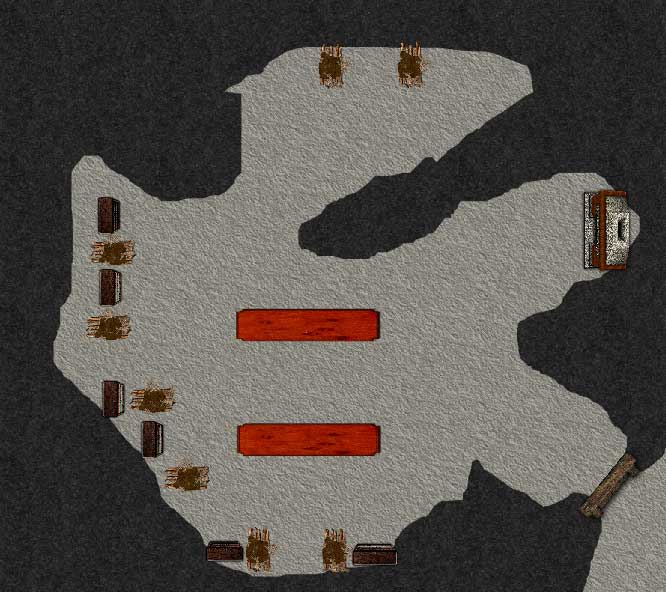
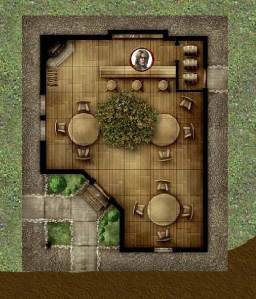
So, I needed to back up and draw some more.  I started with a tavern, using a Dungeon Tile image.  I called it the Shady Maple Inn and built it around a huge maple tree in the middle of the place.  It was built and owned by an elf who loved the tree and made it part of his establishment (this made me very happy for some reason).  The players had the possibility of meeting some bandits along the road, so I created a bridge encounter map.
There was also going to be an attack by some insects during a night spent camping in the forest, so I put together a forest encounter map with trees and bushes.

This would be everything the party would face, at least for the first session.  I figured that we would get through some decent fraction of the maps I had prepared.  After all, there was a lot to get through in the first session:

  • Character introductions
  • Determining how the party members know one another – past adventures together, etc.
  • Meeting the NPC who would ask for the party’s help
  • Getting from the tavern to the manor house where a minor noble was looking for aid (likely encountering bandits along the way)
  • Meeting the minor noble and learning about the family heirloom that had been stolen
  • Investigating near the manor house to learn more about the thieves
  • Tracking the thieves through the forest
  • Battling creatures overnight in the woods
  • Getting to the stronghold
  • Dealing with the front door defenses
  • Working their way into the depths of the keep

Now, I don’t know if it was the efficiency of running the game in MapTool with the projector or what, but we got through a LOT in one session!

We started playing at about 4:15 this afternoon.  We spent about 30 minutes on character introductions and party backgrounds.  Then the action started, and the players jumped on it.  No gallavanting about, chatting with random NPCs – they heard about a mission, pounced on it without asking questions and started to complete it.  They wisely figured out that they could take a boat up the river to the manor house, which meant that they could skip the bandit encounter at the bridge.  At the manor house, they investigated the theft of the family heirloom efficiently and moved on to the forest.

Here, they were set upon by some creepy crawlies at night.  The luck of the dice had this encounter happen during the first watch, which meant that everyone would be taking an extended rest afterwards (some of them had just started doing so).  This worked out pretty well, actually – since the extended rest was coming, everyone was free to blow daily powers and action points.  The attack came from some centipedes and rot grub swarms (set to appropriate levels for the party, of course).  Even after I brought in some extra centipedes in the second round, the PCs had no trouble beating them all up.

The next morning we had a little skill challenge to continue the navigation through the forest to the orcs’ lair.  The party just barely failed this skill challenge, which made for a cool encounter.  Instead of being able to walk right up to the front door and trying to figure out how to get through, their failure meant that orc archers in the guard tower saw them coming and got a surprise round on them.  This was excellent, because the archers with surprise were pretty darn scary.  Even though these are only level 4 creatures, they have a burst 1 attack (a hail of arrows, basically) that deals d10+6 damage to everyone in the burst that it hits, and I rolled a 9 and a 10 for damage for the two archers who fired into the group.  Suddenly our healer was down to 12 hit points (out of a maximum of 43) and the party was legitimately scared.

Despite the fear, the party had the right tools to handle this problem: Area attacks.  By the rules of the game, an area attack only requires that the spellcaster have line of effect to the origin square of the area burst (which the arrow slit grants), and then enemies inside the tower would not have cover from the area attack because it’s originating inside the tower.  Unleashing a few of these helped bring the archers down before they could raise the alarm.

The door to the stronghold was trapped, and I allowed some active Perception checks to notice the trap before just setting it off on everyone’s heads.  This was a bit generous on my part, but our games haven’t involved a lot of traps in the past and I felt like it was unfair to shock them TOO much by springing a trap when they would never think to look for one.  Now they’ll think about it!

Once inside, the party used some good Stealth to sneak up on the orc minions (two-hit minions, as is usual in my games) in the next room, who were distracted by their dice games.  For this battle, the minions went to the far side of the bridge and pulled it back across, attacking mainly from range (even though they’re not great at range).  I made it clear that the river is nasty and the party does not want to fall into it.  Again, the PCs beat up the bad guys before they could raise a further alarm.

The last battle of the evening took place in the orcs’ sleeping chamber.  This area was dark, as the night shift orcs were sleeping.  One orc was awake – the cook over in the kitchen area, preparing a foul-smelling stew.  The party again made good use of Stealth, letting the party’s Monk get a surprise attack on the cook.

This battle was a little more interesting, as the orcs who had been asleep quickly woke up and did their best to sneak toward the party in the dark.  The Monk ended up bloodied a couple of times, and the Warlock/Sorcerer got a little bit beat-up as well, but since the baddies kept clustering, they were mowed down by burst and blast attacks.  Who says you need dedicated controllers in a party?At this point it was a little after 9:15 PM.  It had been five hours since we had started playing, and we had taken about an hour-long break for dinner in the middle.  We played through four combat encounters, plus the background stuff and some role-playing, investigations and skill challenges.  And this was all with brand-new characters and players who were still figuring out what those characters can do.  I was amazed at how far the party had gotten.  This was as much of the adventure as I had prepared, so we called it a night at that point (playing a few games of Zombie Dice first).

Today was a great start for a new campaign!  I feel like everyone had a good time, and the MapTool / projector combo continues to be a big hit.

DM Lessons

  • Once you’re comfortable as a dungeon master, run your own homebrew games whenever possible.  Time constraints may make this hard, but don’t let a lack of confidence stand in the way.
  • Drop future adventure hooks liberally – even if you haven’t figured out exactly where they’ll lead yet.  See what piques your players’ interest, and run with those, abandoning the others.
  • Preparation is huge.  Know the layouts of combat areas and how the enemies will use them before the battle starts.  If you can do the mapping in advance (such as with MapTool, or even pre-drawing the maps on battle mats or paper) it will save a lot of time at the table.
  • Be prepared for players to come up with ways to skip over combat encounters, and let them do it if they find a way.  Don’t get too attached to a battle.  You can probably find an excuse to use it again at some point in the future!
  • If you’re comfortable with it, technology at the table can automate the boring parts and help everyone get to the fun faster.
http://onlinedm.wordpress.com/2010/08/03/two-hit-minions/
Starting my first in-person campaign

The day has come: I’m about to serve as dungeon master for an ongoing, in-person campaign.  I’ve been running my online campaign through the War of the Burning Sky via MapTool and Skype for nine sessions over the past few months, and it’s gone very well.  I’ve also run one-shot Living Forgotten Realms games in-person at my local store and at TactiCon.

This is different.  This is in-person and ongoing, playing with people I already know (including my wife).  We’ve played two short campaigns with this same group of people.  Nate ran the first one, which took our characters halfway through third level in a largely home-brew campaign inspired by some published stuff.  That one ended when my character died and everyone else just felt like trying new characters and a new person wanted to DM.

The second campaign was run by Bree (Nate’s wife) and consisted of several of the Chaos Scar adventures.  That took our characters from first up to third level as well.  We wrapped that one up this past Saturday, with Bree deciding to step down as DM because of her other time commitments.  I had previously offered to try my hand at running the game if she didn’t have time, and she took me up on the offer.

So, here I am.  I will definitely be using my projector rig and MapTool to run the games.  I love the rig, and I love MapTool.  The next question is, what campaign will I run?

I’m considering running War of the Burning Sky (WotBS) since I’m already familiar with it and I have lots of maps and monsters already built in MapTool (meaning easier prep for me).  The complicating factor there is that this new campaign is going to start with the characters at level 5, and WotBS starts at level 1.  This gives me a few options.

  • Drop them in the middle of the second adventure, when WotBS assumes characters are around level 5, hand-waving the back story
  • Start them at the beginning of WotBS but skip most of the encounters from the first adventure, increasing the difficulty of those encounters that I do run to be fun for fifth-level characters, eventually getting synched up with level and adventure sometime around level 6.
  • Run something else.

I definitely don’t like the first option – dropping them in the middle of the story.  That just feels wrong.  I’m torn between the second and third options.  The second option wouldn’t be too hard.  I already have maps for the encounters I want to run, and I would just have to create new monsters (or level up the ones that I have).  I can do that… but I’m trying to decide how much fun that would be.  I’d really like the in-person campaign to be more free-form than that.

I could run a different published adventure.  More Chaos Scar?  Maybe Scales of War?  Those leave me feeling a little cold, frankly.  Tomb of Horrors is interesting to me, but that’s for higher-level characters (hey, this group will level up eventually…).

If I don’t go with WotBS, I think I’m going full-on homebrew.  I mentioned a few months ago that I discovered a complete adventure I had written (but never run) when I first tried D&D Third Edition a long time ago.  It’s actually pretty well fleshed out with nice maps and everything, and I could probably use it for this game.  I’d have to pick completely different monsters, of course, not just because this is a Fourth Edition game but also because I wrote the adventure for first-level characters.  I can do that, though.  That one adventure would probably last a couple of sessions, which would give me time to start planning ahead.

The more I think about it, the more I’m feeling like the homebrew option will be more fun.  Of course, it will be a lot more work, too!  What do you think?  Go with what I know?  Or go with the treasure from the past?

Dice Sprites

Aren’t these the most adorable things you’ve ever seen to keep your dice company?

A few months ago I saw a post on DM Samuel’s blog about Dice Sprites, and I thought they were pretty cute.  I showed the post to my wife Barbara, who also found them adorable.  Since her birthday was coming up, I thought that getting her a custom set of sprites for some of her dice would be an excellent idea.

I visited the web site of the “Claymancers” and sent an email to Kirai and Stark to ask about ordering some custom sprites for my wife.  They showed me some of the photos of sprites from their Facebook page so that I could get an idea of what they could do and figure out what I would like.  As you can see, I settled on three custom sprites:This is a sprite that I left to the Claymancers’s imagination.  I ask for something to sit on top of a d6.  He’s great!

This is a kitten-inspired sprite, with the d20 being like a ball of yarn for the sprite to play with.  My wife fosters kittens for the local animal shelter, and we have four cats of our own.

This one is a dragon sprite, hovering over his treasure.  I love the wings and tail – this guy is so detailed!

If you’re looking for a creative gift for a dice lover in your life, I highly recommend Dice Sprites.  They’re much more durable than I expected (made of some kind of plastic, I think, definitely not ceramic or anything like that) and they can be custom made.  The custom sprites that aren’t attached to dice went for $15 apiece (if I had wanted the die to be part of the sprite, it would have been $10 apiece).  I sent the Claymancers photos of my wife’s favorite dice so that they could pick colors to match, and you can see that they did fantastic work.

Thank you, Claymancers!