WATE 2-4: Factotum the Bard is back on stage!

This past Thursday evening, I had the rare opportunity to play D&D as a player rather than a DM. My wife has been feeling unwell for a while, so I try to mostly stay home with her in the evenings, but on this particular night she was getting together with another friend. A new-to-me Living Forgotten Realms module was being run at the friendly local game store, Enchanted Grounds, so I headed on down for a game.

Spoilers ahead for WATE 2-4 Stage Misdirection

The particular adventure we were playing was set in Waterdeep, the hometown of my beloved bard Factotum. This was the first time I had gotten to play an adventure with Factotum in Waterdeep, and I was excited.

I learned that the adventure begins with the PCs having various jobs in an opera house. “Star of the show” wasn’t an option, so Factotum settled for a spot in the orchestra pit with his horn, while the rest of the party either served as bouncers or sat in the audience. I asked the DM if Factotum could be an understudy, and he was fine with it. Excellent!

Imagine my delight, then, when the opening scene of the adventure involved an opera where a man was about to duel his sweetheart’s father, and the man fell to the stage – apparently dead after drinking poisoned wine. The poisoned wine was not part of the show, and it was soon accompanied by an angry crowd being riled up by some thugs. While the rest of the party sprang into action fighting the thugs, Factotum did the natural thing for him:

He jumped on stage, picked up the fallen actor’s sword, and continued the faux sword fight with the actor playing the love interest’s father.

He feinted and twirled, finding the time to shout words of majesty to his ailing compatriots and to sing powerfully to push interlopers off the stage (Majestic Word and Staggering Note), but largely focused on entertaining the crowd.

Yes, this adventure was tailor-made for Factotum.

The rest of the evening was a fun investigative romp, ultimately culminating in a fight with other actors. Factotum attacked one man who hadn’t directly menaced anyone yet, simply because the man was a terrible actor – an unforgivable offense.

WATE 2-4 is an adventure that definitely benefits from having a bard in the party. I’m sure it could have been fun without one, but I was really glad I’d brought Factotum to the table. It’s an opportunity for his fame to grow!

MapTool: Using the latest version

I first discovered MapTool in May 2010. At the time, the most up-to-date version of the program was good ol’ 1.3.b66. That’s what I downloaded, and that’s what I kept using for about a year and a half.

Why? Well, first of all, it worked. Second, I had heard that certain things that worked in older versions (macros, etc.) would not necessarily work if you tried them out in a newer version. Third, new builds kept coming out regularly, and I didn’t want my players to have to constantly download new programs just to connect to my game.

Recently, I was browsing the MapTool wiki and forums and found some discussion about the program’s performance. Specifically, I saw a note that moving a whole bunch of tokens at once was faster in newer builds.

Now, I don’t have many complaints about MapTool, but it’s definitely been a major annoyance to want to move the entire party from one section of the map to another and having to wait 30 seconds for MapTool to make this happen. So, I downloaded the current version of MapTool, 1.3.b86 (as of this writing), which has been the most recent version for months (and thus pretty stable).

Woo hoo – I can now move mobs of tokens across the map instantly! I can also run a macro on a whole bunch of tokens at once – such as when I have a bunch of enemies that are invisible to the players and I want to run my “Toggle Visibility” macro on all of them. Previously, the tokens would blink into existence one by one (which was a kind of neat effect, I suppose, but not really what I wanted). Now – poof, they all appear! Awesome!

Best of all, I haven’t found any macros that have broken yet. I try to keep my macros pretty straightforward, of course, and I’m guessing that helps. But every adventure I’ve opened so far in 1.3.b86, even though it was created in 1.3.b66, has had no problems.

The real test will come on Friday, when my regular players will have downloaded the new software and will try playing with it together. Honestly, I’m expecting it to be a non-issue, but we shall see.

So, the moral of the story for me is: Use the latest version of MapTool, as long as it’s been out for, say, a month with no updates. I don’t want to update constantly, but in this case the update is definitely worth the trouble.

MapTool macro: Attack and defense modifier states

More MapTool macro fun! Yes, I’m a nerd and proud of it.

In a game like Dungeons and Dragons 4th Edition, it’s pretty common to get temporary bonuses to attack rolls or defenses. When you’re playing with pen and paper, you have to keep track of these yourself. When you’re using MapTool, the program can help.

Now, I’m sure that some of the snazzier MapTool frameworks out there will handle temporary modifiers in super-fancy ways that actually change the calculation of attacks based on these modifiers and so on. I’m not looking for any of that. I’m simply looking for a visible reminder on a token that it has a temporary bonus or penalty.

I started creating +2 attack and-5 attack and +2 defense states in a piecemeal manner months ago. As PCs and monsters in my games started getting powers that could apply these bonuses or penalties, I created states that would remind me of them. I would then turn these states on and off very manually – right click on the token, find the right state, click on it. Repeat to turn it off.

Well, I’m sick of that, so I decided to automate the process.

First, I created a set of 20 token states: +1 to +5 attack, -1 to -5 attack, +1 to +5 defense and -1 to -5 defense. They look something like this:

      

Depending on whether I’m using MapTool online or with my projector setup, I either display these states as 3×3 grid images (online) or 2×2 grid images (projector – the larger images show up better). The red boxes are for attack (or damage) and the blue boxes are for defenses. I use 80% opacity, so you can still make out a little of the token art behind the states.

A monster with +5 to attack, one with -3 to defense, and one with +2 to attack and defense

For a while, I was creating individual toggle buttons for my states. Click a token, then click the “+2 Attack” button, and the +2 Attack state will toggle on or off. Now that I have 20 of these states, I decided to streamline. Rather than 20 buttons, I have two: One to set attack modifiers and one to set defense modifiers.

Attack bonus macro (download the macro)

[h: x=input("NewMod|0|What is the token's new attack modifier?")]
[h: abort(x)]

I start by asking for the new attack modifier in a pop-up; if the user clicks the Cancel button, the macro ends. Note that the user can specify a +2 bonus as either “2” or “+2”; the macro works either way.

[h: SelectedTokens=getSelected()]
[FOREACH(TokenID, SelectedTokens, " "), CODE:

I create a list of token IDs called SelectedTokens for however many tokens are currently selected, and then I loop through each of these tokens to perform the same code on them. This lets me apply (or remove) a bonus or penalty to a bunch of tokens at once.

 {[if(NewMod>5 || NewMod<-5), CODE: {[assert(1==0,add("<b>Error</b>: Attack modifier must be between -5 and +5"),0)]}; {}]

I throw off an error message if the user tries to enter a number over 5 or under -5, since that’s the range of states I’ve created.

  [h: OldMod=getProperty("AttackState",TokenID)]
  [h: OldState=if(OldMod>=0, add("+", OldMod, " Attack"), add(OldMod, " Attack"))]
  [h: NewState=if(NewMod>=0, add("+", NewMod, " Attack"), add(NewMod, " Attack"))]

I figure out what the current value of the token’s AttackState property is (a number from -5 to 5), and then convert this to a string like “+2 Attack” or “-3 Attack”. This corresponds to the names of the states in my campaign file. I do the same for the new attack modifier, getting the appropriate state name.

  [h, if(OldMod==0), CODE:{}; {[h: setState(OldState,0,TokenID)]}  ]
  [h, if(NewMod==0), CODE:{}; {[h: setState(NewState,1,TokenID)]}  ]

If the new or old modifier is zero, I don’t try to change it (since no state is displayed on the token for a zero bonus). Otherwise, I turn off the old state (setting it to false, or 0) and turn on the new state (setting it to true, or 1).

  [h: setProperty("AttackState", NewMod, TokenID)]
    }
   ]

I set the value of the AttackState property to whatever the user entered, so that the macro can reference that property the next time it’s run. I then close the CODE block and the FOREACH loop that I started at the top. Voila!

The whole macro is as follows:

[h: x=input("NewMod|0|What is the token's new attack modifier?")]
[h: abort(x)]

[h: SelectedTokens=getSelected()]
[FOREACH(TokenID, SelectedTokens, " "), CODE:
 {[if(NewMod>5 || NewMod<-5), CODE: {[assert(1==0,add("<b>Error</b>: Attack modifier must be between -5 and +5"),0)]}; {}]
  [h: OldMod=getProperty("AttackState",TokenID)]
  [h: OldState=if(OldMod>=0, add("+", OldMod, " Attack"), add(OldMod, " Attack"))]
  [h: NewState=if(NewMod>=0, add("+", NewMod, " Attack"), add(NewMod, " Attack"))]
  [h, if(OldMod==0), CODE:{}; {[h: setState(OldState,0,TokenID)]}  ]
  [h, if(NewMod==0), CODE:{}; {[h: setState(NewState,1,TokenID)]}  ]
  [h: setProperty("AttackState", NewMod, TokenID)]
    }
   ]

Defense bonus macro (download the macro)

The defense macro is exactly the same as the attack macro – just replace “Attack” with “Defense”.

[h: x=input("NewMod|0|What is the token's new defense modifier?")]
[h: abort(x)]

[h: SelectedTokens=getSelected()]
[FOREACH(TokenID, SelectedTokens, " "), CODE:
 {[if(NewMod>5 || NewMod<-5), CODE: {[assert(1==0,add("<b>Error</b>: Defense modifier must be between -5 and +5"),0)]}; {}]
  [h: OldMod=getProperty("DefenseState",TokenID)]
  [h: OldState=if(OldMod>=0, add("+", OldMod, " Defense"), add(OldMod, " Defense"))]
  [h: NewState=if(NewMod>=0, add("+", NewMod, " Defense"), add(NewMod, " Defense"))]
  [h, if(OldMod==0), CODE:{}; {[h: setState(OldState,0,TokenID)]}  ]
  [h, if(NewMod==0), CODE:{}; {[h: setState(NewState,1,TokenID)]}  ]
  [h: setProperty("DefenseState", NewMod, TokenID)]
    }
   ]

I hope this type of macro is useful for folks out there. As always, let me know if you have questions about my macros or requests for new macros. I love this kind of thing, as you can no doubt tell!

Note: All macros were generated with version 1.3.b66 of MapTool, but they work with 1.2.b86 as well.

Download the properties for online games with these states

Download the properties for projector games with these states

Download my complete campaign template for online games

Download my complete campaign template for projector games
Rejected for DDI – and I feel fine!

Edit: The final, polished version of the adventure can be found at this link.

I decided to submit the third adventure in my Staff of Suha trilogy to Dungeon Magazine for their consideration. The timing was right, after all; the adventure was ready to go at just about the time the submission window would be opening (October 1).

I spent a lot of time in September trying to polish the adventure itself, figuring that if I could attach the finished adventure to the “pitch” email it would help my chances. I ran the adventure four times and had a couple of friends and a couple of readers from my blog look over it and provide really useful feedback.

Since I live in the Mountain time zone, the submission window opened at 10:00 PM Friday night for me (midnight Eastern time). I was finishing my Friday night game that I run via MapTool at the time, after which I read Chris Perkins’ editorial about submitting pitches. I had already written the pitch weeks before, so I went ahead and submitted it exactly one hour after the window opened. The entirety of my email to submissions@wizards.com follows:

Descent Into Darkness – an adventure for 8th-10th level characters – 5,000 – 6,000 words

The powerful wizardess Tallinn seeks adventurers to be teleported into the Underdark bearing a powerful magical artifact, the Staff of Suha. The mission: Find three other artifacts that have been stolen by unknown creatures, likely in an effort to recreate a teleportation device once used by a long-dead drow sorcerer to bring his foul armies to the overworld in conquest. The other three artifacts (Orb of Oradia, Chalice of Chale and Shield of Shalimar) must be recovered or destroyed, and the forces behind their theft must be stopped.

The adventurers discover that the powerful beholder Ergoptis has enslaved drow, diggers (new insectoid monsters), halfling thieves and mindless duergar as soldiers and hunters of artifacts. The party must fight their way through treacherous traps and puzzles to ultimately face Ergoptis and its underlings in a room dominated by a ziggurat, with a magma river crossed by bridges and floating platforms. Can they recover the final artifact and escape or destroy Ergoptis before the one-hour time limit on their teleportation ritual runs out? Or will the beholder simply add the adventurers to its army of enslaved warriors and continue its plans for domination?

Descent Into Darkness includes four new artifacts, an all-new monster (the digger), a find-the-path puzzle with custom runes and an exciting final encounter with an evil beholder.

Link to a PDF of the current draft of the adventure, complete with maps, stat blocks, puzzles, etc: http://dl.dropbox.com/u/6875434/Descent%20into%20Darkness%20Submission.pdf

Michael, the OnlineDM

http://onlinedm.wordpress.com/

That was the pitch. I wondered how long it would take to get a response; they said that they’ll reply to everyone within two months of the close of the submission period, which meant that I could theoretically have to wait until the end of January.

Fortunately, I didn’t have to wait that long. Monday morning I received the following email from Chris Perkins:

Hi Michael,

Thanks for the adventure proposal. The “artifact hunt” story doesn’t really grab me, so I’m going to pass on this one. We see a lot of artifact hunts, and four artifacts seems a bit much (the write-ups for them alone would eat up thousands of words of text). Also, we already have an adventure in the works featuring a beholder villain.

Regards,

Chris Perkins
D&D Senior Producer
Wizards of the Coast LLC

I’ve got to say, I felt pretty good about that. No, they didn’t accept my adventure, but Chris took the time to explain what he didn’t like about the adventure. “Collect the artifacts” doesn’t interest him, and they have another adventure coming with a beholder villain. That’s totally fair.

I came away from this feeling pretty good. The best part was that I got the response quickly, which means that I can release the adventure here on the blog!

The version I actually submitted to Chris is at this link. It’s set up specifically for upper-heroic parties.

However, I also assembled the adventure in a way that can be run with any level in heroic tier (though I feel that the adventure runs best at level 6 or higher). That version can be downloaded here.

I’ll talk more about the adventure itself in a later post, but I wanted to share my thoughts about the process for anyone else who wants to submit an adventure to Dungeon.

First, just focus on the pitch, not the finished product. I’m sure that Chris didn’t even look at the link I sent him, and I don’t blame him for that. He has tons of submissions to go through, and he’s not going to read a sixteen-page PDF for each submission.

Second, be creative. It seems like the key is to pitch something that makes the editor say, “Wow, I’ve never seen anything quite like that before!” The key is novelty, not execution, when it comes to the pitch. I feel like I’ve put together a fun, solid adventure, but the things that make it fun and solid (cool combats, puzzles, magic items, etc.) aren’t the things that make a good pitch. It’s a fairly run-of-the-mill adventure premise, and that’s not going to get it past the initial screen.

Third, do your research. In my case, my adventure was rejected in part because there’s an upcoming adventure with a similar villain, which I couldn’t have known about. But I’m sure that if I had pitched an adventure whose villain was similar to something done in the past few issues of Dungeon, it would have also been rejected. And there’s no excuse for me not knowing that.

Anyway, I’m glad I went through the submission process, and I’m especially glad that Chris handled my rejection letter the way he did – quickly, professionally, and with some helpful feedback. If I get any truly inspired ideas for adventures, I might pitch again. But this process was a good one for me.

MapTool macros: Numbers on tokens – elevation, etc.

Ah, how I love to geek out with new MapTool macros!

Some months ago, I was going to be running a Living Forgotten Realms adventure that involved underwater combat, which meant that elevation could come into play. I wanted to have a visible way of displaying a token’s elevation right on the token itself, so I settled on using some token states that would display a number from 1 to 9 on the upper right corner of the token, representing its elevation.

However, I later realized that having a generic number to stick on a token is a useful thing. For instance, a later battle with a hydra showed me that it would be nice to have an indicator for the number of heads. Furthermore, I’d like to be able to display higher numbers as well, just in case.

Three monsters - one with no elevation, one with elevation 29 and one with elevation 4

Enter the new Elevation macro. First, I should explain that this macro requires you to have a certain set of token states (downloadable as a full set of properties and states here for online use or here for projector use) that include “_0” through “_9” for the ones digit and “0_” through “9_” for the tens digit. You’ll need an Elevation property on your token. And then you’ll need a macro like this one, which you can keep on either the Campaign or Global window.

[h: x=input("NewElevation|0|What is the token's new elevation?")]
[h: abort(x)]

The code above brings up an input window that asks for the new elevation and ends the macro if the user chooses the Cancel option.

[h: SelectedTokens=getSelected()]
[FOREACH(TokenID, SelectedTokens, " "), CODE:

This creates a list of token IDs called SelectedTokens, then starts a loop through each of the tokens, performing the following code on them. Thus, you could set the elevation for a group of three monsters all to the same level at once if you wished.

 {[h: OldElevation=getProperty("Elevation",TokenID)]

Figure out the token’s current Elevation property; assign it to the OldElevation variable.

   [if(NewElevation>99), CODE: {[assert(1==0,add("<b>Error</b>: Elevation cannot be higher than 99"),0)]}; {}]
   [if(NewElevation<0), CODE: {[assert(1==0,add("<b>Error</b>: Elevation cannot be lower than 0"),0)]}; {}]

Give an error message if the user tries to enter a new elevation that’s over 99 or less than zero.

   [h: OldTensDigit=FLOOR(OldElevation/10)]
   [h: OldOnesDigit=OldElevation-10*OldTensDigit]

   [h: NewTensDigit=FLOOR(NewElevation/10)]
   [h: NewOnesDigit=NewElevation-10*NewTensDigit]

Figure out the tens digit and ones digit of both the old and new elevations. I don’t know if MapTool has a modulus function, so I went with an alternative way of getting the ones digit (pretty elegant in the end, I think).

   [h: OldOnesState=add("_", OldOnesDigit)]
   [h: OldTensState=add(OldTensDigit, "_")]

   [h: NewOnesState=add("_", NewOnesDigit)]
   [h: NewTensState=add(NewTensDigit, "_")]

Since the states are called “_1” and “_2” and so on for the ones, and “1_” and “2_” and so on for the tens, I need to concatenate some strings to set up the names of the old and new states (in preparation for removing the old states and adding the new).

   [h: setState(OldOnesState,0,TokenID)]
   [h: setState(OldTensState,0,TokenID)]

   [h: setState(NewOnesState,1,TokenID)]
   [h: setState(NewTensState,1,TokenID)]

And here I actually set those states. The old states get set to zero (turned off) while the new states get set to one (turned on). Thus, if the token is changing from an elevation of 13 to an elevation of 20, I’m turning off “1_” and “_3” and turning on “2_” and “_0”.

   [h: setProperty("Elevation", NewElevation, TokenID)]

Since I’m changing the elevation states, I need to make sure I also change the elevation value on the token itself so that the macro will work again the next time I run it (the new elevation after this go-through will become the old elevation for the next time I run the macro).

   [if(NewElevation<10),CODE:{[h: setState(NewTensState,0,TokenID)]};{}]

This is just for prettiness’ sake; if the new elevation is between 1 and 9, I want to drop the zero from the tens place so the elevation will show up as “7” instead of “07” for instance.

   [if(NewElevation==0),CODE:{
     [h: setState(NewOnesState,0,TokenID)]
     [h: setState(NewTensState,0,TokenID)]};{}]

Further prettiness; If the new elevation is zero, I want no elevation states to be displayed at all, so I now remove the new states that I just added.

    }
   ]

And here I close the FOREACH loop and the Code brackets that I started way up at the top.

This macro is useful any time you want to stick a visible number on a token for whatever reason. Now that I’ve got it working, I’ll be interested to see how often it will come up. My suspicion is that I’ll end up using it a lot.

As always, please let me know what macro questions you have or any requests for new macros. I love this stuff!

Note: All macros were generated with version 1.3.b66 of MapTool.

Campaign template for online use, including this and all of my other macros

Campaign template, formatted for projector use

Campaign properties for online use

Campaign properties for projector use

Download the elevation macro alone

The full elevation macro code:

[h: x=input("NewElevation|0|What is the token's new elevation?")]
[h: abort(x)]

[h: SelectedTokens=getSelected()]
[FOREACH(TokenID, SelectedTokens, " "), CODE:
 {[h: OldElevation=getProperty("Elevation",TokenID)]
   [if(NewElevation>99), CODE: {[assert(1==0,add("<b>Error</b>: Elevation cannot be higher than 99"),0)]}; {}]
   [if(NewElevation<0), CODE: {[assert(1==0,add("<b>Error</b>: Elevation cannot be lower than 0"),0)]}; {}]

   [h: OldTensDigit=FLOOR(OldElevation/10)]
   [h: OldOnesDigit=OldElevation-10*OldTensDigit]

   [h: NewTensDigit=FLOOR(NewElevation/10)]
   [h: NewOnesDigit=NewElevation-10*NewTensDigit]

   [h: OldOnesState=add("_", OldOnesDigit)]
   [h: OldTensState=add(OldTensDigit, "_")]

   [h: NewOnesState=add("_", NewOnesDigit)]
   [h: NewTensState=add(NewTensDigit, "_")]

   [h: setState(OldOnesState,0,TokenID)]
   [h: setState(OldTensState,0,TokenID)]

   [h: setState(NewOnesState,1,TokenID)]
   [h: setState(NewTensState,1,TokenID)]

   [h: setProperty("Elevation", NewElevation, TokenID)]

   [if(NewElevation<10),CODE:{[h: setState(NewTensState,0,TokenID)]};{}]

   [if(NewElevation==0),CODE:{
     [h: setState(NewOnesState,0,TokenID)]
     [h: setState(NewTensState,0,TokenID)]};{}]
    }
   ]

D&D Encounters – Lost Crown of Neverwinter – Week 8

Edit 10/1/2011: Apparently WotC is NOT changing their policy of requiring that D&D Encounters be run on Wednesday nights, as I had originally mentioned in this post. My mistake.

I ran D&D Encounters at my friendly local game store, Enchanted Grounds, all summer long, and I loved it. I love the mini-sessions for prep purposes, I enjoyed the story, and most of all I enjoyed helping new players learn the game. One of the people I met via encounters is now good friends with my wife and I, along with his wife.

Thus, I was sad to have to give up DMing Encounters this fall when my Wednesday night bowling league started up. I agreed to serve as a backup DM in case any of the regular folks were out of town, though, and this week I got the call. Put me in, coach – I’m running a game!

My party consisted of four PCs – two warpriests, a bladesinger and a thief. They began the session by taking a short rest in a boat house in a swamp, where they had come in search of the Dead Rats gang. The boat house held only a table and a rug, and a sharp-eyed PC noticed the rug sagging in the middle. Pulling it aside revealed a stone pipe with metal rungs forming a ladder down into darkness.

The adventurers successfully negotiated crumbling ceilings, narrow ledges, tough climbs and tricky tracking with no problem and eventually emerged into the sewers proper. They noticed some movement in the water – two pairs of eyes staring at them from just above the water’s surface. As the dwarf warpriest pushed forward, the eyes revealed themselves to be attached to a pair of crocodiles, and a swarm of hundreds of rats poured out of some pipes in the walls to join the fun. The PCs could also hear noises inside a larger pipe, as if something else was making its way toward them.

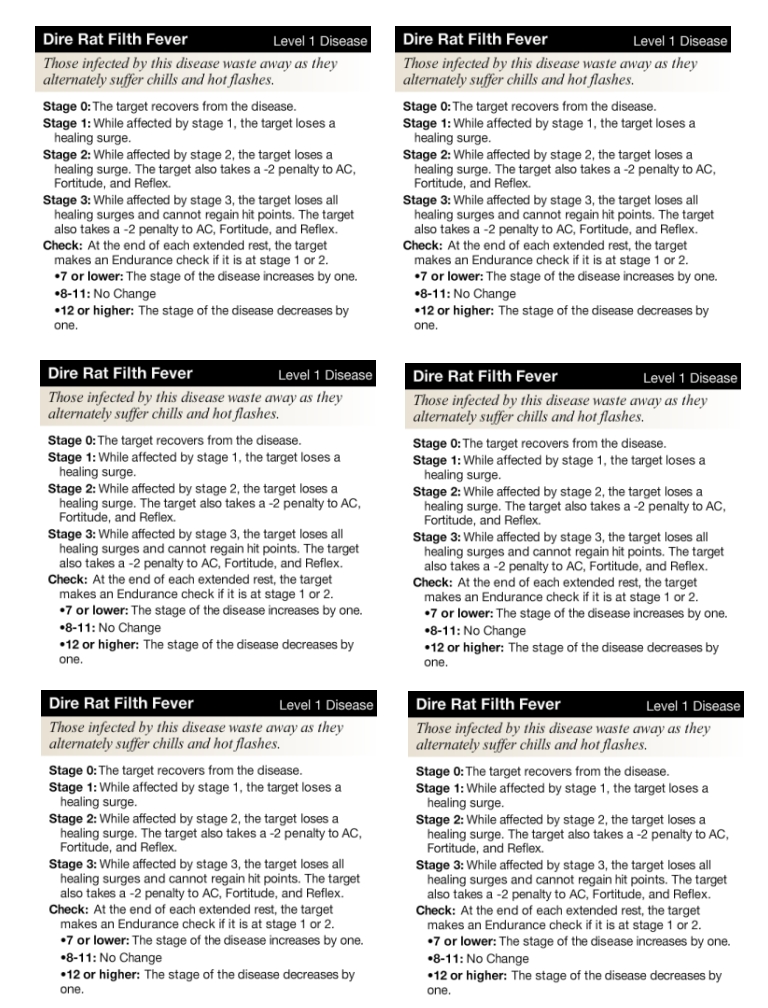
The party thief decided to try to jump across the sewer channel but failed, landing in the water next to the large pipe – which was revealed to contain a dire rat. The rat bit the thief (one exposure to Dire Rat Filth Fever) and was soon joined on the other side by a crocodile who clamped its jaws around the poor thief’s leg. Ouch!

The rest of the party was dealing with the swarm and the other crocodile, but the drow warpriest did wade into the muck and drop a cloud of darkness to help the thief get away. No luck, though – the crocodile’s next turn of grinding its jaws down on the delicious thief left the sneaky bugger unconscious (and getting more exposure to disease from the dirty water).

Eventually the thief was healed and got himself out of harm’s way and the rest of the party started taking care of the bad guys one by one – first the dire rat, then the swarm, then finally the crocodiles. And there was much rejoicing!

At the end of the encounter, since the thief had been exposed three times to Dire Rat Filth Fever (twice from rat bites and once from bleeding in the dirty water) I invoked my house rule: He only had to make one saving throw to avoid infection, but because of the two extra exposures, the saving throw was at a -2 penalty. It was a moot point, as he rolled a 7 on the die and found himself infected.

In prepping for the game, I realized that it would be a pain in the butt for a typical Encounters player to have to deal with a disease. “Wait, what do I have to roll to get better? And what happens if I get worse?” So, I used the awesome Power2ool to create disease cards to hand out to any players who get infected:

While it was only a one-week return to the Encounters DM table, I had a lot of fun. It was also nice to have more people compliment me on my projector setup + MapTool for my in-person games. The encounter itself wrapped up within an hour, so I was even able to make it to bowling on time.

Best of all, the coordinator at the store is thinking about moving Encounters to Tuesday nights in the future, since WotC has given store owners more flexibility about when they run the program. That would be awesome, since I’d be able to get involved again!

Edit: However, it looks like this is not a new WotC policy after all, and Encounters is still required to be run on Wednesday. Well, poop.

OnlineDM’s house rules – Part 1

Every DM has some house rules that they like to use at their table, so I thought I’d share some of mine here on the blog.

If a creature is force-moved into hazardous terrain (fire, off a cliff, etc.) they get a saving throw to fall prone instead of going into the hazard. This is a standard rule. However, it’s annoying when a character has a power that force-moves the creature multiple squares, but a single saving throw negates those extra squares entirely.

  • House Rule: If a forced movement power would move a creature extra squares into hazardous terrain, the extra squares of movement can be applied as a penalty to the creature’s saving throw. Thus, if a creature is at the edge of a cliff and you push it three squares, you can push it one square (off the cliff) and give the creature a -2 penalty to the saving throw to avoid going over the edge (so it needs a 12 or better to save itself).
A related issue comes up with diseases from creatures like rats and lycanthropes. If you are hit by one of these creatures’ diseased attacks, you make a saving throw at the end of the encounter to avoid contracting the disease. It doesn’t matter how many times you were exposed to the disease; a single saving throw will save you.
  • House Rule: If a creature is exposed to a disease multiple times in an encounter, each exposure beyond the first imposes a -1 penalty to the creature’s saving throw against contracting the disease at the end of the encounter. Thus, if a creature is bitten four times by Dire Rats in a combat, the creature will make a saving throw with a -3 penalty at the end of the encounter to avoid contracting Dire Rat Filth Fever (needing a 13 or better to avoid the disease).
Lots of people have complained about action-denying conditions like Dazed, Stunned and Dominated. I have my own way of running the Dominated condition:
  • House Rule: If an effect would dominate a creature, instead that creature takes a free action to move up to its speed (provoking no opportunity attacks along the way) and then use any at-will ability of the dominator’s choice against a target of the dominator’s choice. Any attacks made in this way have a +2 bonus to hit and +5 bonus per tier to any damage (+5 at heroic tier, +10 at paragon, +15 at epic). If the dominated condition is “save ends”, then the creature still makes a saving throw at the end of its turn to end the condition. If it fails the saving throw, it takes another free action at that point to move and use an at-will ability of the dominator’s choice with the appropriate bonuses. It can still take opportunity attacks and flank and does not grant combat advantage (basically, the domination only applies while it is taking its dominated action).
I’m always looking for other suggestions for cool house rules to make the game more fun, so if you have any that you like, please share them in the comments!

Running online D&D: Weekly prep

I’ve talked a fair amount on my blog about macros that I’ve programmed in MapTool for my online games and recaps of adventures that I’ve run, but I realized that I haven’t spent any time talking about the prep process. Preparing to run a game online has a lot in common with an in-person game with vinyl mats and minis, but it definitely has its differences.

1 week before the game

I figure out what I’m going to be running. For my longest-running online game, this is easy; we’re running EN World’s War of the Burning Sky campaign and have been for over a year. I do still need to make sure I’ve read far enough ahead in the campaign to know what’s coming in the broad sense, but I try to be good about staying ahead of things there.

For my other online games, this might mean picking out a one-shot game (like a Living Forgotten Realms adventure) or actually writing my own adventures (a topic for another blog post).

This is also the time that I reach out to the online players about any changes they need to make to their characters. For instance, if they’ve leveled up after the last session, I remind them to tell me what choices they’re making for their characters. This is a difference between an online game and an in-person game; online, I have to maintain the tokens for the PCs and add new powers, adjust stats, etc. I also talk about magic items that the party acquired in the previous session and see which PC is going to be using them (so I can update their tokens).

3 days before the game

I send out an email to the group, announcing that there will be a session at our usual time (6:00 PM Mountain Time on Friday night for me and the person in South Dakota; 5:00 PM for the person in California; 7:00 PM for the people in Indiana and Texas, 8:00 PM for the people in New Jersey and Florida, and 9:00 AM Saturday for the person in Japan), asking who will be able to attend. I usually get a couple of responses right away and the rest trickle in over the next couple of days. Sometimes I’ll get a “maybe” (there’s a possible schedule conflict, but they might be able to come – this is usually a “no” in the end). I have a total of seven players, and we usually have 4-5 show up each week. One of the seven is almost never there, and four are almost always there; the other two are there most of the time, but not all of the time. This works for us, though I know some DMs don’t like it if players are absent irregularly. This is why I have seven players! We can still game even if three people are unavailable.

1-2 days before the game

I do my actual prep work (sometimes I get this done earlier, of course). This involves a few things:

  • Updating PC stats if the players have sent them to me after a level-up
  • Updating PC treasure if the players have decided on what they’re using
  • Setting up the maps for the next few encounters (easy for War of the Burning Sky, since decent JPG versions of the maps are available)
  • Building monsters for the next few encounters using my handy-dandy monster construction macro

For some reason, I used to procrastinate more about the PC stuff than the map and monster stuff. When the PCs hit paragon tier, I actually canceled a session so I could use that four-hour time slot to work on their PC tokens. It’s gotten better since I’ve changed my PC properties to be easier to level up (defenses now scale automatically with level, for instance), but there was a time when I almost wanted to stop running online games just because of the extra layer of work on the DM to update PC tokens. It’s better now, though.

The new monster macro has made building the monsters way easier and actually more fun. I also enjoy the process of using TokenTool to create cool-looking monster tokens from images I find online. I’m sure lots of these images are copyrighted and such, but I’m only using them in my own game (this is part of the reason I don’t distribute lots of monster tokens on my blog – well, that and laziness).

The day of the game

Since our game starts at 6:00 PM my time, I go to work early so I can leave at 4:00 PM. It only takes me 15 minutes to get home, at which point I’ll chat with my wife briefly and help take care of household tasks (feed the cats, figure out dinner). This usually leaves me at the computer by around 5:00, giving me time for last-minute prep. If there are any monsters I haven’t done yet, I’ll try to put those together quickly. If I already have a good image for the monster, it tends to take about 5 minutes per monster type to assemble.

If all goes well, I like to spend the time from 5:30 onward re-reading the material I’ll be running that evening. War of the Burning Sky is a very story-heavy adventure, and I want to make sure I understand the various NPCs and the branching points of the tale so that it all makes sense during the game.

At 5:45, I start up the MapTool server so that my players can connect. It’s not at all unusual for one or two people to be ready to go right at that time, and we might chat a bit in the text window of MapTool until start time, or they might say, “Hi, I’m here, but I’m going to be busy with something else for the next few minutes.” I also might say, “Okay, the server is up, but I’m still preppping! Please talk amongst yourselves. I’ll give you a topic: A half-elf is neither a halfling nor an elf. Discuss.”

At 6:00, assuming we have at least 3 players on MapTool, I’ll start the Skype audio call so we can talk to each other… and away we go!

Game on!

After that, we play D&D for four hours. Honestly, the online experience is darn near as good as the in-person experience for me. We still get to know each other out-of-game and chat as friends. Role-playing still happens. Combat is still exciting – and pretty quick, too, thanks to the software handling a lot of the math. It’s a ton of fun, and while I also enjoy in-person games, my online game is my longest-running campaign by far.

I’ll talk in later posts about the process of running a session, but I hope this window into the online game prep process helps to show you what it’s like. Give online D&D a try sometime – it’s a ton of fun!

D&D community follow-up discussion

Little did I know that sharing my feelings about my little place in the online D&D community would lead to so much discussion! I think most of the discussion was really generated by Adam Page’s guest post after my original post, but still, it’s been very interesting to hear this issue discussed on the Haste podcast and the Dungeon Master Roundtable / 4 Geeks 4e podcast.

Here are a few clarifications and follow-up thoughts I wanted to share.

First, the “three tiers” structure of the D&D blogging / Twitter community was Adam’s phrasing, not mine. I can take neither credit nor blame for that description! I did talk about feeling like there was an active community that I thought I was a part of until I met people in that community and realized that they didn’t know me, so I did imply the existence of two groups, but I didn’t express it using tiers.

Second, a lot of the follow-up discussion seems to have implied that people think Adam or I were saying that we feel excluded, that people ignore us when we reach out to them, etc. I can’t speak for Adam on this point, but this is NOT the case for me at least. I’ve never felt excluded or ignored. My revelation was that I was unknown without realizing I was unknown.

I think because it’s so easy to listen to and read people’s work online, it’s easy to forget that reading a blog or listening to a podcast is mostly a one-way street. I “knew” the folks from the DM Roundtable, for instance, but they didn’t know me. I wasn’t putting out a podcast for them to hear, and none of them had ever read my blog. Yes, this is a, “Well, duh!” revelation, but worth noting. Just because I’d been blogging for over a year and was on the various RPG blog networks, I mistakenly assumed that people in the relatively small RPG blogging community (and the even smaller D&D 4e blogging community) had read some of my stuff and knew who I was. And that simply wasn’t the case.

I didn’t feel excluded – I just felt that I was unknown (because let’s face it – I was!). And it’s not even that I desperately wanted to be known before that; it was that I never considered that I might be unknown, and it was jarring to discover. I tended to think of people whose 4e blogs I read and whose podcasts I listened to as people I “knew”, but I don’t actually know these people, and they don’t know me. They haven’t read my blog. There’s no reason I should have thought any of them did, just to be clear here. It was a little bit silly on my part.

Third, for me it wasn’t about Twitter. I only joined Twitter the week of GenCon because I wanted to hear about what was going on while I was there. I didn’t have any followers, nor did I especially feel the need to have any; I signed up mostly to read other people’s stuff. So, any conversations about people worrying that others feel excluded because they’re not replying to everybody’s tweets – that’s not an issue for me, personally. I know this is something @SarahDarkmagic has worried about, and I can tell Tracy that for me at least, it’s not a problem.

Finally, I will say as I mentioned on my earlier follow-up that talking about this community issue ended up changing things for me. I’m still not a “top tier” blogger (Adam’s term, not mine!) and I doubt if I ever will be. But some of the people whose blogs and podcasts I follow now know I exist and have mentioned my name. Maybe I’m not known for the reasons I wanted to be known, but, well, at least I know I’m part of the community now! And that’s all I was looking for.

Okay, back to my regular D&D adventures and MapTool talk now. Anyone want to play-test the adventure I plan to submit to Dungeon? I’d love more feedback! 🙂

-Michael, the OnlineDM

Speak Out With Your Geek Out: D&D of course!

It’s Friday night, but since I’m in the Mountain time zone it’s not midnight yet. Thus, I’m not too late to Speak Out With My Geek Out! #speakgeek

The basic idea is for bloggers to celebrate their “geeky” hobbies without shame, celebrating that which others may consider uncool.

I’ve written about this topic before. Originally, I was in the RPG closet, especially among co-workers. Now I’m out of the closet, and even farther out than I was at my last post. Today, even the people I work most closely with know that I play role-playing games and that I spent the first weekend of August at GenCon and Labor Day weekend at TactiCon.

I’ve only been playing D&D for less than two years, but it’s become my number one hobby by far. I still enjoy board games, too, but I spend the vast majority of my hobby time on Dungeons and Dragons. I mainly run games as the dungeon master, whether at a home game for friends, an online game for strangers who have now become friends, an online game for family members, or public games at the local store or at conventions.

I run published adventures, and I also write my own adventures. I’ve even published adventures on my blog and am planning to submit my next adventure to Dungeon Magazine! If that adventure ends up being published (a long shot, but you never know), my actual full name will be linked online to this geeky hobby. When co-workers or clients Google my name, they will see not just my work profile and articles I’ve written professionally, but also a Dungeons and Dragons adventure by this otherwise serious finance guy.

And I’m okay with that. I’m having fun with D&D, and I’m proud of it!